Select User’s Manual
15
1. Follow steps 1 through 4 in Starting a Therapy Session, above.
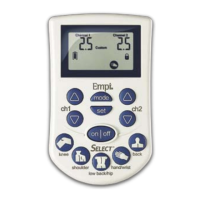
2. Select offers nine (9) program options. Selecting a specific program option
is done by pressing the button or one of the five Quick Select Program
buttons.
3. Use the Ch1 and Ch 2 buttons (fig. ch) to set the intensity for each
channel, as directed by your clinician.
4. On the device, press the button to shut the device off.
Quick ReferenceQuick Reference
When you are very familiar with the operation of the Select system, use the following steps
as a quick reference to operate the device. For more information, refer to the Operation
section in this manual.
Starting a Therapy Session
1. Connect the lead wire(s) to the electrodes and the device.
NOTE:
Make sure the device is turned off before connecting the lead wires to the device.
2. Wash and dry the skin areas where you will be applying the electrodes.
Use skin prep if necessary.
3. Apply the electrodes to your skin.
4. On the device, press the button to display the Program screen. The
software version will flash, then the entire LCD display will be displayed for 1/2
second. The last program used will display.
channel,as
directed by your clinician. The program will begin to operate.
6. On the device, press the button to shut the device off.
Changing a Therapy Session
Ending a Therapy Session
1. On the device, press the button to shut the device off.
2. Unclip the belt clip from your clothing.
3. Disconnect the lead wire(s) from the device.
4. Disconnect the lead wire(s) from the electrodes.
5. Remove the electrodes from your skin. Follow the instructions on the electrode
package for storing electrodes. If necessary, use adhesive remover to remove
any remaining adhesive (or gel) from your skin.
6. Use skin cream or lotion to moisturize your skin after removing the electrodes.
7. Remove the batteries from the device prior to storing.
8. Store the components in the carrying case.
CORRECT NOT CORRECT
fig. ch
fig. ch
user_manual_NEW_BH_edit_r5.indd 14-15 3/3/08 2:08:35 PM
5. U se the Ch1 and Ch2 buttons (fig. ch) to set the intensity for each


 To Next Page