Select User’s Manual
17
System ComponentsSystem Components
The Select system is a battery-operated electrical stimulator. The device has five Quick
Select programs and four program options that can be customized by a clinician.
Device
Intensity
Controls
(Channel 2)
Intensity
Controls
(Channel 1)
Session Parameter
Control
Program Option
Control
Quick
Select
Buttons
Quick
Select
Buttons
ON/OFF
Button
Channel Output Jacks
ON/OFF Indicator Lights
Device
Side View
Device
Front View
Belt Clip and
Battery
Compartment
Cover
Device
Back View
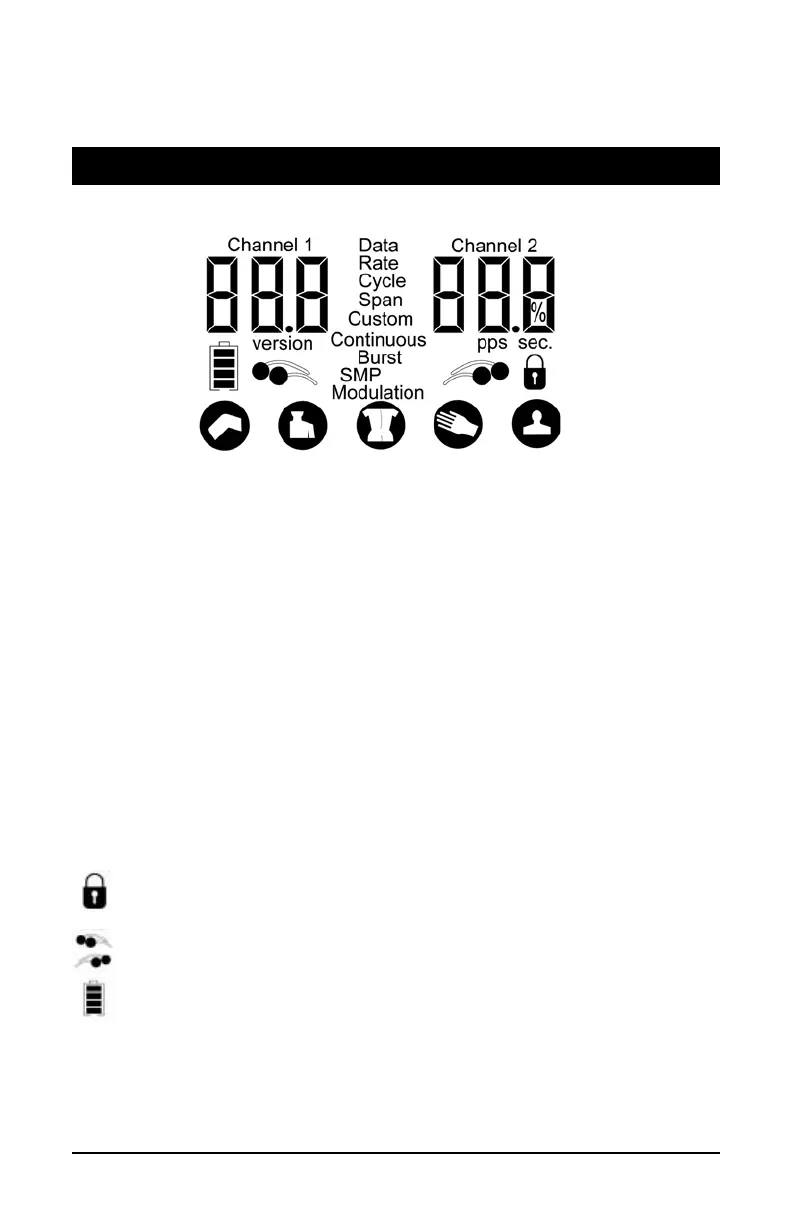
LCD Screen
This is the area that displays the therapy settings as you program and use the stimulator.
•
Channel icons
– denotes the channel being used – Channel 1 and/or Channel 2.
•
Intensity
– displayed under the Channel icons and ranges from 0.0 to 60.0
in 0.5 increments.
•
Software version
– displays for a few seconds when the Select is turned on.
•
Data
– denotes that the unit is in Data Retrieval Mode or in Quick Select
Button Reset Mode.
•
Rate
– when adjusting the pulses per second, “Rate” will be displayed next to
the value, along with “pps”.
•
Cycle
– when adjusting the cycle time, “Cycle” will be displayed next to the
cycle time value along with “sec”.
•
Span
– when adjusting the span percentage, “Span” will be displayed next to
the span percentage value along with “%”.
•
Custom text
– for each of the Quick Select Program options, when the
default parameters have been changed and saved, the Custom text will
denote that the buttons have been customized.
•
Program options
– four program options (Continuous, Burst, SMP and
Modulation) can be selected with the Mode button.
•
Lock icon
– when treatment intensity is set at greater than zero and no activity
has occurred within 15 seconds, the Lock icon appears to tell the user that the
unit is locked and intensity/program cannot be changed until it is unlocked.
•
Pad contact icons
– two icons – one for each channel; icons will display
and flash, indicating bad contact.
•
Battery icon
– displays the battery life.
•
Quick Select programs
– five pre-set programs for particular body areas
(Knee, Shoulder, Low Back/Hip, Hand/Wrist, and Back).
user_manual_NEW_BH_edit_r5.indd 16-17 3/3/08 2:08:38 PM


 To Next Page