Need help?
Do you have a question about the Empress Effects Superdelay and is the answer not in the manual?
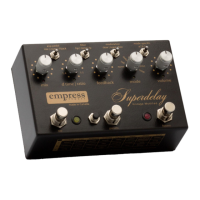
Standard digital delay operation with options for short, medium, and long delay times.
Delay time controlled by tapping the tap switch, with ratio control for tap tempo accuracy.
Delay time set automatically by listening to playing dynamics, with adjustable thresholds.
Delay samples played backwards, with options for knob control, tap tempo, and double time.
Inputs rhythm via tap switch, with ratio, scaling, and dynamic volume sub-modes.
Emulates analog tape delays with saturation, wow/flutter, and dropouts.
Features dynamic feedback/mix adjustments and a tap mute with trails for selective delay application.
Records and loops audio with normal, long, reverse modes. Details capturing, layering, clearing, and leaving the looper.
Controls the delay feedback and adds high or low pass filtering to the signal.
Adjusts dry/wet mix and configures expression pedal input.
Manages delay time, tempo ratios, and tap tempo input.
Handles saving presets and cycling through them.
Applies modulation and selects different operational modes.
Adjusts overall output volume and engages bypass.
Cycles through and manages stored presets.
Details how the 8 presets are represented and how to cycle through them.
Explains how to set controls and save the current configuration to a preset.
Describes how to select and load saved presets using the switches.
Details the procedure to restore factory preset settings, overwriting current ones.
Explains how to connect an external pedal and select parameters like mix or feedback.
Lists electrical and physical specifications including impedance, response, voltage, and dimensions.
 General
| Brand | Empress Effects |
|---|---|
| Model | Superdelay |
| Category | Music Pedal |
| Language | English |

 To Next Page