EasyManua.ls Logo

ENACFIRE Future Plus - Mono and Stereo Mode Switching; Mono Mode Activation; Stereo Mode Activation

ENACFIRE Future Plus
17 pages
Print Icon
To Next Page IconTo Next Page
To Previous Page IconTo Previous Page
Loading...
Mono
and
stereomode————————
©
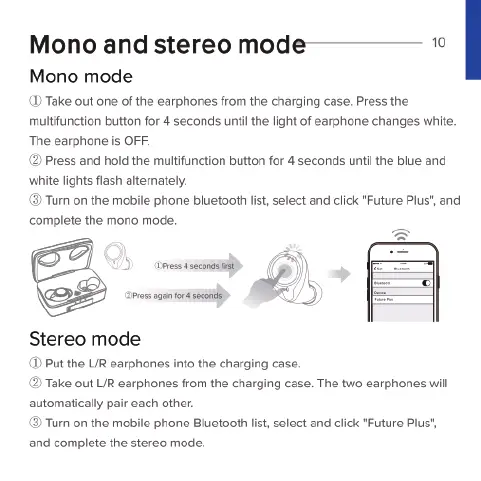
Mono mode
(D
Take
out
one
of
the
earphones
from
the
charging
case.
Press
the
multfunction
button
for
4
seconds
until
the
light of
earphone
changes
white.
The
earphone
is
OFF.
2
Press
and
hold
the
multifunction
button
for
4
seconds
unti
the
bive
and
‘white
lights
flash
alternately.
Tum
on
the
mobile
phone
bluetooth
list,
select
and
click
"Future
Plus",
and
complete
the
mono
mode.
2o
o
)
Stereo
mode
D
Put
the
LIR
earphones
into
the
charging
case.
©
Take
out
LIR
earphones
from
the
charging
case.
The
two
earphones
will
automatically
pair
each
other.
Tum
on
the
mobile
phone
Bluetooth
list,
select
and
click
"Future
Plus",
and
complete
the
stereo
mode.

Related product manuals