EasyManua.ls Logo

ENACFIRE Future - Mono and Stereo Modes; Mono Use Guide; Stereo Use Guide

ENACFIRE Future
18 pages
Print Icon
To Next Page IconTo Next Page
To Previous Page IconTo Previous Page
Loading...
Mono
and
stereo
use
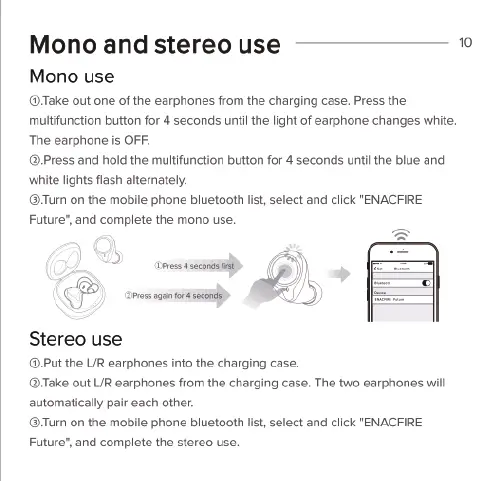
Mono
use
®Take
out
one
of
the
earphones
from
the
charging
case.
Press
the
multifunction
button
for
4
seconds
until
the
light
of
earphone
changes
white.
The
earphone
is
OFF.
@Press
and
hold
the
multifunction
button
for
4
seconds
untilthe
blue
and
‘white
lights
flash
alternately.
®Turn
on
the
mobile
phone
bluetooth
list,
select
and
click
"ENACFIRE
Future®,
and
complete
the
mono
use.
e
g
o
)
Stereo
use
@.Put
the
L/R
earphones
into
the
charging
case.
@Take
out
L/R
earphones
from
the
charging
case.
The
two
earphones
will
automatically
pair
each
other.
®Turn
on
the
mobile
phone
bluetooth
I
Future’,
and
complete
the
stereo
use.
,
select
and
click
"ENACFIRE

Related product manuals