Home
Enfora
GPS
MT 3000
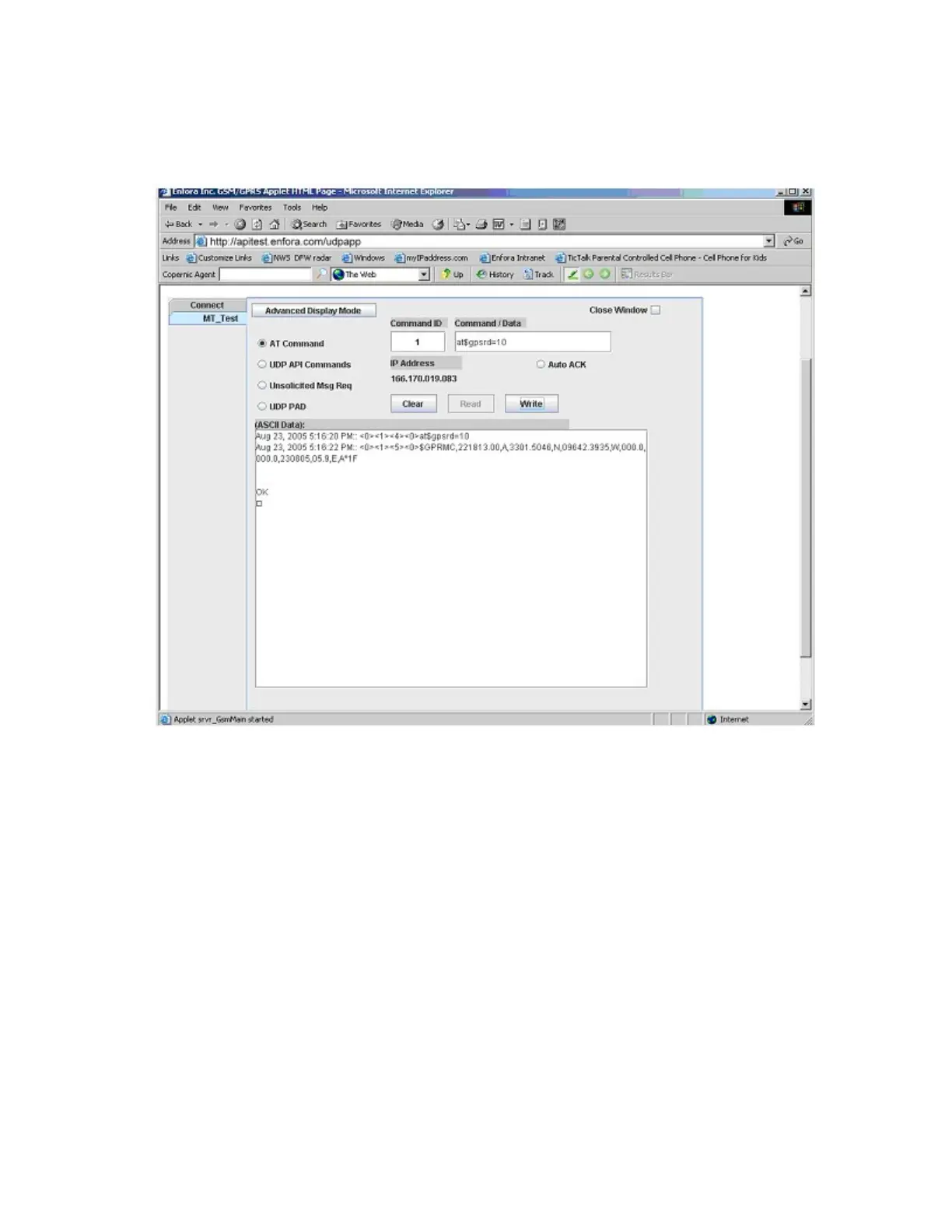
Page 45 (Figure: 26 - Verify GPS Operation)
Enfora MT 3000 - Figure: 26 - Verify GPS Operation
45 pages
Manual
Save Page as PDF
To Previous Page
To Previous Page
Loading...
Her
e
i
s
a
n
exa
m
ple
o
f
a
GPRM
C
messag
e
with
ou
t
a
GPS
l
ock:
$GPRM
C
,221553
.30,V,,,,,,,,,,N
*7C
The
sam
e
comma
nd
c
a
n
b
e
u
sed
i
n
th
e
ser
ver
a
pp
l
i
c
a
tion
See
F
i
g
u
r
e:
26
-
"Veri
fy
GP
S
O
pera
tion
"
.
Fig
ur
e
:
2
6
-
V
e
r
ify
G
PS
Ope
rat
ion
-
34
-
44
Table of Contents
Main Page
Default Chapter
3
Warranty Information
3
Regulatory Compliance
5
Rohs Compliance
6
Table of Contents
8
1 Introduction
12
Objective
12
Figure: 1 - N4A System Overview
12
References
13
On-Board Diagnostics Overview
13
2 Overview
15
Description
15
MT 3000 Panel Illustrations
15
Figure: 2 - Front Right View
15
Figure: 3 - Bottom Left View
15
Barcode Label
16
Connector & Leds
16
Figure: 4 - MT 3000 Label
16
Figure: 5 - MT 3000 Connector and Leds
16
Accelerometer
17
GSM Radio
17
Packet Data
18
GPS Functionality
18
3 Hardware Features
19
Opening the Device
19
Figure: 6 - MT 3000 Opening Toolkit
19
Figure: 7 - MT 3000
20
Figure: 8 - Lever Inserted into MT 3000 Lid Gap
20
Figure: 9 - MT 3000 with Lid Unsnapped
21
Figure: 10 - MT 3000 on the Opener Base
22
Figure: 11 - Lid Pulled Away from the MT 3000
23
Figure: 12 - MT 3000 with Lid Completely Removed
23
Closing the Device
24
Figure: 13 - MT 3000 Without Lid
24
SIM Card Access
25
Figure: 14 - Replacing the MT 3000 Lid
25
Power
26
Micro USB
26
Figure: 15 - Internal SIM Holder
26
Figure: 16 - Micro USB Cable
27
4 Software Features
28
AT Commands over SMS
28
Store/Transmit Event Data
28
Synchronize RTC Time with GPS Time
28
New Event Reporting
28
Vehicle Identification Number (VIN)
28
Excessive Engine Speed (RPM)
29
Vehicle Speed
29
Vehicle Battery Voltage (Low Battery Warning)
29
Check Engine Light (MIL Alert)
30
Trip Odometer Reporting
30
Idle Time Reporting
30
Low Fuel Alert
30
Rapid Acceleration
30
Sudden Deceleration (Harsh Braking)
31
Motion Detection
31
OBDII Basic Event Data
31
5 Installation
32
Inserting the SIM
32
Figure: 17 - Internal SIM Holder
32
Device Installation
33
Accelerometer Calibration
34
Figure: 18 - Typical OBDII Socket Location
34
6 Network Test Procedure
35
Configuration
35
Equipment Needed
35
Configure the Computer and Verify Correct Communications
35
Configure the Device to Communicate with the Enfora Server
35
Figure: 19 - ATI Response
36
Figure: 20 - Verify GPRS Status
38
Figure: 21 - Verify GPRS Activation
39
Verifying Server Connectivity
41
Figure: 22 - Wakeup Command
41
Figure: 23 - Verify Server Connectivity
42
Figure: 24 - Wakeup Messages
43
Verify GPS Operation
44
Figure: 25 - ATI Response
44
Figure: 26 - Verify GPS Operation
45
Related product manuals
Enfora Mini-MT GSM2228UG001
55 pages
Enfora GSM2218
27 pages


 To Previous Page