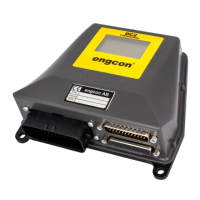
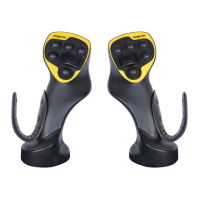
This user manual describes the "Constant Flow" function for engcon tiltrotators and tools, specifically for the engcon DC2 control system. Engcon is a market leader in tiltrotators and tools for excavators, focusing on innovation, knowledge, and customer needs.
Function Description
The Constant Flow function in the engcon DC2 control system allows selected functions to operate without continuous active input from the DC2 controls. Once activated, these functions run at a pre-programmed speed and direction until deactivated. This feature is designed to simplify operation for tasks requiring continuous hydraulic flow, such as operating rotating brushes or other continuous-flow attachments.
The operation of the Constant Flow function involves three main sequences:
- Programming Sequence: In this sequence, the user defines which specific functions (e.g., Extra1, Extra2, PWM5, or PWM6) will utilize the constant flow, and at what specific flow rate and direction they will operate. This is done by operating the desired function(s) using rollers or buttons on the joystick, then pressing and holding the constant flow button for 3 seconds until a buzzer sounds in the DC2 cabin module. Releasing the function roller/button locks the speed and direction for the constant flow functions.
- Activation Sequence: This sequence initiates the constant flow to the pre-programmed functions. It can be performed immediately after the programming sequence without releasing the button. The user holds down the constant flow button. After 3 seconds, a buzzer sounds in the DC2 cabin module. If the operator releases the button within 2 seconds after this audible signal, the constant flow functions are activated, and the audible signal is also activated. If the button is not released within 2 seconds, the constant flow function will not start, and the activation sequence must be restarted.
- Deactivation of Constant Flow: Constant flow is automatically deactivated for all activated functions under several conditions:
- If any of the constant flow functions are manually activated by a button or roller (e.g., if Extra1 on the roller is moved).
- If the constant flow button is depressed again.
- If the safety gate is opened.
- In case of a faulty constant flow button.
Important Technical Specifications
The Constant Flow function is integrated with the engcon DC2 control system. The system conforms to several harmonized standards, ensuring safety and electromagnetic compatibility:
- SS-EN ISO 13849-1:2008: Safety of machinery - Safety-related parts of control systems - Part 1: General principles for design.
- SS-EN ISO 12100:2010: Safety of machinery – General principles for design – Risk assessment and risk reduction.
- SS-EN 474-1:2006+A3:2018: Earth-moving machinery - Safety - Part 1: General requirements.
- SS-EN 474-5:2006+A4:2013: Earth-moving machinery - Safety – Part 5: Requirements for hydraulic excavators.
- SS-EN 60204-1:2006: Safety of machinery - Electrical equipment of machines - Part 1: General requirements.
- SS-ISO 15998:2008: Earth-moving machinery - Machine-control systems (MCS) using electronic components - Performance criteria and tests for functional safety.
- SS-EN 13309:2010: Construction machinery - Electromagnetic compatibility of machines with internal power supply.
The control system is declared to conform with Directives 2014/30/EC and 2006/42/EC.
The system includes an indicator lamp in the joystick button with an LED, which is the same button selected for constant flow activation. Additionally, an indicator lamp lights up in a conspicuous place in the cab when constant flow is activated.
Usage Features
- Simplified Operation: Allows continuous operation of selected hydraulic functions without constant manual input, freeing the operator to focus on other tasks.
- Programmable Settings: Users can program specific functions, speeds, and directions for constant flow, tailoring it to various attachments and tasks.
- Audible and Visual Feedback: A buzzer in the DC2 cabin module provides audible feedback during programming and activation sequences. Indicator lamps (on the joystick and in the cab) provide visual confirmation of constant flow activation.
- Safety Interlocks: The system incorporates safety features such as deactivation upon opening the safety gate or manual intervention, preventing unintended operation.
- Compatibility: Designed for use with engcon tiltrotators and tools, integrating seamlessly with the DC2 control system.
Maintenance Features
- User Manual Availability: The user manual should always be stored safely and be readily available for reference.
- Technical Support: Contact information for support and spare parts is available on the engcon website (www.engcon.com).
- Professional Maintenance: Maintenance and repair of the electrical system must only be carried out by professionally qualified persons.
- Troubleshooting Guide: The manual includes a troubleshooting section to address common issues such as:
- "CONST FLOW BLOCKED BY SAFETY GATE" alarm: Possible causes include disconnected/incorrectly configured safety lock lever signal, or an open/closed safety gate at system start. Suggested actions involve checking the safety lock lever signal installation and configuration, and ensuring the safety gate is closed.
- Selected function stopping after a 2-second audible signal during activation: Indicates the activation interval was exceeded, requiring the constant flow button to be released within 2 seconds.
- Nothing happening when the constant flow button is held for 3 seconds or more: Suggests incorrect constant flow configuration, requiring a check of the installation and configuration according to the 9000224 Installation Instructions.
- Nothing happening on the programmed function after programming and activation: Indicates the programmed function is not activated for constant flow, requiring a check of the constant flow configuration.
- "CONST FLOW BLOCKED BY PARAMETER ERROR" alarm: Points to incorrect parameter entry in the cabin module, requiring contact with support.
The manual emphasizes several safety warnings:
- DANGER: Indicates an accident will occur if regulations are not followed, with a risk of personal injury or death.
- WARNING: Indicates an accident may occur if regulations are not followed, with a risk of personal injury or death. This includes warnings about moving parts and the risk of crush injuries, as well as not attempting to increase equipment capacity by unapproved modifications.
- CAUTION: Indicates an accident may occur if regulations are not followed, with a risk of personal injury. Specifically, if constant flow is activated without activating a function, the tiltrotator or tool may start unexpectedly.
- IMPORTANT: Indicates an accident may occur if regulations are not followed, with a risk of damage to property, process, or surroundings. This also highlights that maintenance and repair of the electrical system must be carried out by professionally qualified persons.
Engcon's products are designed with environmental considerations, comprising at least 99% recyclable material. All assembly and service work must comply with environmental, health, and occupational safety legislation. Hazardous waste must be disposed of by authorized personnel, and spillages must be avoided and dealt with appropriately. Materials like metal, plastics, packaging, and paper should be recycled, while hydraulic hoses, oils, greases, and electronic components should be sorted as hazardous waste for energy recovery or material recycling.

 Need help?
 General

 To Next Page