39
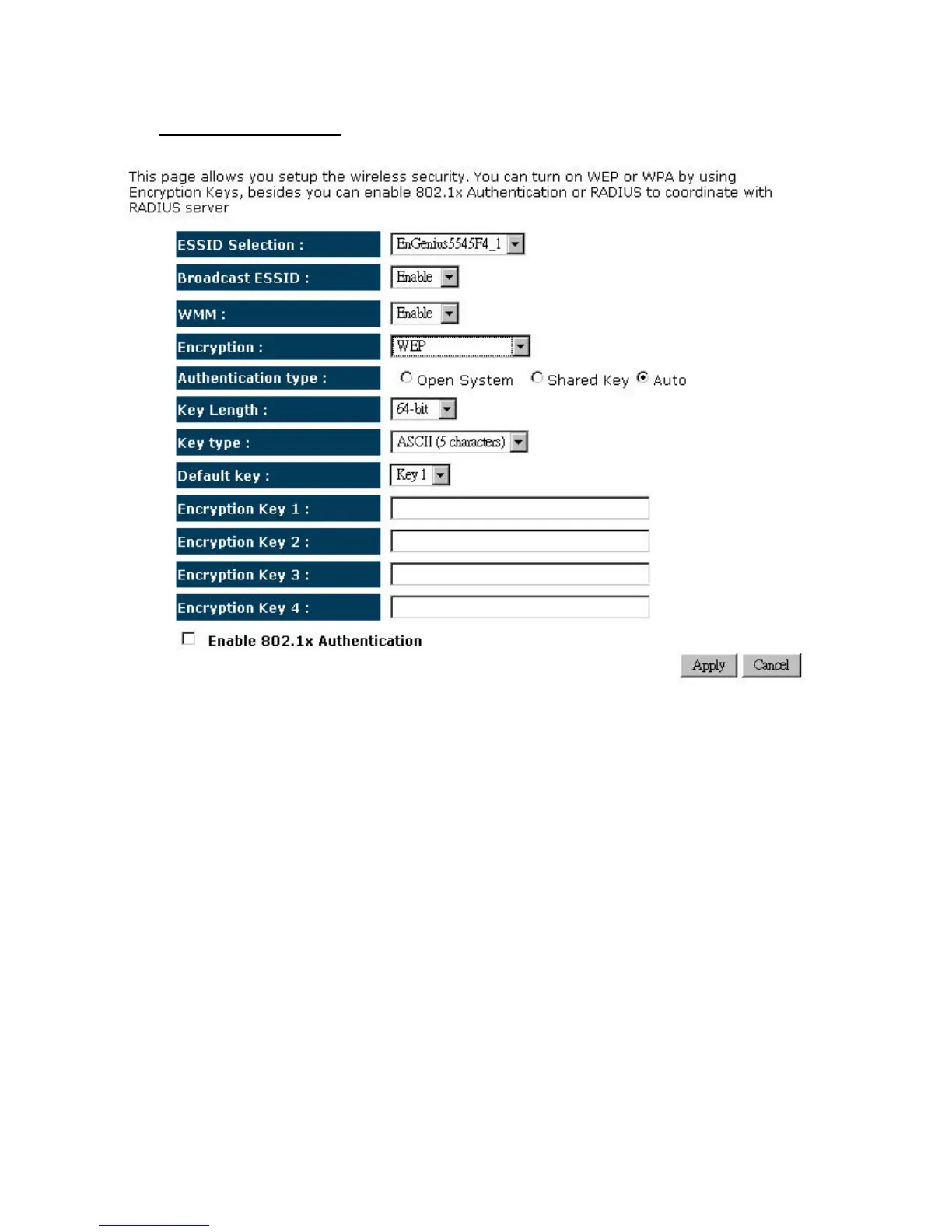
¾ Encryption:WEP
¾ ESSID Selection: As this device supports multiple SSIDs, it is possible to configure a
differentsecuritymodeforeachSSID(profile).SelectanSSIDfromthedrop‐downlist.
¾ Broadcast SSID: Select Enable or Disable from the drop‐down list. This is the SSID
broadcast feature. When this option is set to Enable, your wireless network name is
broadcast to anyone within the range of your signal. If you're not using encryption then
they could connect to your network. When this is disabled, you must enter the Wireless
NetworkName(SSID)ontheclientmanuallytoconnectto
thenetwork.
¾ WMM:ChoosetoEnable orDisableWMM.ThisistheQualityofService(QoS)featurefor
prioritizing voice and video applications. This option can be further configured in WMM
undertheWirelessdrop‐downmenu.
¾ Encryption:SelectWEPfromthedrop‐downlist.
¾ Authentication
Type: Select Open System, Shared Key, or auto. Authentication method
from the drop‐down list. An open system allows any client to authenticate as long as it
conforms to any MAC address filter policies that may have been set. All authentication
packets are transmitted without encryption. Shared Key sends an unencrypted challenge
text string to any device attempting to communicate with the AP. The device requesting


 To Next Page