40
authentication encrypts the challenge text and sends it back to the access point. If the
challenge text is encrypted correctly, the access point allows the requesting device to
authenticate. It is recommended to select Auto if you are not sure which authentication
typeisused.
¾ KeyLength:Selecta64‐bitor128‐bitWEPkeylengthfromthedrop‐downlist.
¾ Key Type:Selectakeytypefromthe drop‐down list.128‐bitencryptionrequiresalonger
keythan64‐bitencryption.Keysaredefined byenteringinastring inHEX(hexadecimal‐
usingcharacters0‐9,A‐F)orASCII(AmericanStandardCodeforInformationInterchange‐
alphanumericcharacters)format.ASCIIformatisprovidedsoyoucanenterastringthatis
easiertoremember.
¾ DefaultKey:Youmaychooseoneofyour4differentWEPkeysfrombelow.
¾ EncryptionKey1‐4:YoumayenterfourdifferentWEPkeys.
¾ Enable802.1xAuthenti cation:PlaceacheckinthisboxifyouwouldliketouseRADIUS
authentication.ThisoptionworkswithaRADIUSServertoauthenticatewirelessclients.
Wirelessclientsshouldhaveestablishedthenecessarycredentialsbeforeattemptingto
authenticatetotheServerthroughthisGateway.Furthermore,itmaybenecessaryto
configuretheRADIUSServertoallowthisGatewaytoauthenticateusers.Youwillthenbe
requiredtospecifytheRADIUSServer’sIPaddress,port,andpassword.
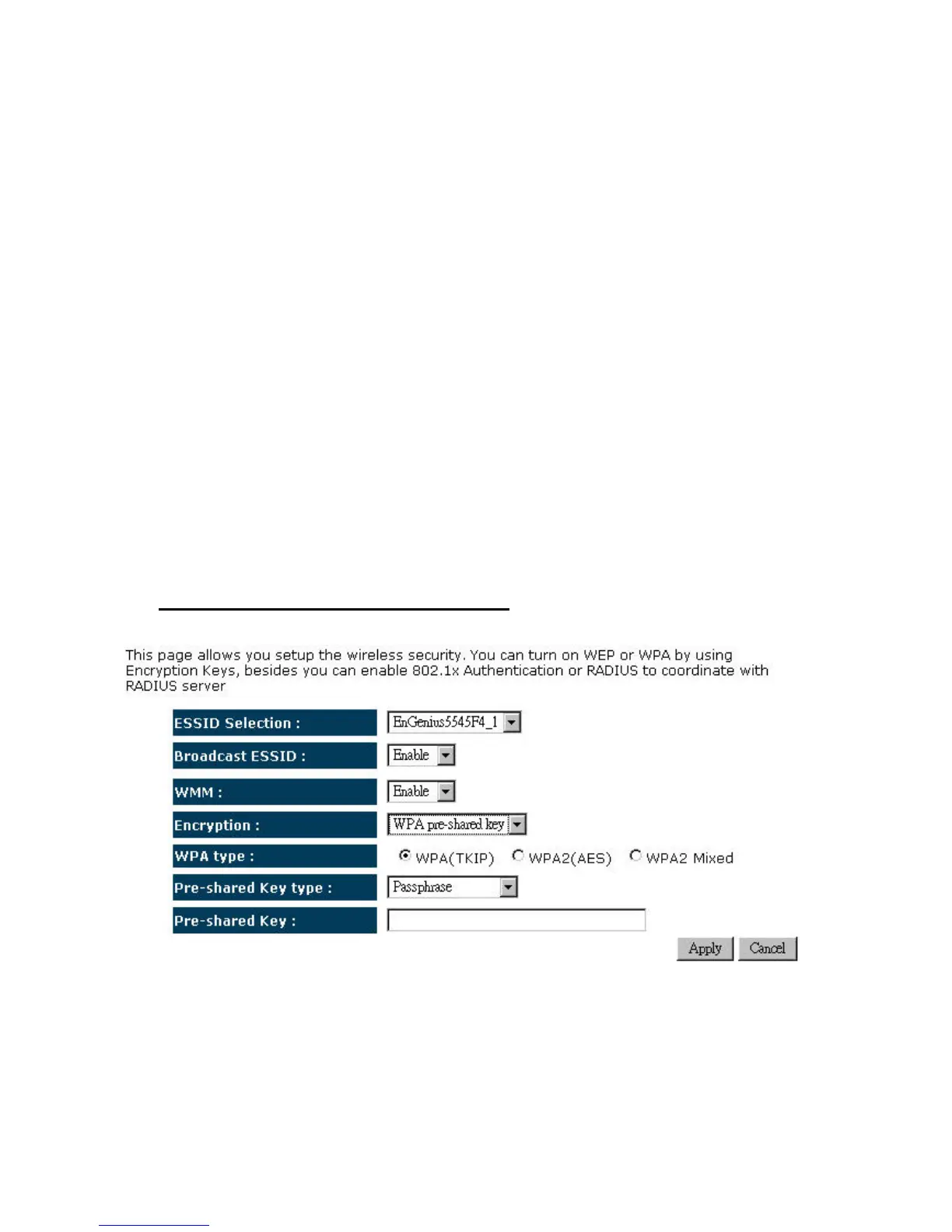
¾ Encryption:WPApre‐sharedkey
¾ ESSID Selection: As this device supports multiple SSIDs, it is possible to configure a
differentsecuritymodeforeachSSID(profile).SelectanSSIDfromthedrop‐downlist.
¾ Broadcast SSID: Select Enable or Disable from the drop‐down list. This is the SSID
broadcast feature. When this option is set to Enable, your wireless network name is
broadcast to anyone within the range of your signal. If you're not using encryption then


 To Next Page