41
they could connect to your network. When this is disabled, you must enter the Wireless
NetworkName(SSID)ontheclientmanuallytoconnecttothenetwork.
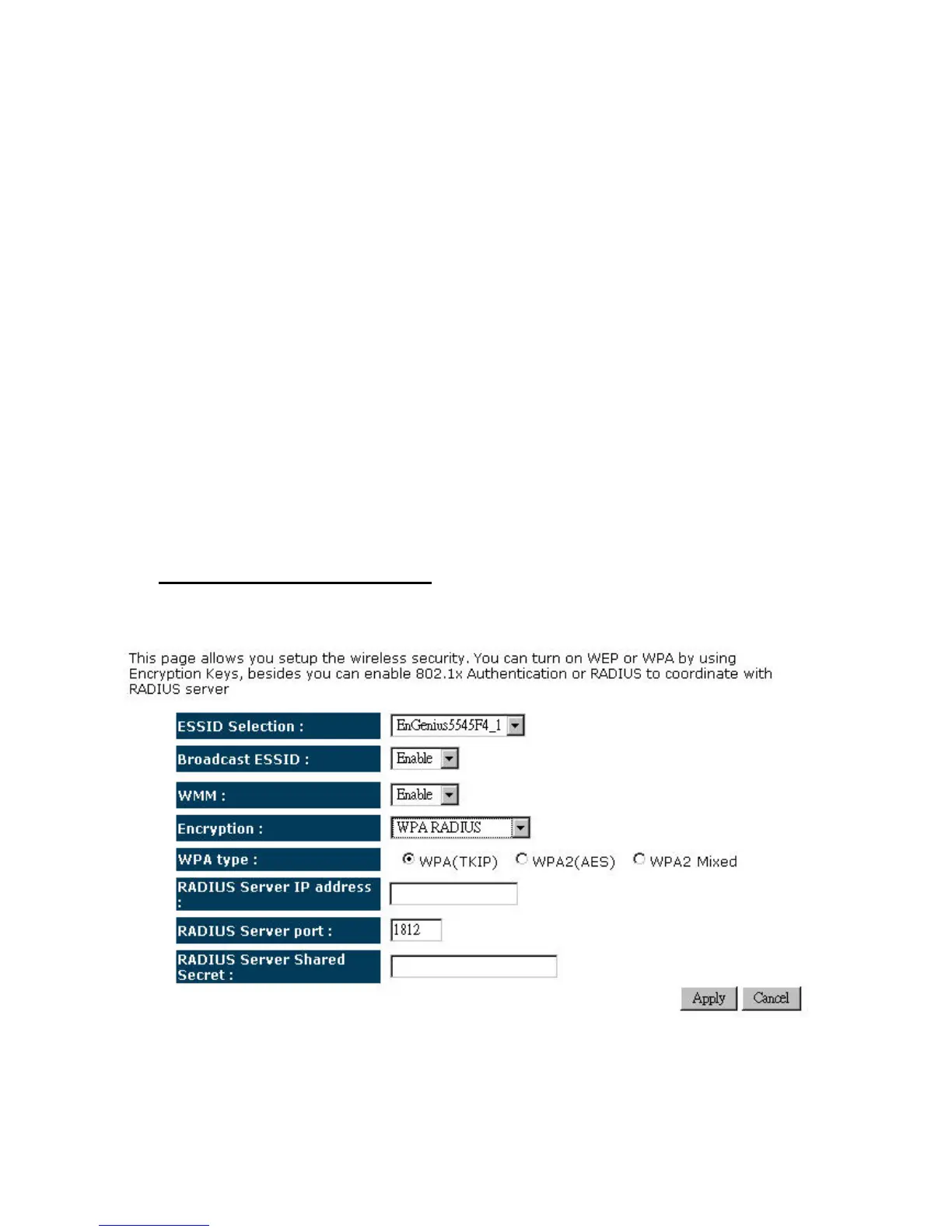
¾ WMM:ChoosetoEnable orDisableWMM.ThisistheQualityofService(QoS)featurefor
prioritizing voice and video applications. This option can be further configured in WMM
undertheWirelessdrop‐downmenu.
¾ Encryption:SelectWPApre‐sharedkeyfromthedrop‐downlist.
¾ WPAType:SelectTKIP,AES,orWPA2Mixed.Theencryptionalgorithmusedtosecurethe
data communication. TKIP (Temporal Key Integrity Protocol) provides per‐packet key
generation and is based on WEP. AES (Advanced Encryption Standard) is a very secure
block based encryption. Note that, if the bridge uses the AES option, the bridge can
associatewiththeaccesspointonlyiftheaccesspointisalsosettouseonlyAES.
¾ Pre‐sharedKey Type:TheKeyTypecanbepassphraseorHexformat.
¾ Pre‐SharedKey:Thekeyisenteredasapass‐phraseofupto63alphanumericcharactersin
ASCII (American Standard Code for Information Interchange) format at both ends of the
wireless connection. It cannot be shorter than eight characters, although for proper
securityitneedstobeofamplelengthandshouldnotbeacommonlyknownphrase.This
phraseisusedtogeneratesessionkeysthatareuniqueforeachwirelessclient.
¾ Encryption:WPARADIUS
¾ ESSID Selection: As this device supports multiple SSIDs, it is possible to configure a
differentsecuritymodeforeachSSID(profile).SelectanSSIDfromthedrop‐downlist.


 To Next Page