EasyManua.ls Logo

enphase AC Battery - User Manual

enphase AC Battery
4 pages
Print Icon
To Next Page IconTo Next Page
Loading...
HOMEOWNER’S GUIDE
Enphase Storage System
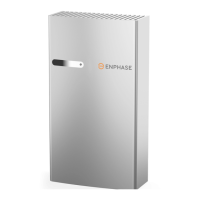
The Enphase AC Battery
The Enphase Storage System includes the Enphase AC Battery™ and uses the Enphase Envoy-S
Metered™ to measure PV production, home energy consumption, and energy storage. The system
knows when it is optimal to charge or discharge battery power so that energy is stored when it is
abundant and used when scarce.
Access Your System Online
You can view your PV solar production, your electricity consumption, and your energy storage using
Enphase MyEnlighten™. Once your installer creates a prole with your email address, Enphase will
email you with instructions on setting up your MyEnlighten account. Read the Enlighten terms of
service at https://enphase.com/en-us/legal/terms-of-service.
Safety warnings are listed on the back of this guide.
1) Only qualied electricians shall install, troubleshoot, or replace the AC Battery.
2) The AC Battery contains no user serviceable parts. Do not open the AC Battery.
© 2016 Enphase Energy Inc. All rights reserved.

Other manuals for enphase AC Battery

Question and Answer IconNeed help?

Do you have a question about the enphase AC Battery and is the answer not in the manual?

Summary

Access Your System Online

Where to Place the Battery

Safety Considerations

Internet Connectivity

LED Operation

LED Overview

Explains the meaning of different LED states for the AC Battery, including charging, discharging, idle, and error states.

Troubleshooting

Provides steps for addressing common error states and connectivity issues, including checking room temperature and internet connection.

Important Safety Instructions

In Case of Fire or Other Emergency

Provides guidance for handling emergencies like fire, flooding, or unusual noises, smells, or smoke from the AC Battery.

Safety and Advisory Symbols

Explains the meaning of DANGER, WARNING, and NOTE symbols used throughout the safety instructions.

General Safety Instructions

Details critical safety warnings regarding electrical shock, fire, explosion, transport, storage, and proper installation.

Environmental Protection

Instructs users on the proper disposal of electronic waste and batteries according to local regulations.

Summary

Access Your System Online

Where to Place the Battery

Safety Considerations

Internet Connectivity

LED Operation

LED Overview

Explains the meaning of different LED states for the AC Battery, including charging, discharging, idle, and error states.

Troubleshooting

Provides steps for addressing common error states and connectivity issues, including checking room temperature and internet connection.

Important Safety Instructions

In Case of Fire or Other Emergency

Provides guidance for handling emergencies like fire, flooding, or unusual noises, smells, or smoke from the AC Battery.

Safety and Advisory Symbols

Explains the meaning of DANGER, WARNING, and NOTE symbols used throughout the safety instructions.

General Safety Instructions

Details critical safety warnings regarding electrical shock, fire, explosion, transport, storage, and proper installation.

Environmental Protection

Instructs users on the proper disposal of electronic waste and batteries according to local regulations.

Overview

The Enphase AC Battery is a component of the Enphase Storage System, designed to store energy from your solar PV system. This system integrates with the Enphase Envoy-S Metered communications gateway to monitor PV production, home energy consumption, and energy storage. The system intelligently manages when to charge and discharge the battery, optimizing energy use by storing power when abundant and releasing it when scarce.

Function Description:

The primary function of the Enphase AC Battery is to provide energy storage for residential solar installations. It works in conjunction with Enphase Microinverters, which convert DC power from solar panels into AC power. The AC Battery stores this AC power for later use, such as during periods of low solar production (e.g., at night or on cloudy days) or during peak electricity demand. This allows homeowners to increase their energy independence, reduce reliance on the grid, and potentially lower electricity bills by using stored solar energy rather than purchasing it from the utility. The system is designed to be modular, allowing for the installation of multiple AC Batteries to meet varying energy storage needs. The Envoy-S Metered gateway acts as the brain of the system, collecting data from the microinverters and AC Batteries, and communicating with the Enphase MyEnlighten monitoring platform. This enables real-time monitoring and intelligent management of energy flow within the home.

Usage Features:

  • Online Monitoring: Homeowners can monitor their PV solar production, electricity consumption, and energy storage through the Enphase MyEnlighten platform. Once an installer creates a profile, users receive instructions to set up their account. This online portal provides a comprehensive overview of the system's performance, allowing users to track their energy usage and battery status from anywhere with an internet connection.
  • Automated Energy Management: The Enphase Storage System automatically determines the optimal times to charge and discharge the AC Battery. This intelligent management ensures that energy is stored when it is most cost-effective or when solar production is high, and then discharged when electricity prices are higher or when solar production is low. This hands-off operation simplifies energy management for the homeowner.
  • Modular Design: The system is designed to be scalable, meaning additional AC Batteries can be added to increase storage capacity as needed. This flexibility allows homeowners to customize their energy storage solution to match their specific energy consumption patterns and future needs.
  • Internet Connectivity: The AC Battery is intended to operate with a continuous internet connection. This connectivity is crucial for software and firmware updates, ensuring the system always runs with the latest features and security enhancements. It also enables the system to report its health and performance data to the MyEnlighten platform, which is important for warranty validation and remote troubleshooting.
  • LED Indicators: The AC Battery features an LED light that provides visual feedback on its operational status. Different colors and flashing patterns indicate various states such as charging, discharging, idle, starting up, error states, or high temperature. This allows for quick visual checks of the battery's status.
    • Slowly flashing green: Charging
    • Slowly flashing blue: Discharging
    • Solid blue or green: Idle (color transitions based on state-of-charge)
    • Solid red: Starting up
    • Flashing red: In an error state (requires installer contact)
    • Solid amber: Not operating due to high temperature (requires troubleshooting)
    • Off: Not operating (requires troubleshooting)
  • Safety Features: The system includes several safety warnings and instructions to ensure safe operation. These cover aspects like proper installation, handling, storage, and emergency procedures. The AC Battery is designed with safety in mind, but adherence to these guidelines is critical.

Maintenance Features:

  • Professional Installation and Service: The Enphase AC Battery must be installed, troubleshot, and replaced only by qualified electricians. The unit contains no user-serviceable parts, and opening the battery will void the warranty. This ensures that all work is performed by trained professionals, maintaining the safety and integrity of the system.
  • Remote Diagnostics and Updates: The internet connection allows Enphase to remotely monitor the health of the battery and push software/firmware updates. This proactive approach helps maintain optimal performance and address potential issues without requiring on-site visits for routine updates.
  • Troubleshooting Guidance: While the AC Battery is designed for professional service, the manual provides basic troubleshooting steps for homeowners. For instance, if the LED indicates a solid amber state (high temperature), users are advised to check the room temperature and increase cooling/ventilation. For issues with MyEnlighten data, users are guided to check their Envoy-S and internet connection.
  • Warranty Information: The product comes with a warranty, which is contingent on following the installation, usage, and maintenance instructions provided in the guide. Maintaining an internet connection is explicitly mentioned as important for warranty validity.
  • Environmental Protection: The AC Battery is an electronic device and should not be disposed of with household waste. Proper disposal of batteries is required, and users are advised to refer to local codes for disposal requirements. This highlights the manufacturer's commitment to environmental responsibility and guides users on how to responsibly manage the product at the end of its life.
  • Storage Guidelines: Specific instructions are provided for storing the AC Battery, including temperature and humidity ranges, and the requirement for a minimum charge state. These guidelines are crucial to prevent damage to the battery from over-discharge and ensure its longevity. The battery must be installed and energized by the "Must Energize By" date on the shipping box label. A new AC Battery can be stored for a maximum of six months, and an installed battery for a maximum of two months, emphasizing the importance of timely installation and use.

enphase AC Battery Specifications

General IconGeneral
Usable Energy1.2 kWh
Voltage240 V
ChemistryLithium Iron Phosphate (LiFePO4)
Depth of Discharge (DoD)100%
Warranty10 years
Round-Trip Efficiency96%
Operating Temperature-20°C to 50°C (-4°F to +122°F)
EnclosureNEMA 3R
Weight25 kg

Related product manuals