13
IQ System Controller 3M quick install guide
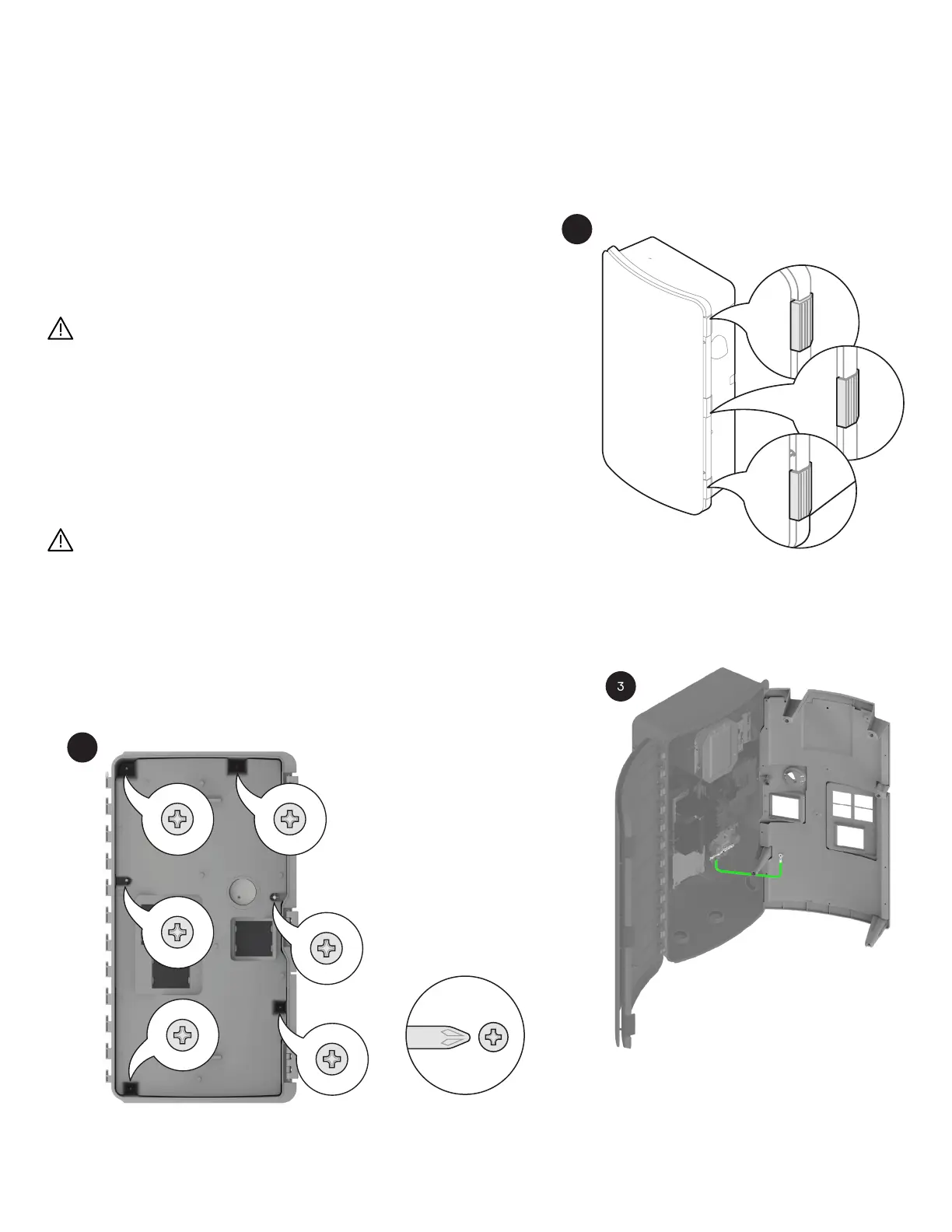
Step 3: Remove the door
• Pinch the lock pin on the top hinge section.
• Lift the door upside down to remove it.
WARNING: Equipment damage if a recommended practice is not followed.
Risk of equipment damage. Do not wire the IQ System Controller when it
is energized.
Open the dead front
Before removing the dead front, ensure the IQ System Controller is completely
de-energized.
WARNING: Risk of equipment damage. Do not remove the pre-installed
solar shield attached to the enclosure door.
• Risk of equipment damage. Do not wire the IQ System Controller when it
is energized.
• Risk of electric shock. Do not modify the dead front other than to remove
or replace ller plates, as needed. The product warranty can be aected
in case of modication.
Phillips screw #2
Section A - Mounting the product
1
2
3
The ground connection to the dead front needs to
be carefully disconnected before the dead front can
be dismantled from the IQ System Controller.


 To Next Page