21
22
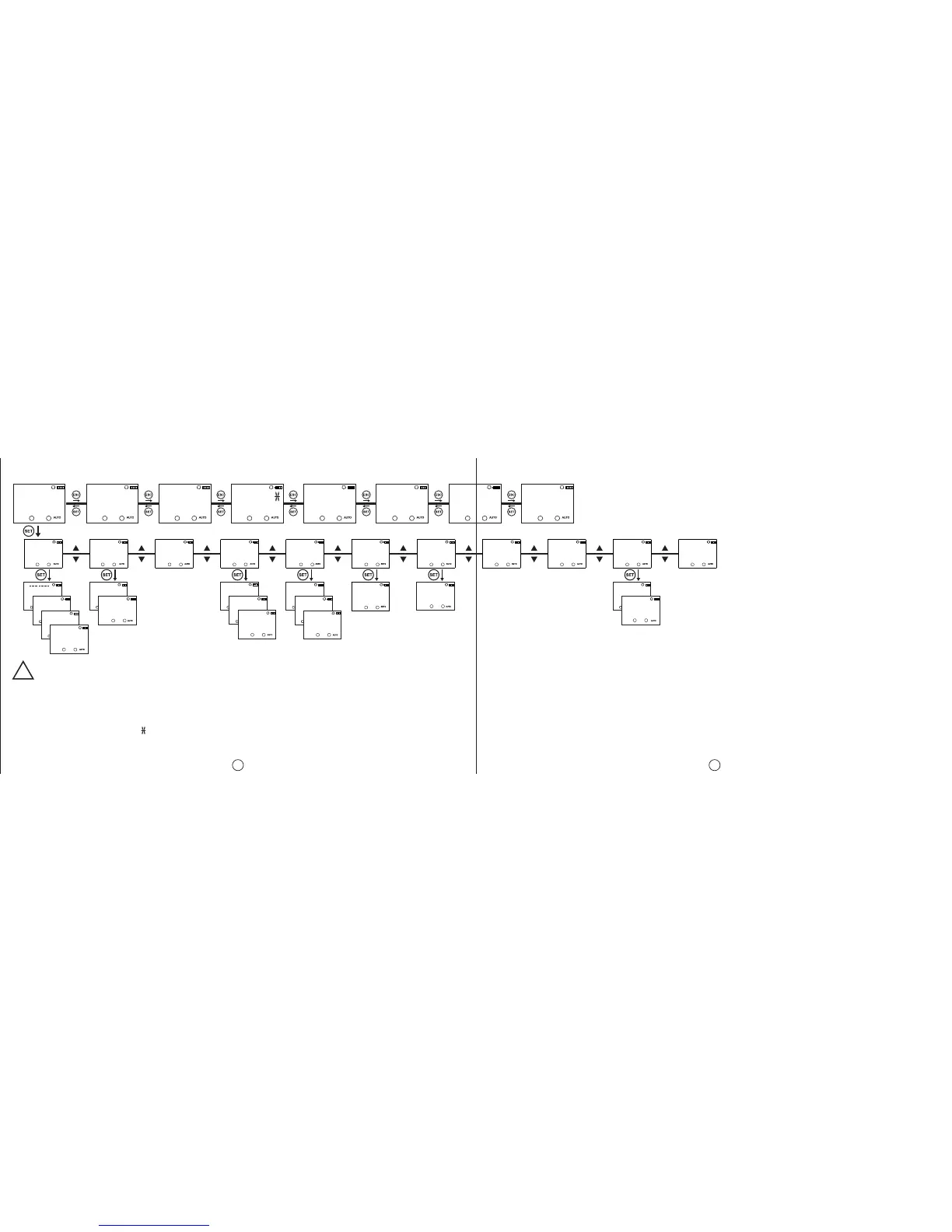
MENU MAP
!
PROGRAM
MO
HOUR
MO
COUNTR
REGIONL
MO
SETING
TIME
MO
SETING
MANUAL
MO
MODE
FACTORY
MO
SETING
EXIT
MO
MENU
DEMO
MO
MODE
CONTRAS
MO
08
P01
MO
1234567
P
MO
P
MO
P15
MO
FREE
C1-TIME
MO
C1-TIME
MO
DELETE
POSITIO
MO
TIMEZON
MO
DAYLIGH
MO
DATE
MO
CLOCK
MO
CENTURY
MO
2010
RECOVRY
MO
DISABL
FIRMWRE
MO
HARDWRE
MO
V000
(Monitoring Menu and Main Programming Menu screens are shown).
C2-SHOT
MO
000000
C1: C2:
C2-TIME
MO
000000
C1: C2:
C1-SHOT
MO
000000
C1: C2:
C1-TIME
MO
000000
C1: C2:
16:12:10
MO
18:45:52
C1: C2:
SUNRISE
MO
07:22:00
C1: C2:
SUNSET
MO
16:36:00
C1: C2:
PO1-C1
MO
05:44:00
C1: C2:
Press for 3 seconds
C1: C2:C1: C2:C1: C2:C1: C2:C1: C2:C1: C2:C1: C2:C1: C2:
C1: C2:
C1: C2:
C1: C2:
C1: C2:
C1: C2:
C1: C2:
C1: C2:
If the “SAVE” query is not confirmed by the user while returning to the monitoring menu, the changes which are committed in the menus will be discarded(This
doesn’t apply to the Time Settings Menu).
* The device shows the entered programs in the order of their program flow in the menu display. The programs can be browsed with the UP or DOWN
buttons. The programs with a symbol next to them are the programs which didn’t run yet.
DISPLAY
MO
SETING
C1: C2:
PASWORD
MO
SETING
C1: C2:
VERSION
MO
INFOS
C1: C2:


 To Next Page