3
4
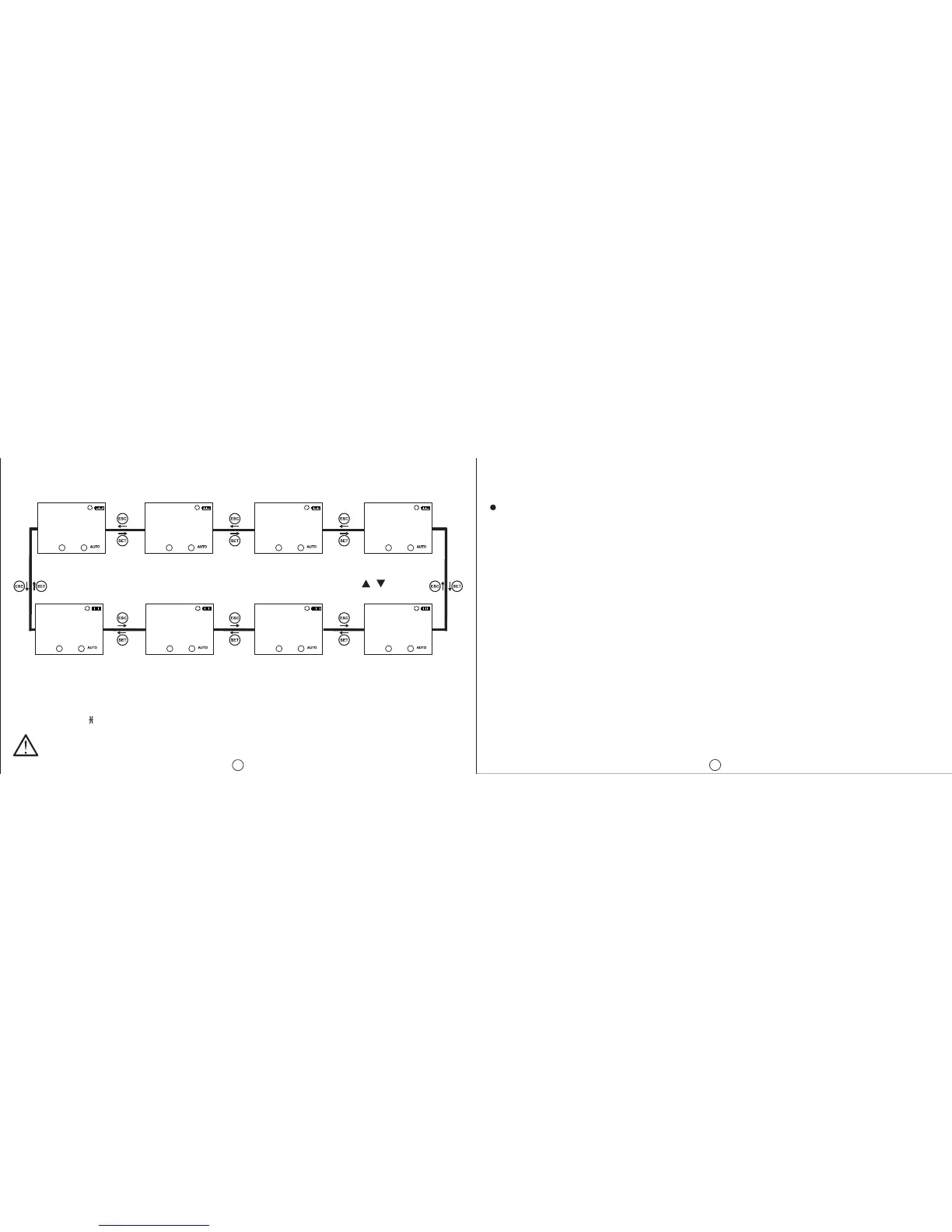
MONITORING MENU :
SET and ESC buttons are used to switch between menus in the monitoring mode. If the device is left
unattended for 60 seconds in any menu other than the real time and date, it returns to the real time and
date screen.
Real Time
and Date
Menu
Sunrise Time
Menu
Sunset Time
Menu
Program
Activity Time
Menu
Activation
Time for C1
Relay(Hours)
Operation
Count for C1
Relay
Activation
Time for C2
Relay(Hours)
Operation
Count for C2
Relay
Program activity time menu shows the programs, which are stored on the device, in order according to
program activity time. The active or finished programs can be shown with UP or DOWN buttons. The
programs with a sign next to them are the programs which are still active.
DTR-10 Menu Settings
If the “SAVE” option doesn’t get accepted when returning to the monitoring menu, the changes
which are made in the DTR-10 menus will be discarded. This isn’t the case for “TIME SETING”
menu. The changes which are done in “TIME SETING” menu are applied immediately.
When none of the keys are pressed in the programming menu, the device returns to monitoring menu and
any changes which were made will be discarded. Refer to the menu map when configuring the DTR-10
menus.
Program Menu:
There are 15 programs available to program between P01 and P15. The available settings for programs
are relay selection, activation time, activation day, deactivation time, time conflict query and save. In
addition to these, an appointed program has two additional settings as “EDIT” and “DELETE”. If “EDIT” is
selected for an appointed program, the existing settings of that program is shown and can be reconfigured.
If “DELETE” is selected for an appointed program, that program will be deleted permanently.
Output Selection ( PXX-OUT ):
DTR-10 has 2 relay outputs as C1 and C2. The user must choose between C1 and C2 as the relay output
which he want to control.
Activation Time Setting ( PXX-ON ):
There are 3 parameters: Time, sunrise and sunset. The user can select and set any of the 3 parameters
which suits the application best.
Time Parameter ( TIME ):
This parameter is the adjustment of the relay according to the real time clock. If this parameter is selected,
the user can enter an activation time between 00:00:00 (HH:mm:ss) and 23:59:59.
Sunrise Parameter ( SUNRISE ):
This parameter is the adjustment of the relay according to sunrise time which is calculated in reference
to the local coordinates and date. If this parameter is selected, the user can enter an activation time
adding or substracting 9:59:59(HH:mm:ss) to the local sunrise time. If the time after the substraction
corresponds to the day before, this parameter is adjusted as 00:00:00 for the current day.
Sunset Parameter ( SUNSET ):
This parameter is the adjustment of the relay according to sunset time which is calculated in reference
to the local coordinates and date. If this parameter is selected, the user can enter an activation time adding
or substracting 9:59:59(HH:mm:ss) to the local sunset time. If the time after the addition corresponds to
the day after, this parameter is adjusted as 23:59:59 for the current day.
16:12:10
MO
18:45:52
C1: C2:
SUNRISE
MO
07:22:00
C1: C2:
SUNSET
MO
16:36:00
C1: C2:
PO1-C1
MO
05:44:00
C1: C2:
C2-SHOT
MO
000000
C1: C2:
C2-TIME
MO
000000
C1: C2:
C1-SHOT
MO
000000
C1: C2:
C1-TIME
MO
000000
C1: C2:


 To Next Page