5
Selection of Activation Days: The day/days in which the program will be activated is adjusted in this
menu. If “ALL DAYS” “YES” is selected, the program will be activated for all days of the week. If “NO” is
selected, the user will be asked to select “YES” or “NO” for the all of the days starting from Monday in which
the program will be active. There are numbers 1 to 7 on the top section of the screen.These numbers stand
for the days of the week. “1” indicates Monday. These numbers also help to indicate the days in which a
program will be active without entering that appointed programs menu.
Deactivation Time Setting ( PXX-OFF ): There are 3 parameters: Time, sunrise and sunset. The user can
select and set any of the 3 parameters in the best way. These parameters are the same as in the relay
activation setting. In this menu, the user can select a different option than in the relay activation setting
but the activation and deactivation times must be set differently. If the activation setting is selected as
sunrise/sunset and the deactivation setting is selected as time, the deactivation time shouldn’t be earlier
than the activation setting. For the cases other than this one in which the deactivation time is set earlier
than the activation time, the deactivation time is set for the next day.
Time Conflict Query: The device checks for any time conflicts between the existing programs and the
newly entered program. If there is a time conflict, it warns the user with the “CROSS PXX” warning. If there
isn’t a time conflict, “PROGRAM VALID” is shown on the screen. These warnings will be shown for 3 seconds.
If a button is pressed before 3 seconds run out while a warning is displayed, the save menu is entered.
Save: In this menu, the user is asked to approve the changed program or not. If the program is not
confirmed by the user, it stays unchanged. If the program is confirmed by the user, the changes are kept
on the memory but are not in effect. When the “SAVE” query is confirmed by the user while returning to
the monitoring menu, the changes are saved to the memory. See application example 1 and 2
Relay Time Menu:
The operation counts and activation times of the C1 and C2 relays are reset in this menu. The user can
reset any of the parameter/parameters of the C1 relay. There are 4 sub-menus as “C1-TIME”, “C1- SHOT”,
“C2-TIME” and “C2-TIME”. When the “SAVE” query is confirmed by the user while returning to the monitoring
menu, the changes are saved to the memory.
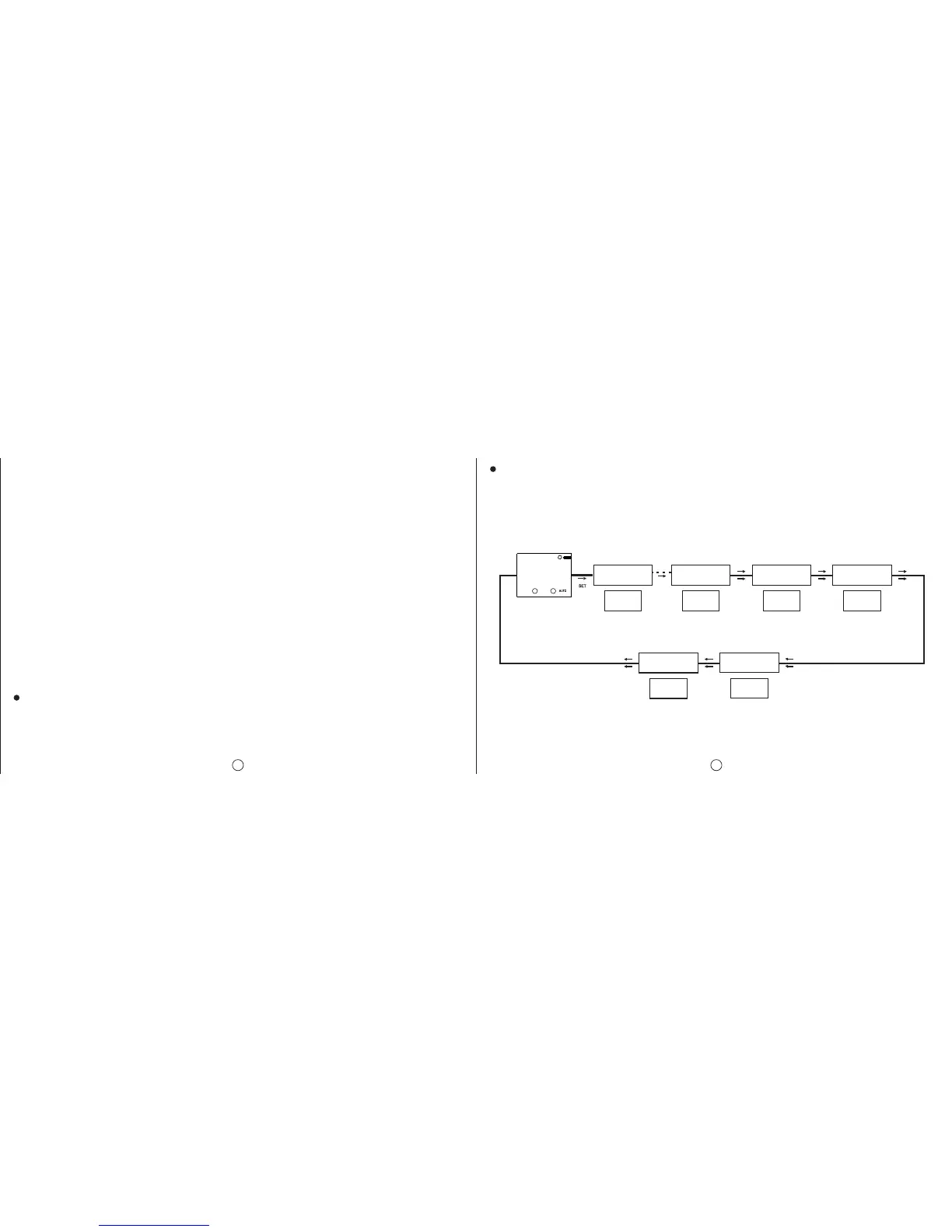
Settings Observation Menu:
The user can observe the sub-menu settings with 3 second intervals in this menu. The activation/deactivation
time settings, time zone, summer/winter time setting, geographical coordinates and the parameter to which
the exit from the manual mode is set can be displayed. UP, DOWN and ESC buttons enables the interval
between screens to extend. The SET button provides a faster browsing between the sub-menus.
xxxx is a symbolic representation. The set parameters are shown here.
DEMO
MODE
RECOVRY
PO1-C1
P31-C1 TIME ZON DAYLIGH
XXXXXXXXXXXXXXXX
XXXX
MO
POSITIO
XXXX
C1: C2:
6


 To Next Page