EasyManua.ls Logo

Enthermics DC350 - User Manual

Default Icon
60 pages
Print Icon
To Next Page IconTo Next Page
Loading...
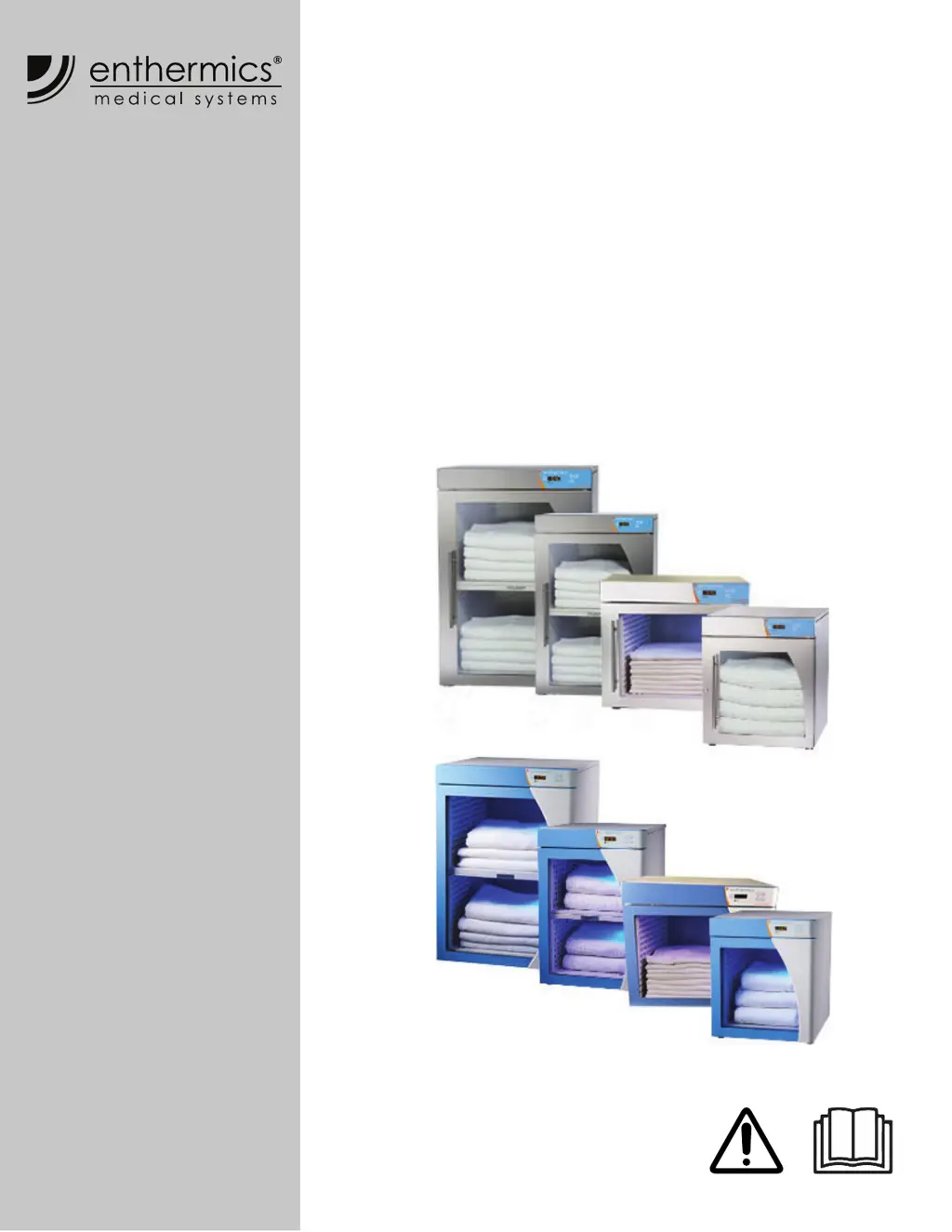
Operators Manual
Titan & Comfort Series
Blanket Warmer
EC250
EC350
EC400
EC750
DC250
DC350
DC400
DC750
MN-39924
REV.04
8/20
EN

Other manuals for Enthermics DC350

Questions and Answers

  • E
    Eric KellySep 12, 2025
    What should I do if my Enthermics Food Warmer displays 'More heater pads detected than set for'?
    • M
      Mrs. Stephanie WalkerSep 12, 2025
      If your Enthermics Food Warmer displays 'More heater pads detected than set for', hold the On/Off button for 12 seconds until the display shows "PAd#” (# = number of pads selected [3-7]). Then, press the up or down arrow to adjust to the correct number of pads.
  • T
    tyler64Sep 10, 2025
    What to do if the sensor reading is above the maximum allowable temperature set-point and over temp value in my Enthermics DC350?
    • T
      Taylor SchmittSep 10, 2025
      If the sensor reading on your Enthermics Food Warmer is above the maximum allowable temperature set-point and over temp value, contact service.
  • M
    Mr. Reginald GarzaSep 9, 2025
    What should I do if the temperature of the cavity sensors 1 and 2 differ by more than 1.7ºC (3ºF) in my Enthermics Food Warmer?
    • N
      Noah ReedSep 9, 2025
      If the temperature of the cavity sensors 1 and 2 in your Enthermics Food Warmer differ by more than 1.7ºC (3ºF), remove the product and allow the appliance to cool down. Verify that the product sensor is clean and operating correctly. Press the power button to clear the error code. If the error persists, contact service to replace the sensor switch assembly.
  • L
    Laura ToddSep 8, 2025
    What does it mean if my Enthermics Food Warmer displays 'Sensor is open' and how do I fix it?
    • C
      Charles LarsonSep 8, 2025
      If your Enthermics Food Warmer displays a 'Sensor is open' error, acknowledge it by pressing the on/off button and detach the sensor from the appliance. Use an Ohm meter to measure the resistance of the sensor at 25°C (77°F). If the reading is 10 KOhm ±1.5 KOhm, replace the display. If the reading is ±2 KOhm, replace the sensor. Check the wires for integrity and ensure proper and secure connections at the control and terminal block, re-securing any faulty connections if necessary. If the error persists, contact service.
  • W
    wagnerluisAug 23, 2025
    What to do if my Enthermics Warming Drawer displays error E-10?
    • R
      Regina LeeAug 23, 2025
      If the Enthermics Warming Drawer displays error code E-10, ES10, ES20, ES30, ES40, ES50, ES60, or ES70, it indicates a shorted sensor. First, acknowledge the error by pressing the ON/OFF button. If the error persists, a qualified technician should test the sensor. This involves detaching the sensor, using an Ohm meter to measure its resistance at 0°C (32°F) in ice water. A reading of 32.6 KOhm ±1.5 KOhm suggests replacing the display, while a reading of ±2 KOhm indicates replacing the sensor. Also, check the wires and connections for integrity and security. If problems persist, contact service.
  • B
    brownjohnSep 6, 2025
    What to do if my Enthermics Food Warmer heating pad has not reached the set-point temperature?
    • P
      Patrick WalkerSep 6, 2025
      If the heating pad in your Enthermics Food Warmer hasn't reached the set-point temperature, first acknowledge the error by pressing the on/off button. Then, turn the appliance off, unplug it from AC power, and use an Ohm meter to measure resistance between the L:(Line) & N:(Neutral) leads of a cold heater pad. If the error persists, contact service.
  • T
    Tara OwensSep 5, 2025
    What to do if the Enthermics Food Warmer heater pad has an over-temp error?
    • C
      Craig SampsonSep 5, 2025
      If your Enthermics Food Warmer displays a heater pad over-temp error, acknowledge the error by pressing the on/off button. Then, allow the appliance to cool down. If the error persists, contact service.
  • J
    James StrongSep 3, 2025
    What does error E-31 mean on my Enthermics Warming Drawer?
    • E
      Ebony AdamsSep 4, 2025
      If your Enthermics Warming Drawer displays error E-31, it indicates that the sensor reading is above the maximum allowable temperature set-point. Contact service.
  • A
    Andrew KrauseSep 2, 2025
    What does error E-95 mean on my Enthermics Warming Drawer?
    • A
      Andrea JonesSep 3, 2025
      If your Enthermics Warming Drawer displays error code E-95, it indicates a Factory Test pin short was detected. Make sure no debris is causing a short between the test pins. If the pins are fine, replace the control.
  • J
    Jeffrey PittsSep 1, 2025
    How to resolve error code E-70 on my Enthermics Warming Drawer?
    • B
      Brian RamirezSep 1, 2025
      If your Enthermics Warming Drawer displays error code E-70, it means more heater pads are detected than set for. Hold the ON/OFF button for 12 seconds until the display shows "PAd#" (# = number of pads selected [3-7]). Use the UP or DOWN arrow to adjust to the correct number of pads.

Summary

SAFETY

The Meaning of Signal Words

Explains the meaning of signal words (DANGER, WARNING, CAUTION, NOTICE, NOTE) used in the manual.

Safety Precautions

Lists precautions for electrical, usage, and operator training.

Servicing the Warmer

Outlines rules for servicing and repairing the warmer.

SPECIFICATIONS

INSTALLATION

How to Install the Warmer

Provides instructions for positioning the warmer and connecting electrical power.

OPERATION

How to Turn On and Turn Off the Warmer

Instructions on how to power the warmer on and off using the power switch and standby button.

MAINTENANCE

Maintenance Schedule

Outlines daily, monthly, and yearly maintenance tasks for the warmer.

How to Clean the Warmer

Detailed instructions for monthly and yearly cleaning procedures.

TROUBLESHOOTING

What to do if a Power Interruption Occurs

Steps to take after a power outage to resume operation.

What to do if the Alarm Indicator Light Flashes

Procedures to follow when the alarm indicator light is active.

Error Codes

Lists various error codes and their corresponding actions for service technicians.

How to Replace a Fuse

Step-by-step instructions for safely replacing a blown fuse.

WARRANTY

Enthermics DC350 Specifications

General IconGeneral
ModelDC350
CategoryFood Warmer
Power Supply120V, 60Hz
Power Consumption1500W
Weight150 lbs
MaterialStainless Steel
Shelves3

Related product manuals