08
Quick Settings Menu
1
2 3 4
5 6 7
8
9
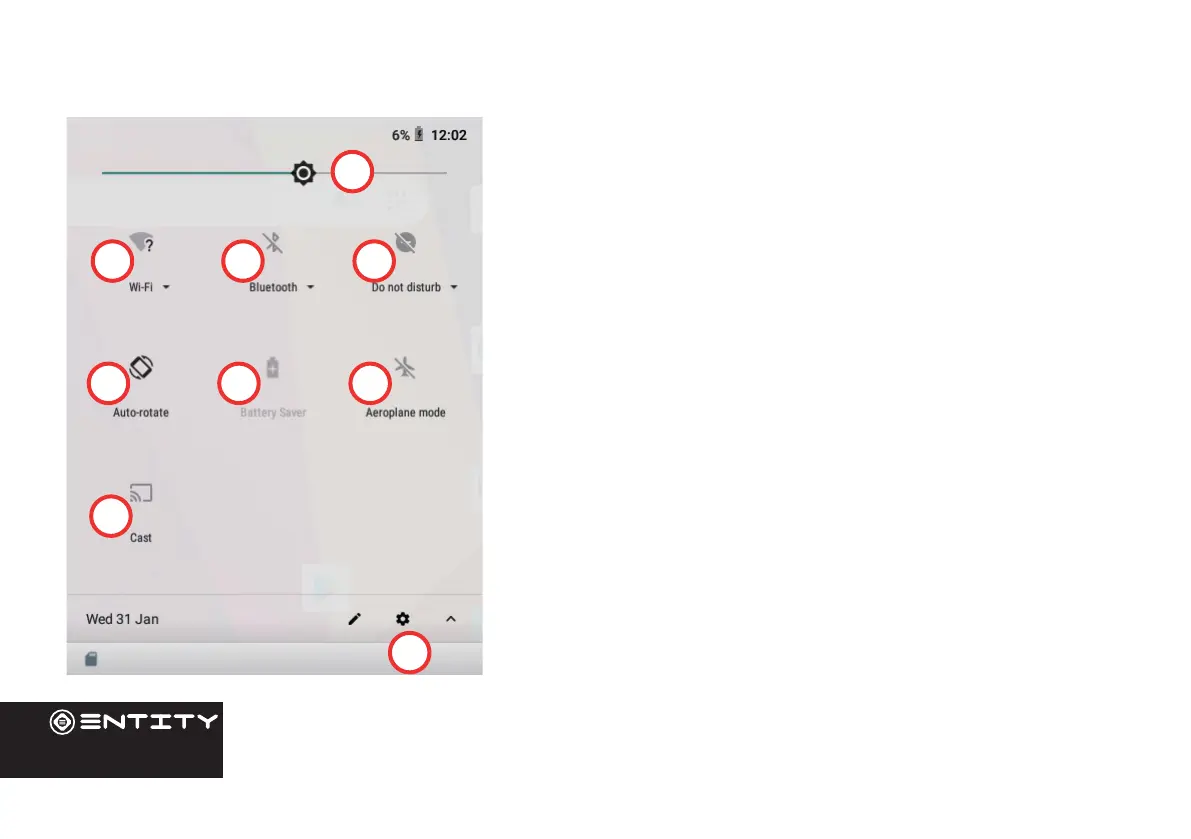
To access the quick sengs, touch the top of the screen and pull
down to open the menu.
1. Brightness: To adjust the screen brightness.
2. WiFi - Tap on the icon to turn on/o your WiFi.
3. Bluetooth - Tap on the icon to turn on/o your Bluetooth
connecon.
4. Do Not Disturb - Turns o all nocaons excluding alarms.
5. Auto-Rotate Screen - Tap to acvate/deacvate.
6. Baery Status
7. Airplane Mode - Tap to turn on/o all data, network and
wireless
connecons.
8. Cast - Wirelessly cast your screen to another device.
9. Sengs - Access all sengs.


 To Next Page