Copyright © 2008 Entone, Inc. All rights reserved
1
Chapter
5
5.1 Connecting Audio System
Your Amulet supports AC-3 (Dolby Digital 5.1 channel). To enjoy multi-channel surround-sound, the content
source must carry multi-channel AC-3 signal. Please refer to your service provider for availability of AC-3
5.1 programs.
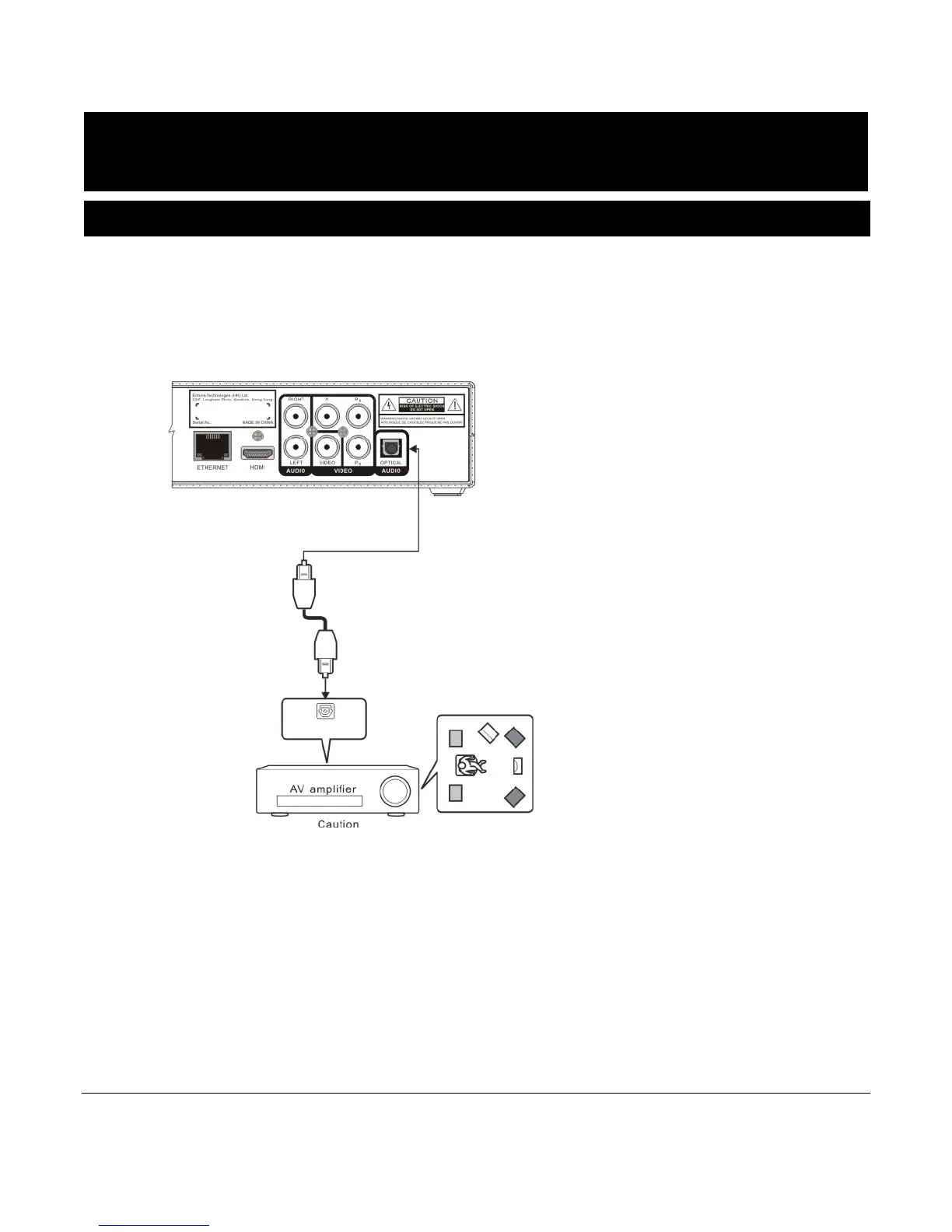
You can enjoy multi-channel surround-sound such as 5.1 channel by connecting the Amulet to an amplifier
compatible with Dolby Digital. You can connect to your amplifier using the digital optical audio output.
Figure 5-1 Connecting Amulet to Audio System
Consult your audio system user guide for connection. Take necessary precautions when working with
electric equipment. Remove the devices from wall power and be sure to use caution when moving
equipment to prevent injury.
If your connected TV or A/V equipment does not support AC-3, you can disable AC-3.
Enabling or disabling AC-3 is controlled by the IPTV middleware. For details of enabling and disabling AC-
3, please refer to usage instruction provided by your service operator.
Please refer to the following table for details of audio output used when AC-3 is enabled or disabled.



 To Next Page