Copyright © 2008 Entone, Inc. All rights reserved
26
Chapter
9
9.1 Aspect Ratio
Amulet supports display of both standard definition content which is traditionally filmed in 4:3 aspect ratio
and high definition content filmed in 16:9 aspect ratio to both 4:3 or 16:9 TV.
Setting of aspect ratio is provided by middleware. Please refer to your service provider for options available
and detailed operation. Typically, aspect ratio is provided in following 3 modes:
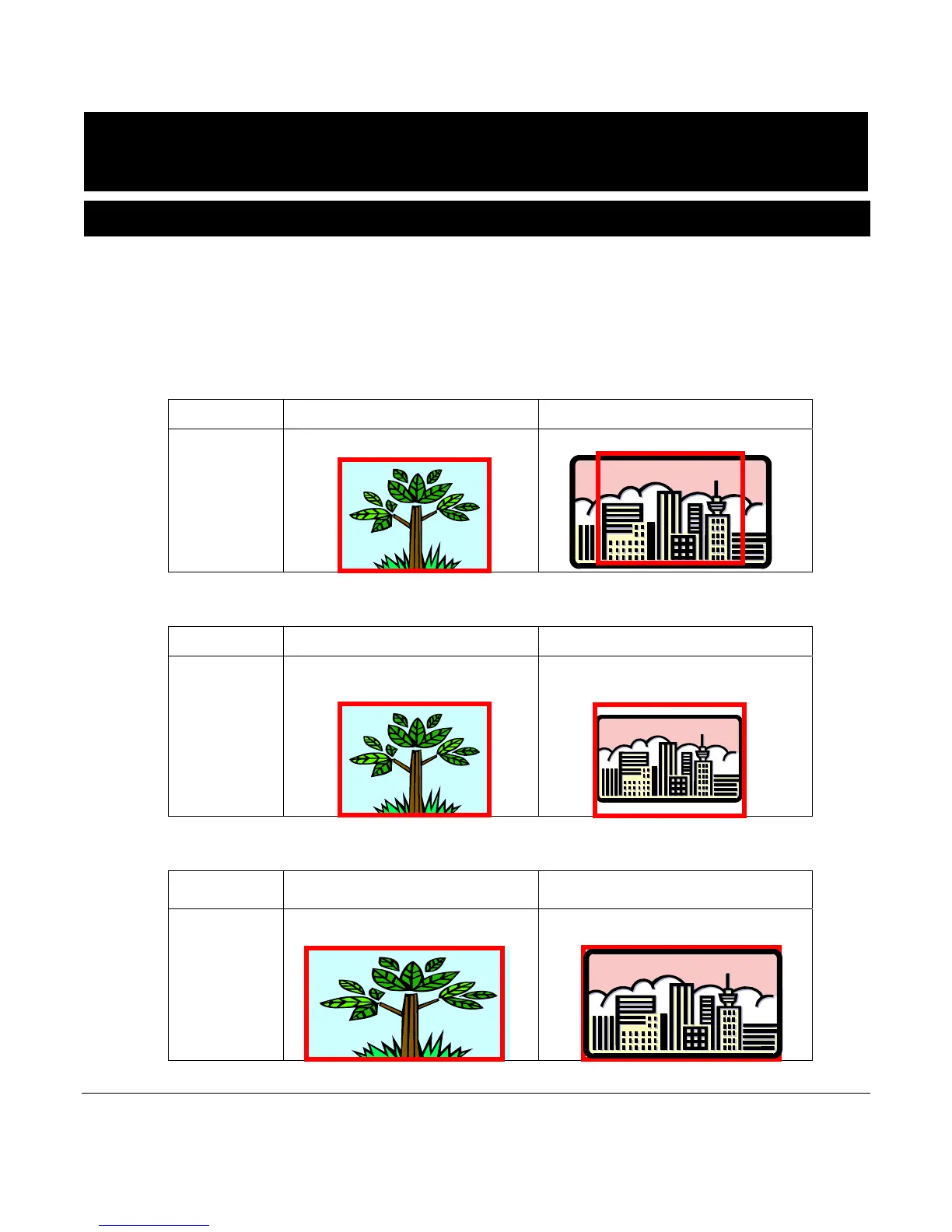
1) Mode 4:3 - You choose this mode when your TV is a traditional 4:3 TV.
4:3 Content 16:9 Content
4:3 TV Normal
Left and Right are cropped
2) Mode 4:3 Letter Box (4:3 LB) - You choose this mode when your TV is a traditional 4:3 TV.
4:3 Content 16:9 Content
4:3 TV
Normal
Letter Box with black bar on top and
bottom
3) Mode 16:9 - You choose this mode when your TV is a 16:9 TV.
4:3 Content 16:9 Content
16:9 TV Panorama – Stretched
Normal



 To Next Page