27
IP1951EN - 2014-10-06
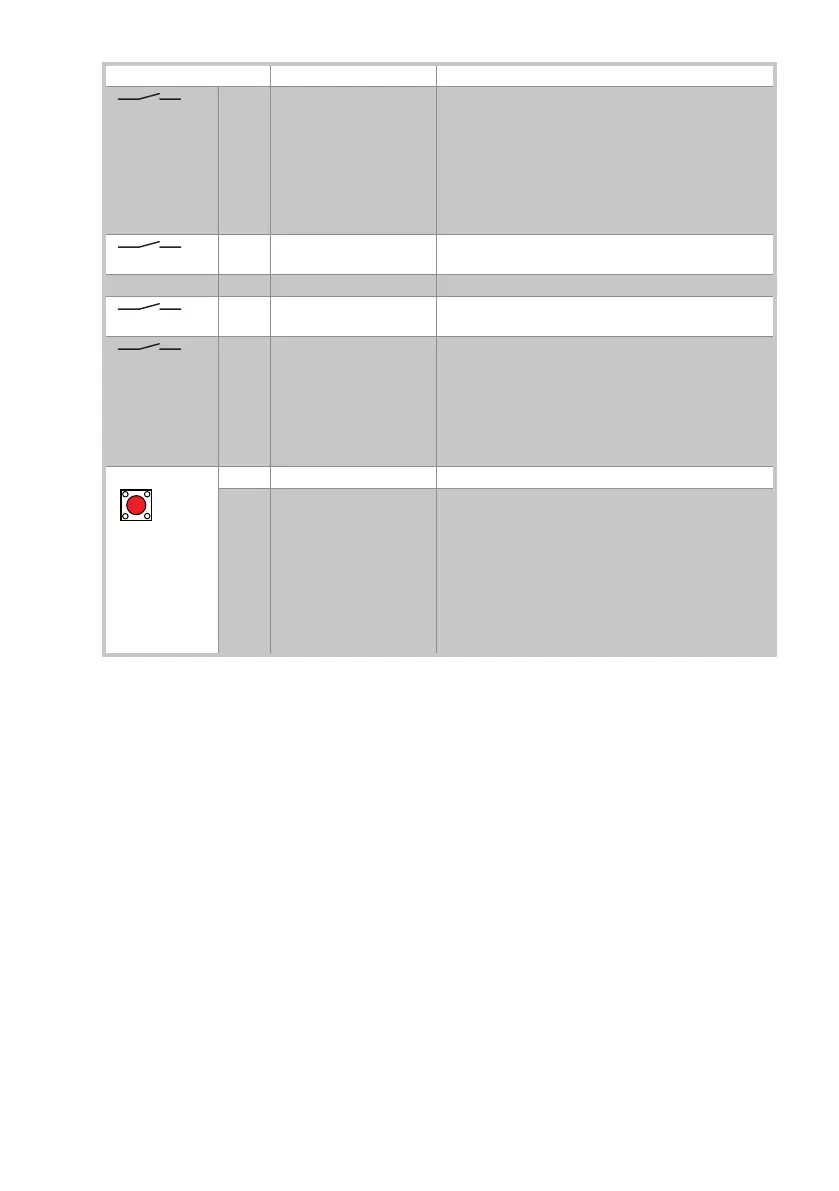
Command Function Description
1 KC NO KEY CLOSING The closing operation starts when the contact is closed.
If the door is set to NIGHT-TIME CLOSURE mode, the
KEY CLOSING command, given after opening with the
1-KO command, will close the door and immediately
restore the NIGHT-TIME CLOSURE mode.
N.B.: this command can be combined with a key to allow
immediate reclosing of a shop door set to NIGHT-TIME
CLOSURE mode.
1 G1
NO
GENERAL PURPOSE Disabling /enabling of COMER function selector switch.
Make connection, as described on page 24.
G2 GENERAL PURPOSE FUTURE USE
1 S1 NO CONNECTION OF
MICROSWITCH
Connect block microswitch as described on pages 24-
25.
1 AO NO AUXILIARY
OPENING
Contact closure activates the opening operation.
If the operation as escape route is disabled, it will be
re-enabled for 5 minutes (or for the time set by the
display module MD1).
N.B.: This command can be combined with a magnetic
card reader for access to automated teller machines if
the door is set to NIGHT-TIME CLOSURE mode .
NO OPENING Press quickly to activate opening operation.
SETTINGS RESET Keep the OPEN button pressed (for 4 s), until the IN
LED starts to flash. To confirm the operation, press the
OPEN button again for 2 seconds within 4 seconds.
The SETTINGS RESET deletes all the remote software
settings made using the DMCS software, the MD1 dis-
play module and the COMER selector.
N.B.: We recommend carrying out the SETTING RESET
during starting (see section 11), or whenever the COM-
ER selector is replaced with a COMKR selector.



 To Next Page