Envent Engineering Ltd. Page 26 Revision 2.4
OPERATION & CONFIGURATION
The 330S/331S H
2
S analyzer can be configured by using the display-button function
or by connecting the analyzer to a computer through USB.
Analyzer Display Interface
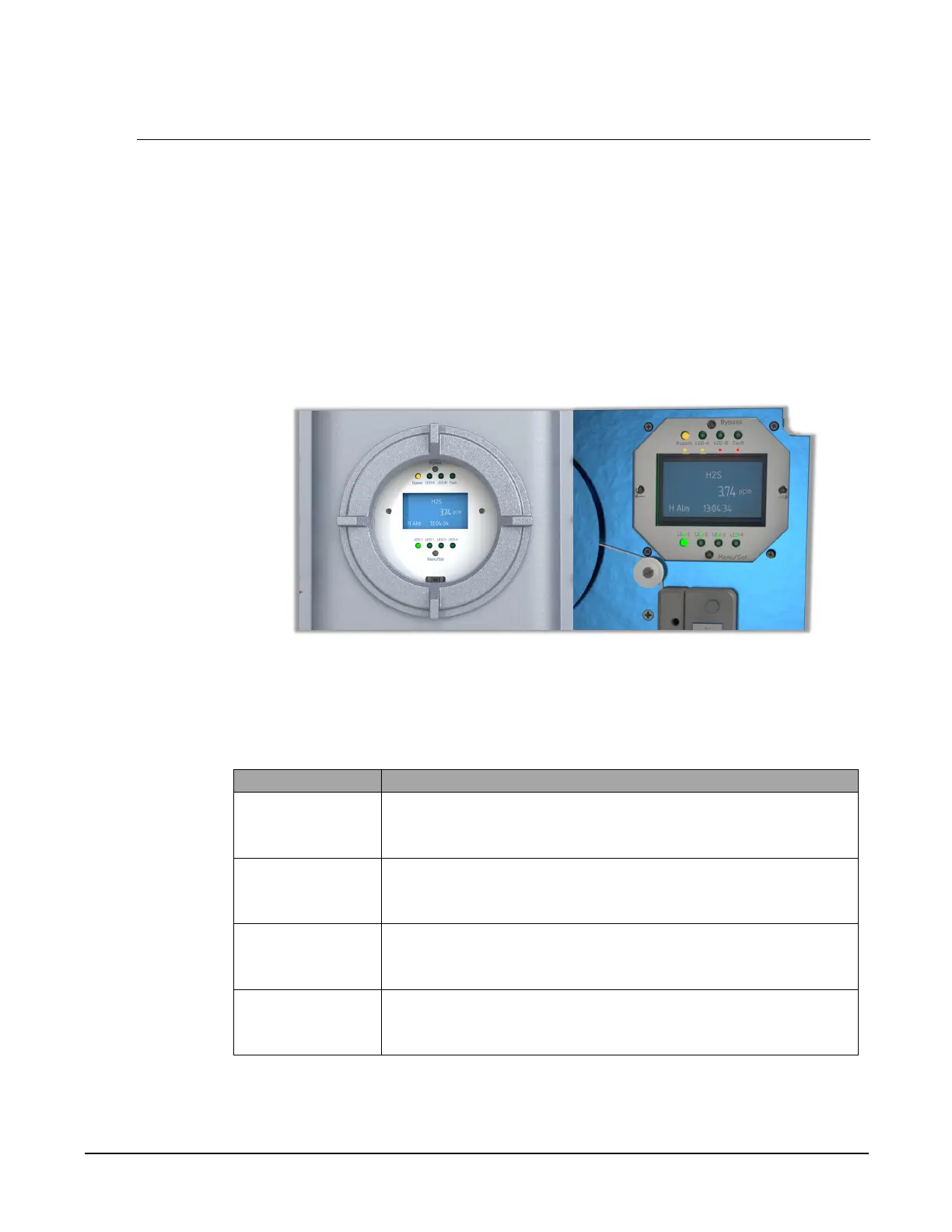
By using the analyzer's display, the user can only view and/or change certain
parameters set at the factory. The display is made up of a Graphic Display, four (4)
push-buttons and (8) LED's. Refer to Figure 10.
Figure 10. 330S Display (left) & 331S Display (right)
The Descriptions and Function of the display buttons and LED's are described in table
Table 4 & Table 5.
Bypass Used to inhibit all analyzer alarms to a non-alarm state and
sets the analog 4-40 mA output to 2 mA. The Bypass LED
illuminates when Bypass mode is enabled.
Scroll
Right [→]
Used to move the cursor to the right. Also used to SAVE
configuration adjustments when moved all the way to the
right of the screen.
Scroll Left
[←]
Used to move the cursor to the left. Also used to CANCEL
configuration adjustments when moved all the way to the left
of the screen.
Menu/Set Used to cycle through the menu options. Also used to
increase numerical values when making configuration
adjustments.
Table 4. Display Button Description/Function


 To Next Page