Search
Click Button to search play directory in DVD songs.
24
OK
Click Button – , click up, down, left and right to select songs being looked for, and
click 【OK】 to confirm selected songs.
26 29
25
Sound Status Display
Click Button to change it as , system is now muted; click again to recover
sound status.
Click TV icon under the main menu interface to enter TV mode (the user could select
analog TV)
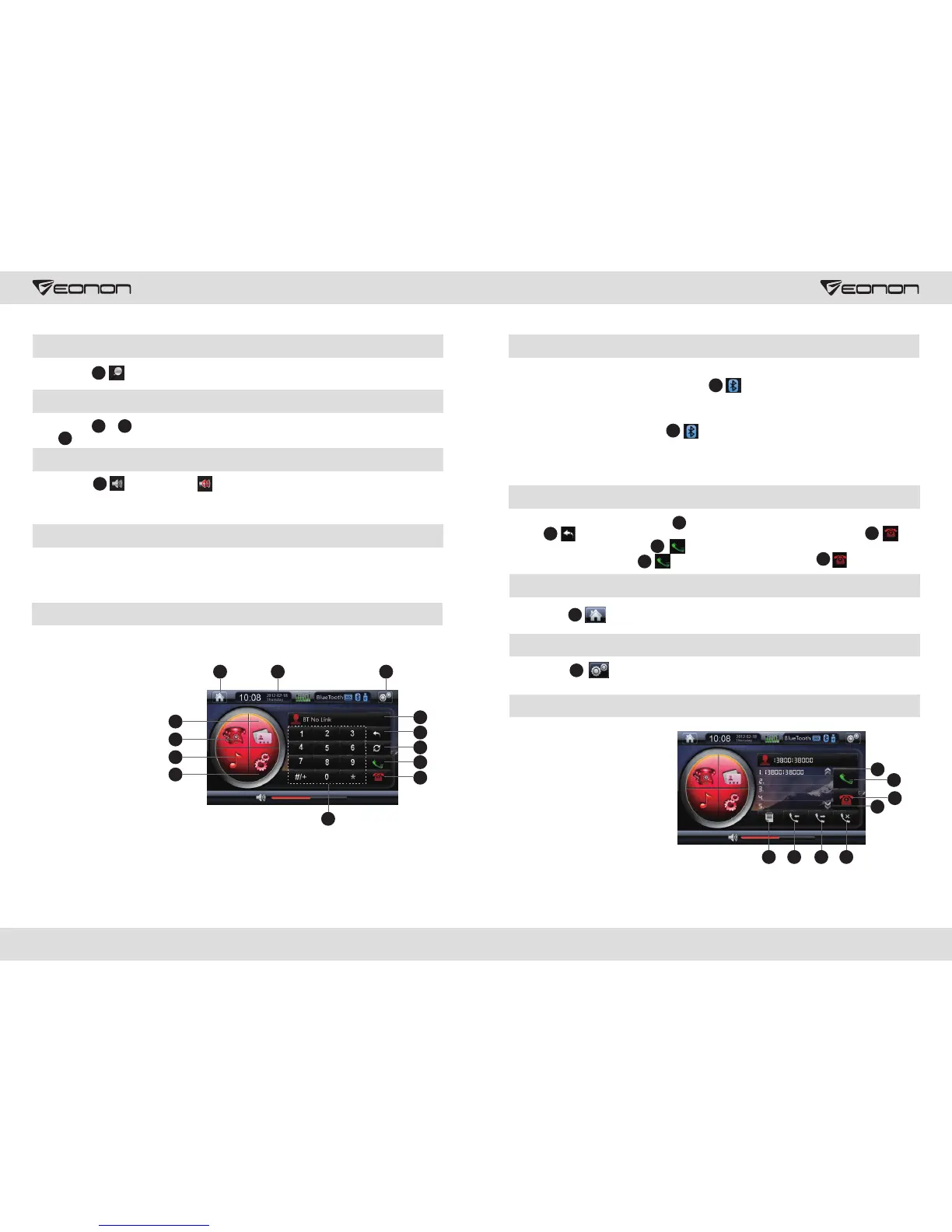
Bluetooth Mode
3
5
6
12
13
11
9
7
8
10
4
1
2
1. Dial/Answer Calls
2. Reject/Hang up Calls
3. Return
4. Bluetooth/Phone Switch
5. Phone Digital Display
6. Phone Book
7. Music Play
8. Bluetooth Setup
9. Number Button
10. Display Digital Zone
11. Back to Main Menu
12. Time Status Display
13. General Setup
13 14
26
Answer/Make Calls
Dialed phone number will display in “Display Number Zone”. The user could click
Button to erase wrong phone numbers; the user could also click Button
to hang up calls or click Button to make calls. When someone calls, status and
time will display here, press to answer the phone, and press to reject.
When searching Bluetooth device during first matching, the user could see the DVD name
EONON via Bluetooth, successful matching will be displayed after the user select OK and
enter password 5802. The color of as is shown in the figure will light up when
connection succeeds after “connect” being selected to connect to Bluetooth.
During the next successful matching, the system will connect to Bluetooth of the phone automatically.
Note: Operation on different phones will be different, for detailed instructions, the user
could refer to the user manual of the phone and carry out corresponding operation.
10
3
2
2
Back to Main Menu
Click Button to go back to the main menu.
11
General Set Menu
Click Button , to display General Set Menu, for more details, return to page 9
general setup instructions.
13
Phone Book
5
4
6
8
321
7
1. Phone
2. Dial in Calls
3. Dial out Calls
4. Unanswered Calls
5. Answer/Make Calls
6. Reject/Hang up Calls
7. Previous Record
8. Next Record
1
1
12
Bluetooth Connection
When Bluetooth is enabled, the system will search automatically and get connected. If the
phone does not connect to Bluetooth, figure will become grey - “No Connection”.
12
Digital TV
It is required to purchase an EONON A0325 cable, if a hanging digital TV is adopted Please
connect DVD with digital TV box according to A0325 wire connection instruction, after the
system entering digital TV mode, and operate according to digital TV box instruction
manual.



 To Next Page