10 | RT Series True Online UPS
5. Operation
5.1 Button Operation
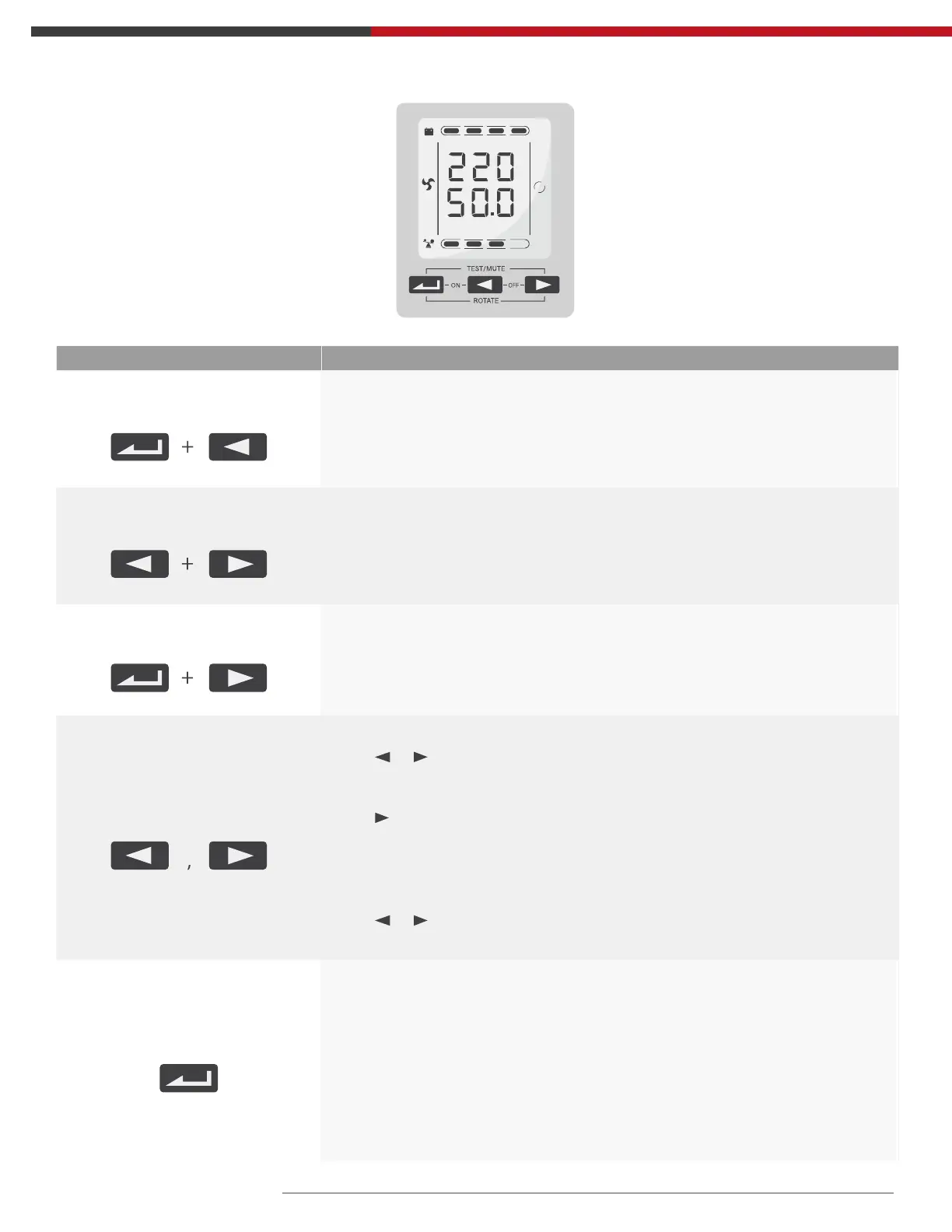
Button Function
“ON” key
Press the two keys for more than half a second to turn on the UPS.
“OFF” key
Press the two keys for more than half a second to turn off the UPS.
TEST/MUTE key
Press the two keys for more than 1 second and less than 5 seconds in Line
mode or ECO mode or CUCF mode: UPS runs the self-test function.
Press the two keys for more than 1 second in battery
mode: UPS runs the mute function.
INQUIRING key
Not in setting mode:
Press or for more than half a second (less than 2 seconds):
display the items orderly.
Press for more than 2 seconds: Circularly and orderly display the items
every 2 seconds, when press the key for some time again, it will turn to
output status.
In setting mode:
Press or for more than half a second (less than 2 seconds):
Select the setting option.
FUNCTION SETTINGS key
Not in setting mode:
• Press the key for more than 2 seconds: Function settings interface.
In setting mode:
• Press the key for more than half a second (less than 2 seconds): go to
the function setting options.
• Press the key for more than 2 seconds: exit from this function settings
interface.
25% 50% 75% 100%
25% 50% 75% 100%
OUTPUT
VAC
Hz
LINE



 To Next Page