8 | RT Series True Online UPS
4. Network Functions
4.1 Communication Port
4.2 EPO Port (Optional)
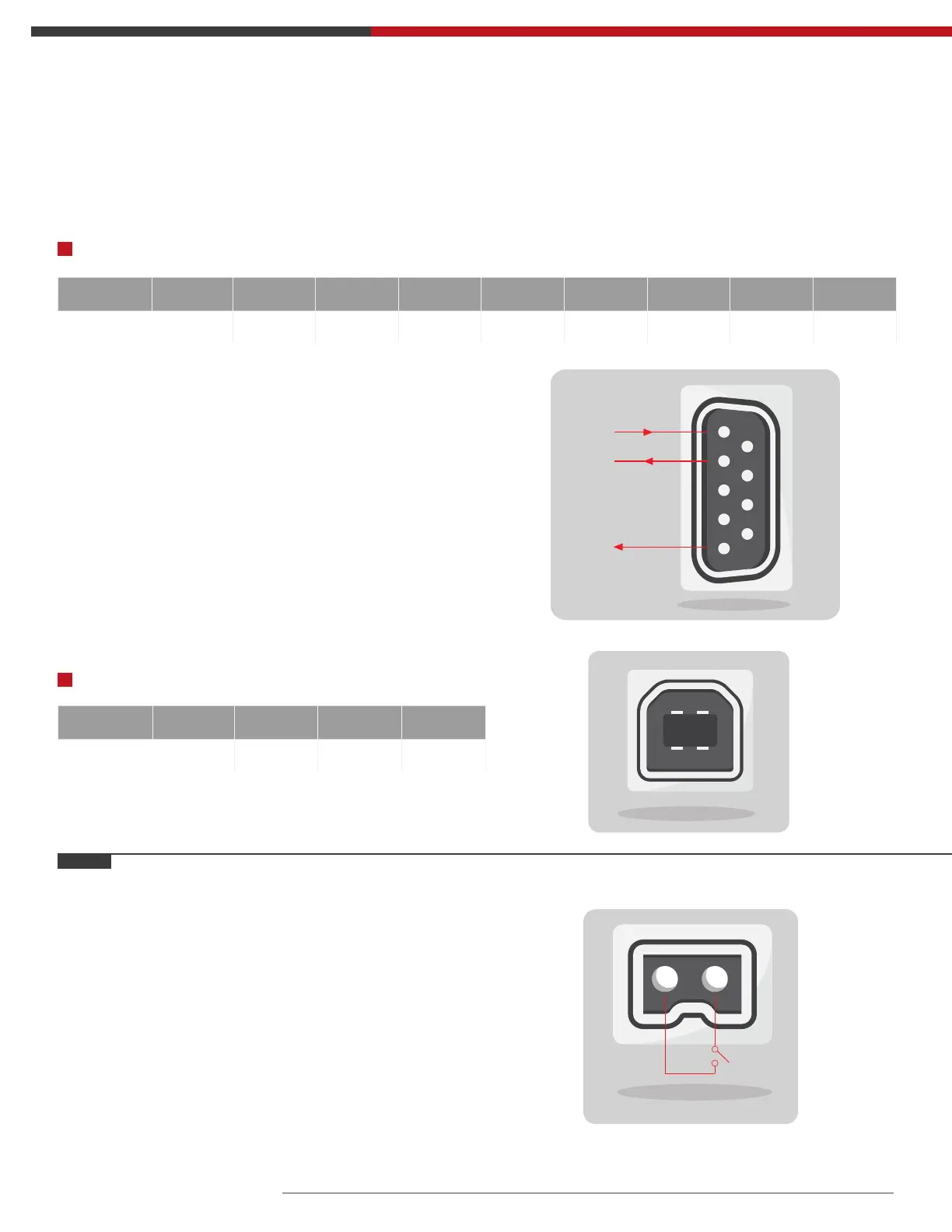
RS232 Port:
USB Port:
Users could monitor the UPS system through the communication port such as standard RS232 port and
USB port with computer. Connecting this UPS with computer by communication cable could achieve UPS
management easily.
EPO is the short for Emergency Power Off. EPO port is
on the rear panel of the UPS. It’s green. Users can cut
off the output of UPS immediately by operating EPO
port in case of emergency.
Normally, pin1 and pin2 are connected so that the
machine can be working normally. When some
emergencies happen, and when users have to cut off
the output, just need to disconnect the connection
between pin1 and pin2, or just pulling it out.
Pins 1 2 3 4 5 6 7 8 9
Indication empty send receive empty ground empty empty empty empty
Pins 1 2 3 4
Indication +5V date+ date- GND
RS232 interface is set as below:
Note:
• Bit rate: 1200bps
• Byte: 8bit
• Completion code: 1bit
• Bit pattern: None
1
2
3
4
21
Txd
Rxd
GND
1
2
3
4
5
6
7
8
9



 To Next Page