Epcom Power Line
10 | RT Series True Online UPS RT Series True Online UPS | 11
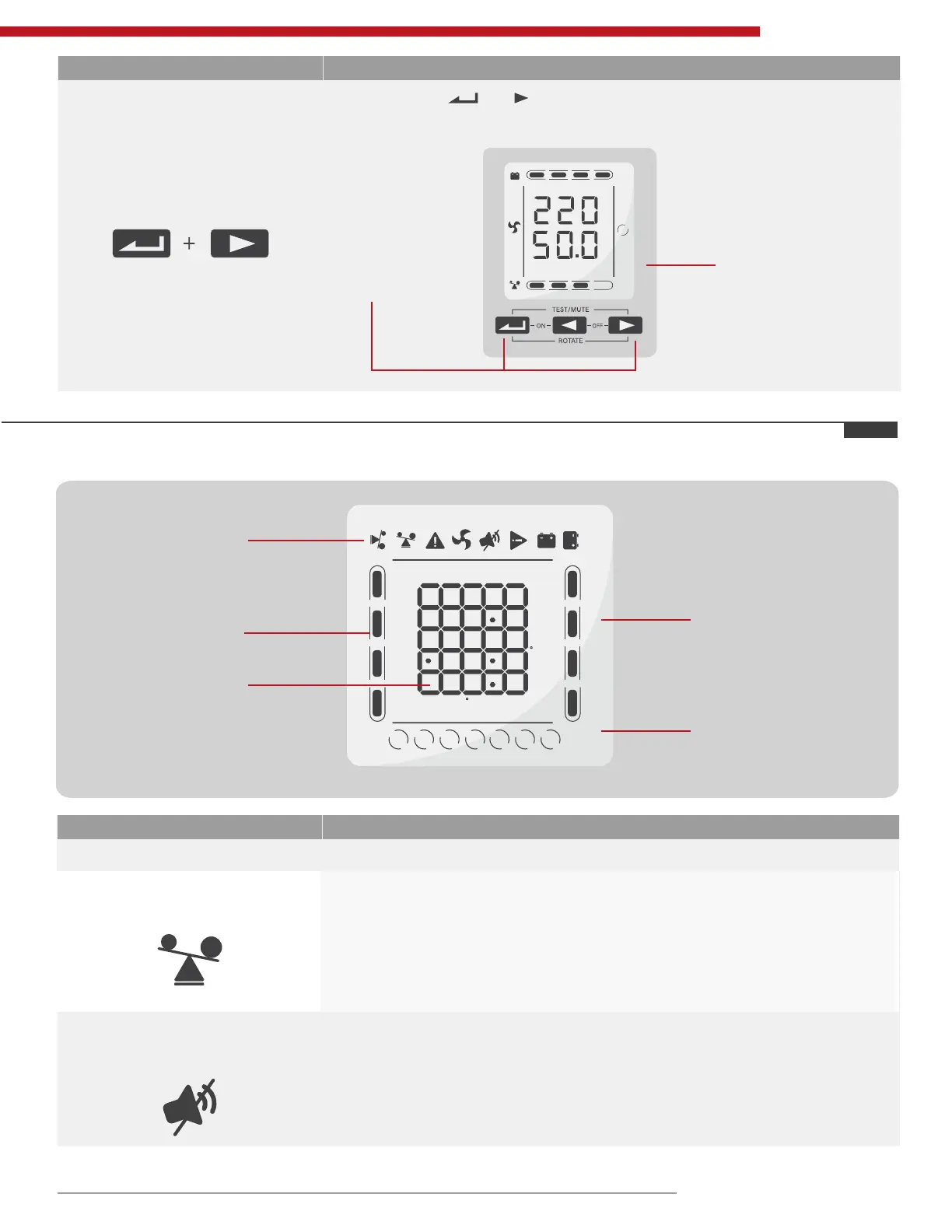
Button Function
ROTATE key
Press and hold and for more than 5 second: Change the direction
to display items.
Press and hold
keys for more
than 5 seconds.
25% 50% 75% 100%
25% 50% 75% 100%
OUTPUT
VAC
Hz
LINE
The direction has
been changed in
the picture.
5.2 Display Interface
Display Function
Icon Display
Load Icon
The approximate load capacity percentage (0-25%, 26-50%, 51-75% and
76-100%) is indicated by the number of load bar sections illuminated.
When UPS is overloaded, the load icon will ash.
Mute Icon
Indicates the audible alarm is disabled/mute.
Press the mute key in the battery mode, the mute icon ash.
25% 50% 75% 100%
25% 50% 75% 100%
INPUT BATTERY OUTPUT LOAD TEMP
INPUT BATTERY OUTPUT LOAD TEMP
VAC
KV
VDC
Hz
KVA
C %
LINE
bat
eco
STDBY
fault
batt
bypass
25% 50% 75% 100%
25% 50% 75% 100%
VAC
VDC
Hz
KVA
C %
Icon display
Battery capacity
display area
Working mode
display area
Load capacity
display area
Digital display area
KW



 To Next Page