4 Device function description
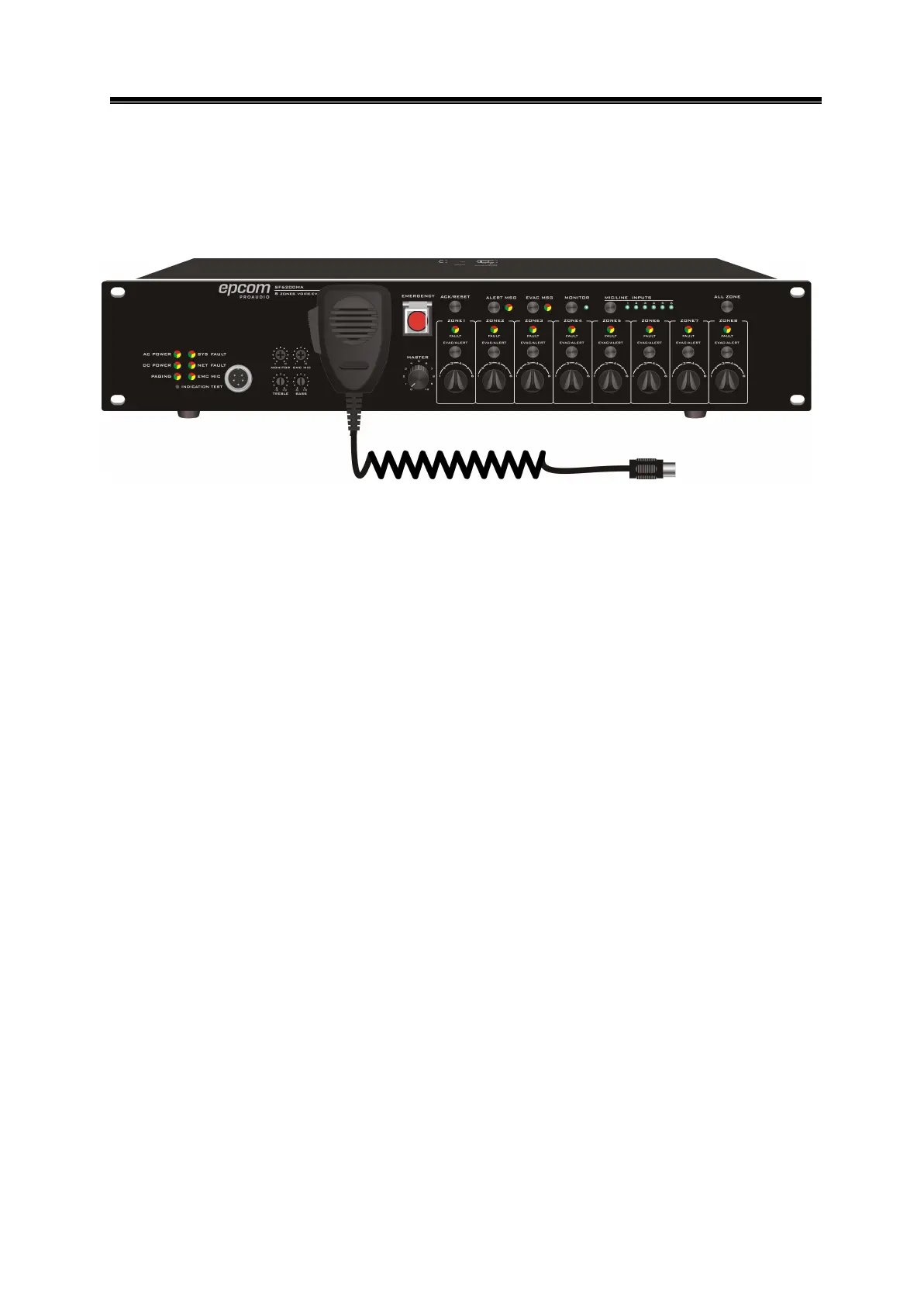
The bellowed is front panel introduction for controller SF6200MA ( for SF6200MS
detailed function, please refer to SF6200MAas they are with same front panel printing ):
Figure 4- 1 SF6200MAfront panel design sketch
4.1 Front panel function description
Indicator and status description:
AC POWER: 110V AC indicator,green on means normal , orange on means
AC power off.
DC POWER: DC p o w e r indicator light, green on means 24V power connected ,
orange on means out of connect to DC 24V,light off means without configuration for
DC power.
PAGING: remote control microphone indicator, green light means that the remote
control microphone is paging the zone from the host.
SYS FAULT: orange indicates the host is faulty, flashing indicates that the host has a
new fault.
NET FAULT: green means the network is normal, orange means the network is
with failure.
EMC MIC:light off if well connected, green means PPT is paging, orange means PPT
is with failure.
MONOROR: Monitor volume adjustment.
EMC MIC: PPT microphone volume adjustment.
REBLE: Treble adjustment.
BASS:: Bass adjustment.
ENERGENCY: emergency broadcast button, press to select ALERT MSG or
EVAC MSG to broadcast emergency voice message, EVAC MSG is prior to ALERT


 To Next Page