www.SnapAV.com | Support: 866.838.5052
EA-MINI-2D-35 EA-MINI-3D-35
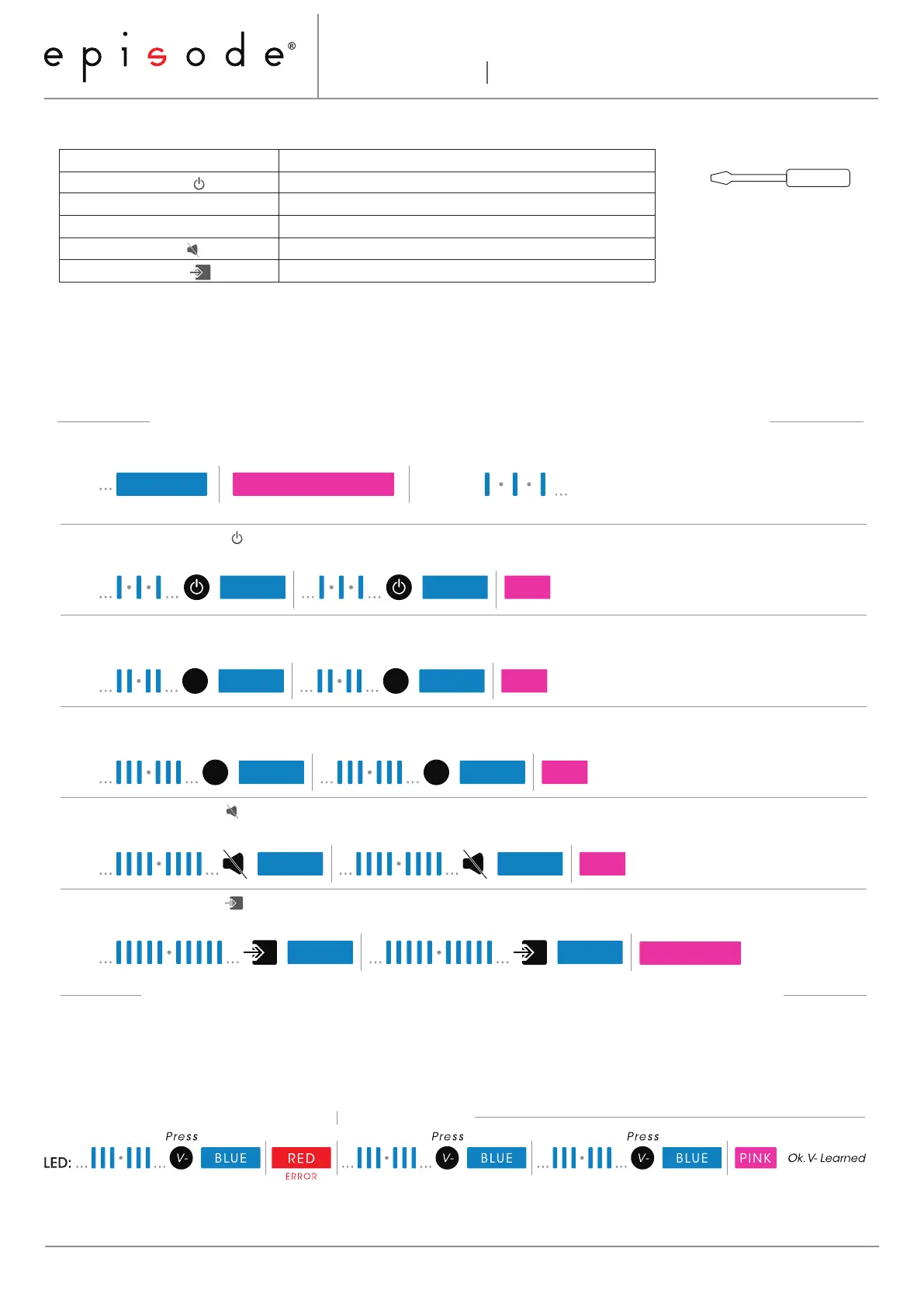
IR Command Learning Procedure
Command Learning Order (Must be learned in this order!) Tools Required
*It is not necessary to wait for the pictured sequence of short blue flashes before entering each
code. These flashes only indicate which code is being learned.
Learning Errors
Command Description
1. Power Toggle ( ) Turn amplifier power on and off.
2. Volume Up (V+) Turn volume up (louder).
3. Volume Down (V-) Turn volume down (quieter).
4. Mute Toggle ( ) Toggle mute mode (no volume) on and off.
5. Input Toggle ( ) Switch between inputs 1 and 2.
A red LED indicates a learning error. After an error, repeat the current command until it learns correctly. See the
example below:
Page 2/2
LED:
Return DIP switch 2 to RUN (UP) using the tweaker. Learning Complete.
Flip DIP switch 2 DOWN with the tweaker to enter IR Learning Mode.
PINKBLUE
RUN Mode ... DIP Switch 2: LEARN (DOWN) Learning Mode, awaiting Command ...
Re-enter command
PINK
LED:
Ok. Power Learned
Press Press
BLUE BLUE
LED:
PINK Ok. V+ Learned
Press Press
BLUE BLUE
V+ V+
Press Press
LED:
V- V-
PINK
Ok. V- Learned
BLUE BLUE
1. Learn Power Toggle ( )
2. Learn Volume Up ( V+ )
3. Learn Volume Down ( V- )
4. Learn Mute Toggle ( )
Press Press
LED:
PINKBLUE BLUE
Ok. Mute Learned
PINK
BLUE BLUE
Ok. Input Toggle Learned
Press Press
LED:
Tweaker Screwdriver
(required tool for DIP Switch)
Instructions
131017-1630
5. Learn Input Toggle ( )



 To Previous Page