ADAPT 200 series Bluetooth
®
headset
Product overview7
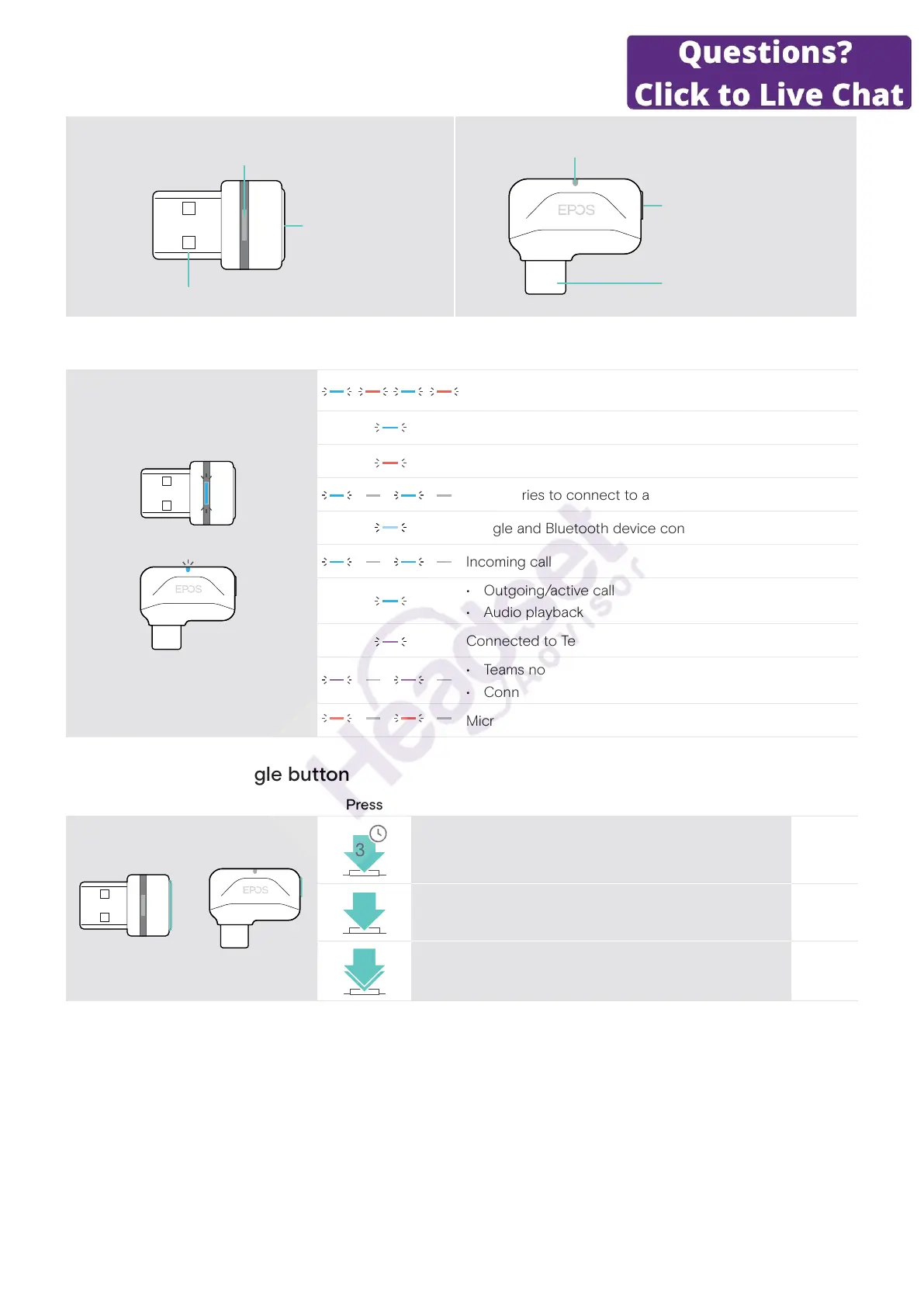
Overview of the dongle
BTD 800 USB BTD 800 USB-C
USB-A plug
Link LED
Link button
USB-C plug
Link LED
Link button
Overview of the dongle LED indications
Dongle in pairing mode:
searching for headset
3x
Pairing successful
Pairing failed
Dongle tries to connect to a Bluetooth device
Dongle and Bluetooth device connected
Incoming call
• Outgoing/active call
• Audio playback
Connected to Teams
• Teams notication
• Connecting to Teams or Invoking Cortana
Microphone of the connected Bluetooth device is muted
Overview of the dongle button
Link button Press Function Page
3s
Pairs the dongle with the headset 8
Reconnects the headset 21
2x
Disconnects the headset 21



 To Next Page