Product description
Mastercycler
®
nexus
English (EN)
16
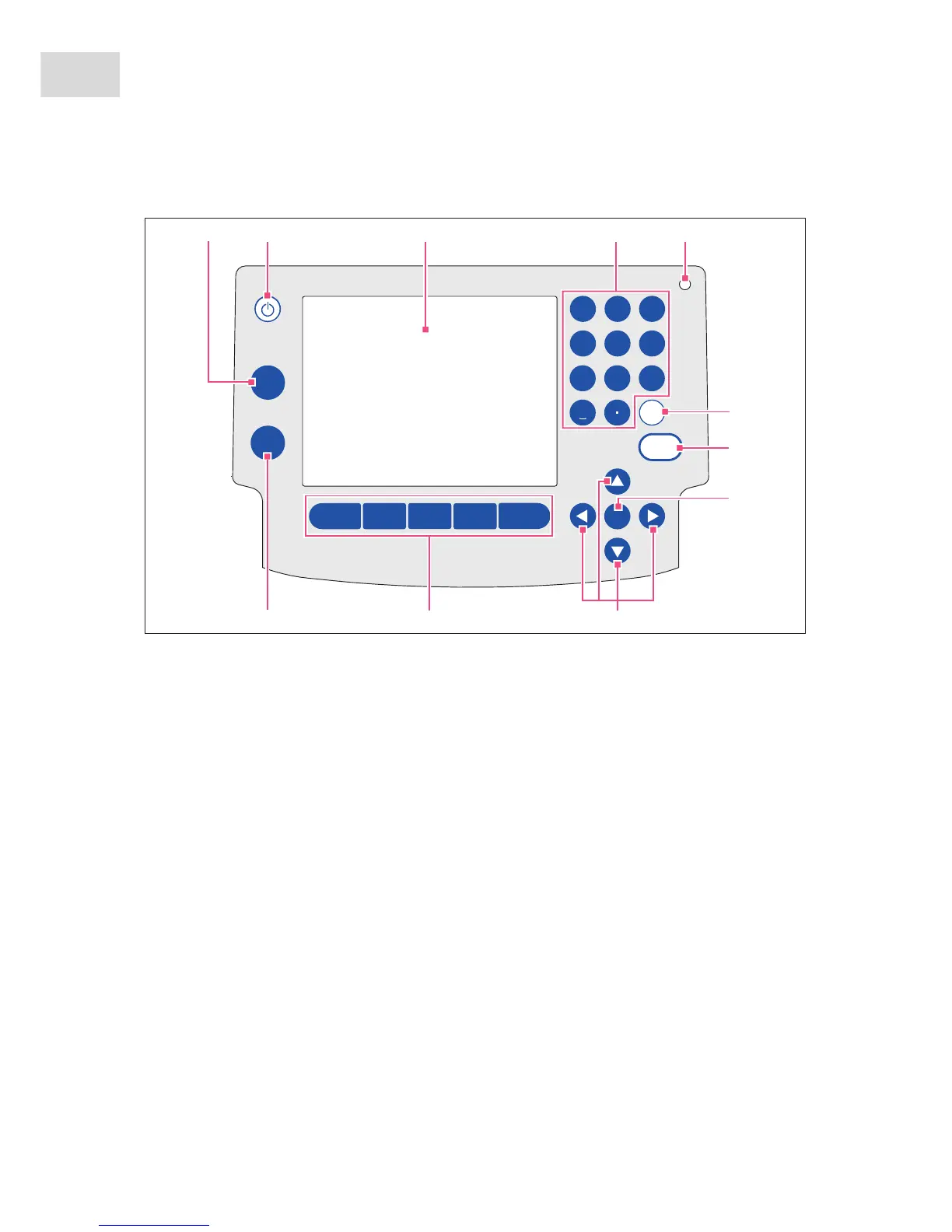
2.1.6 Control panel
Abb. 2-6: Control panel
Fig. 2-6: Control panel
1 stop key
Stop the running program.
2 Standby key
To switch the device to power save mode.
3Display
4Number pad
5Status lamp
In the case of devices with a thermoblock with
64+32 wells, the status lamp in the control panel
is deactivated. The active status lamp for devices
with a thermoblock with 64+32 wells is located on
the heated lid.
6 del key
To delete marked objects and characters to the
right of the cursor.
7enter key
To confirm entries and open selection lists.
8next key
Move the cursor to the next input field.
9Arrow keys
Move the cursor.
10 Softkeys
Function depends on the software dialog and is
indicated in the display above the softkey.
11 start key
Start the selected program.
0
next
start
stop
1 2
abc
3
def
4
ghi
5
jkl
6
mno
7
pqrs
8
tuv
9
wxyz
del
enter
12 34
6
7
88
9
1011
5



 To Next Page