System management
Mastercycler
®
nexus
English (EN)
80
8.7.1 Setting up a network connection
Prerequisites
•Ethernet cable (RJ45, Cat.5), not included in the delivery package
•Logged in as an administrator (see p. 37)
Proceed as follows:
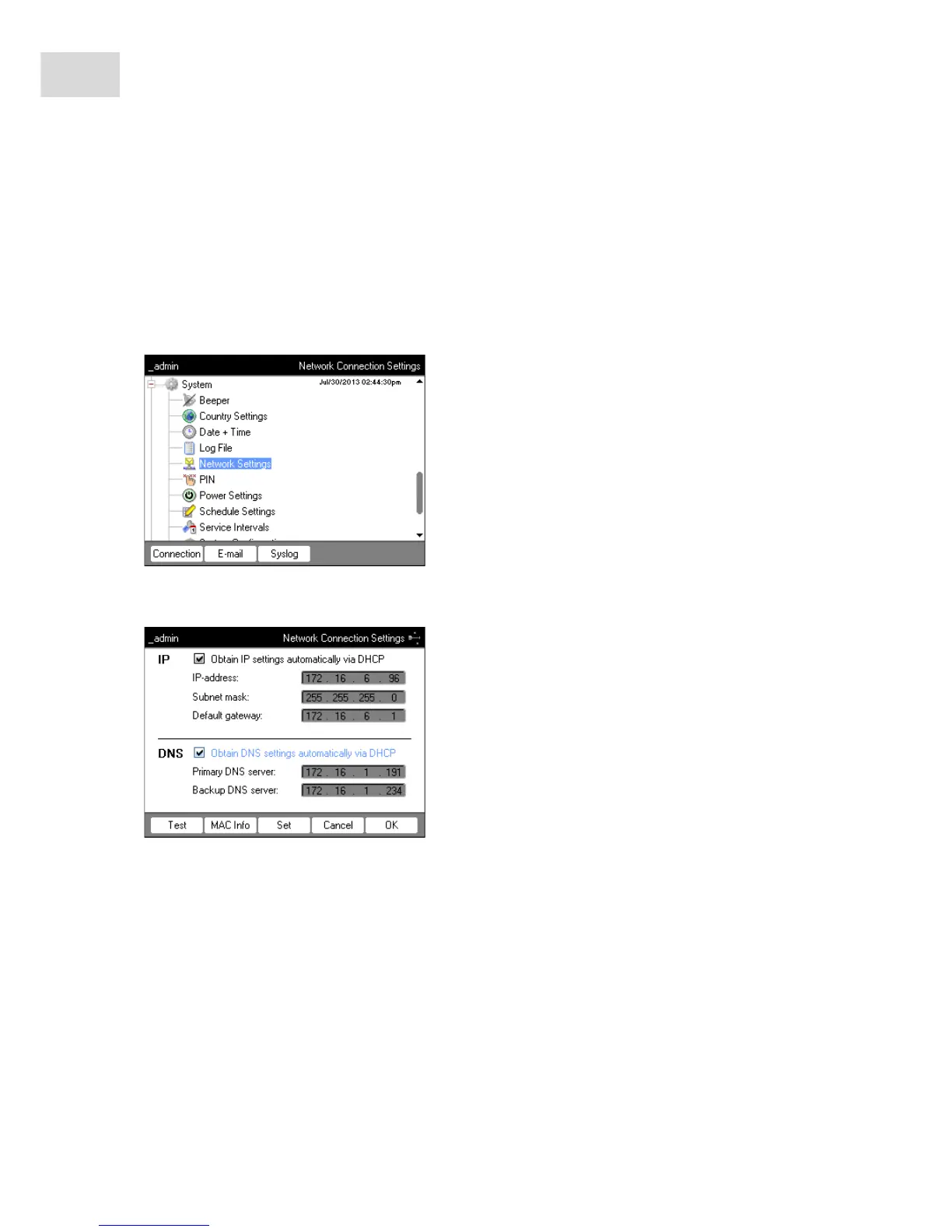
1. Select the System > Network Settings node.
2. Press the Connection softkey.
The Network Connection Settings window appears.
3. To assign the IP address automatically via DHCP, check the Obtain IP settings automatically via DHCP
checkbox. Alternatively, enter the IP address, subnet mask and standard gateway as specified by your
network administrator.
4. To assign the IP address of the DNS server via DHCP, check the Obtain DNS settings automatically via
DHCP checkbox. Alternatively, enter the IP addresses of the DNS servers as specified by your network
administrator.
5. Insert the Ethernet cable into the Ethernet port on the rear of the device and connect it to an Ethernet
port of the Ethernet network.
6. Press the Set softkey to accept the settings.



 To Next Page