11
Opening the Printer Software
After you open your application program and create your document, you’re ready
to select your page setup and other printer software settings.
From the File menu, click
Page Setup
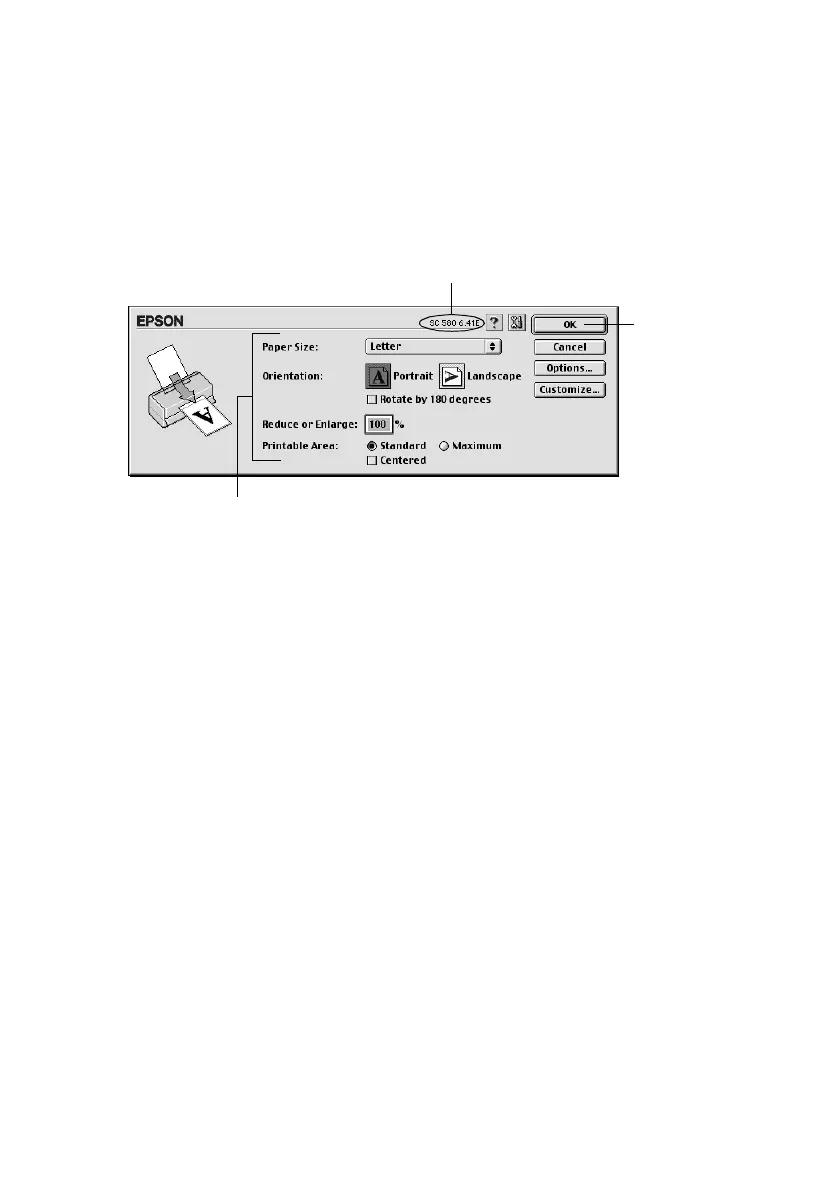
. You see your application’s page setup
dialog box (your dialog box may look slightly different):
Make the following selections on the page setup dialog box:
■
Make sure your printer (
SC 580
) is selected. (If not, you need to select your
printer in the Chooser; see the Start Here sheet for instructions.)
■
Select the correct
Paper Size
,
Orientation
, and
Printable Area
settings for
your document. See your electronic Reference Guide for details.
■
When you’ve selected your settings, click
OK
to close the page setup dialog box
and return to your application window.
Verify your printer model here
Select your Paper Size, Orientation,
and Printable Area settings
Click OK
Pbasics.book Page 11 Wednesday, August 9, 2000 10:26 AM



 To Next Page