12
Selecting Printer Software Settings
Now open the File menu and click
Print
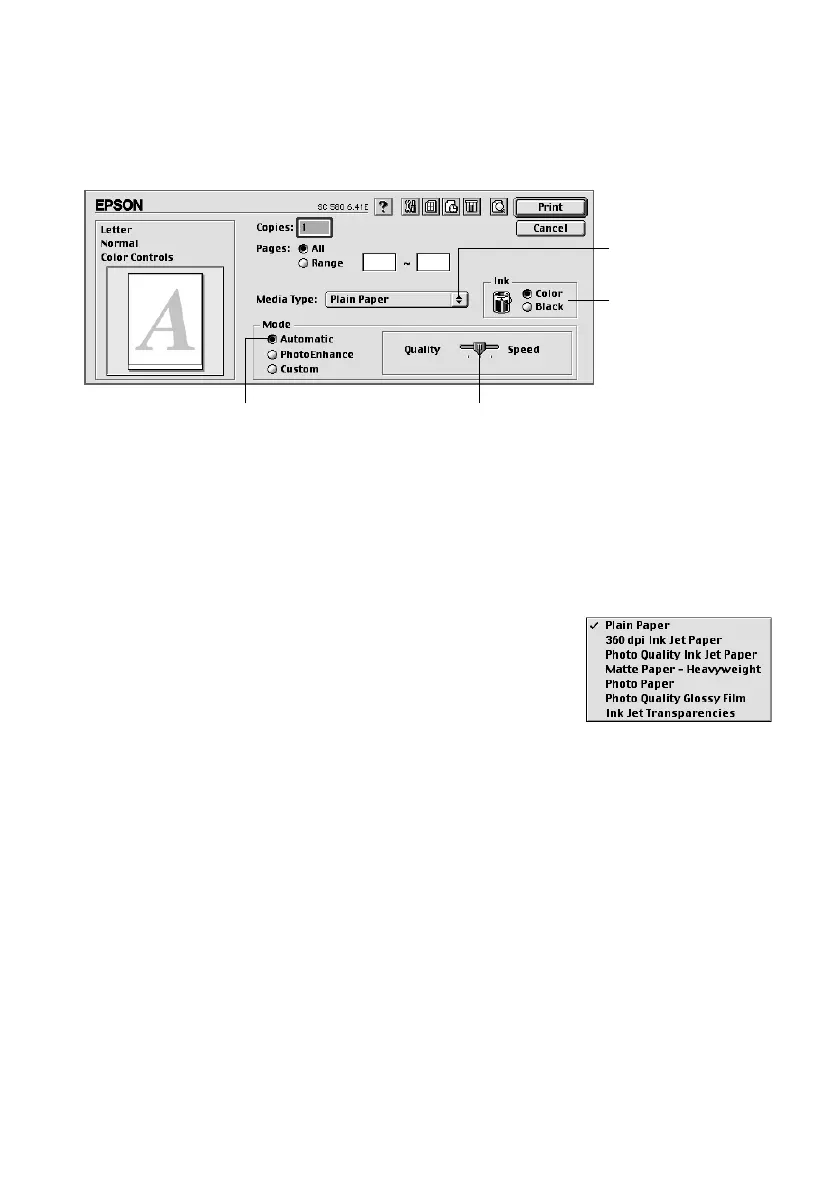
. You see the main printer settings dialog
box for your application (yours may look slightly different):
The most important thing to remember is to set the correct Media Type for
the paper you’re using. The Media Type setting affects the other options you
can choose.
Make the following settings on the dialog box:
■
Choose the Media Type you’re printing on (click
the arrow button to scroll through the list). If you’re
not sure which setting to select, see page 19.
■
Set the Ink option to
Color
unless you’re printing in
black only.
■
Set the Mode option to
Automatic
. This lets the printer software determine
the best settings for your print job. It’s the easiest way to get good printing
results on all types of paper.
■
Set the slider in the Mode box to
Quality
or
Speed
. This lets you choose
between a higher resolution, faster printing, or an in-between setting. (The
slider is not available when certain media types are selected.)
■
When you’ve selected your settings, click
Print
.
Select high-quality printing,
faster printing, or in-between
Select the type of
paper you loaded
Select Automatic mode
Select the ink color
Pbasics.book Page 12 Wednesday, August 9, 2000 10:26 AM



 To Next Page