9
Control panel, top
z
roll paper
Loads and ejects roll paper.
Feeds roll paper in reverse to a position where it can be
easily removed from the sheet feeder, if pressed for
more than 3 seconds.
Clears the
b error light if pressed after removing roll
paper.
e
ink cartridge
replacement
Moves the print head to the ink cartridge replacement
position and charges ink to the printer when ink is out.
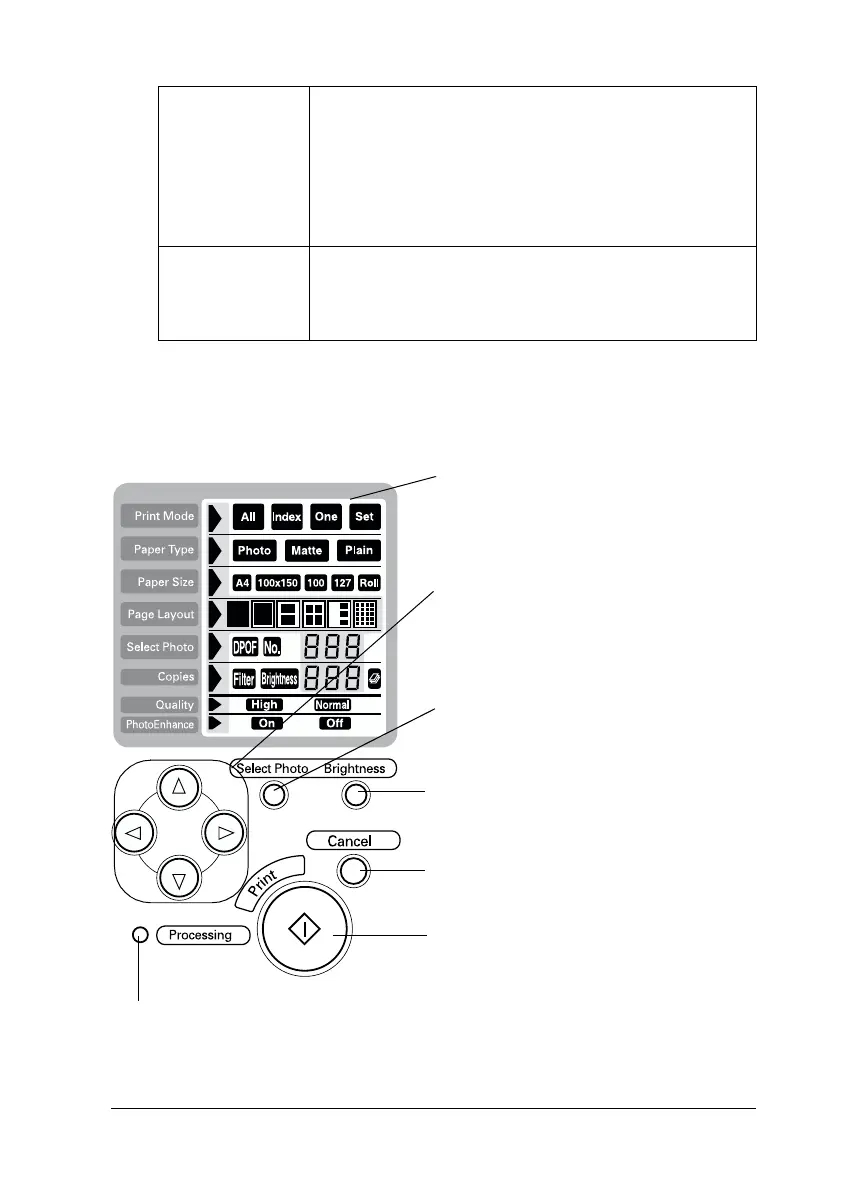
Display:
Shows the items and settings you change
with the buttons on the control panel.
Arrow buttons (up, down, left, right):
Use arrow buttons, up or down to select
setting menus. Use arrow button, left or
right to decide the settings.
Select Photo button: Sets the number of
copies for the photo selected on the
Select Photo menu.
Brightness button: Press to change into the
brightness setting mode. Press three
seconds to change into the filter setting
mode.
Cancel button:
Cancels print operation, or settings on the
display.
Start Print button:
Starts printing with the settings selected
via the buttons on the control panel.
Processing light:
On when ready to print.
Flashes while processing the data.














 To Next Page