EB-S01/W01/X14G/S11/X11/S02/S02H/X02/W02/S12/S12H/X12/W12/X14 EH-TW480
Maintenance CONFIDENTIAL
SEIKO EPSON 127 Revision C
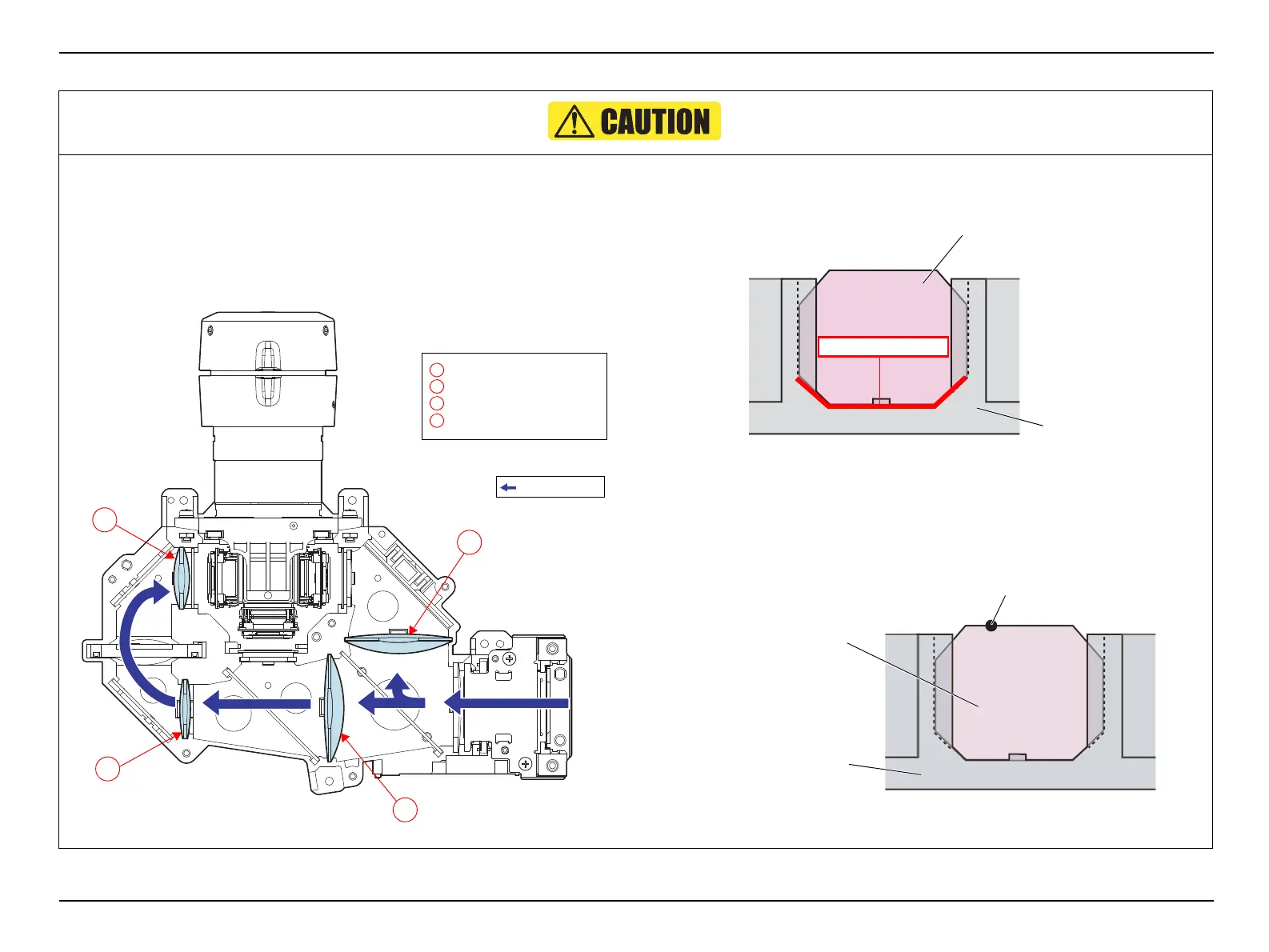
When installing the CONDENSER LENS;D/FB/FG2/R, attach the condenser
lenses with their convex side facing the incidence side as shown below.
Figure 4-11.
Insert the CONDENSER LENS;
D/FB/FG2/R
without any gap between the
bottom of them and the LIGHT GUIDE,LOWER.
Figure 4-12.
Install the CONDENSER LENS;FB
with its black marking on the top left as
seen from the incidence side.
Figure 4-13.
C
CONDENSER LENS;FG2
D
A
B
C
Light path
A
B
D
CONDENSER LENS;D
CONDENSER LENS;FB
CONDENSER LENS;R
Condenser lens
LIGHT GUIDE,LOWER
No gap in between
Black Marking
CONDENSER LENS;FB
LIGHT GUIDE,LOWER



 To Next Page
 Loading...