EB-S01/W01/X14G/S11/X11/S02/S02H/X02/W02/S12/S12H/X12/W12/X14 EH-TW480
Maintenance CONFIDENTIAL
SEIKO EPSON 136 Revision C
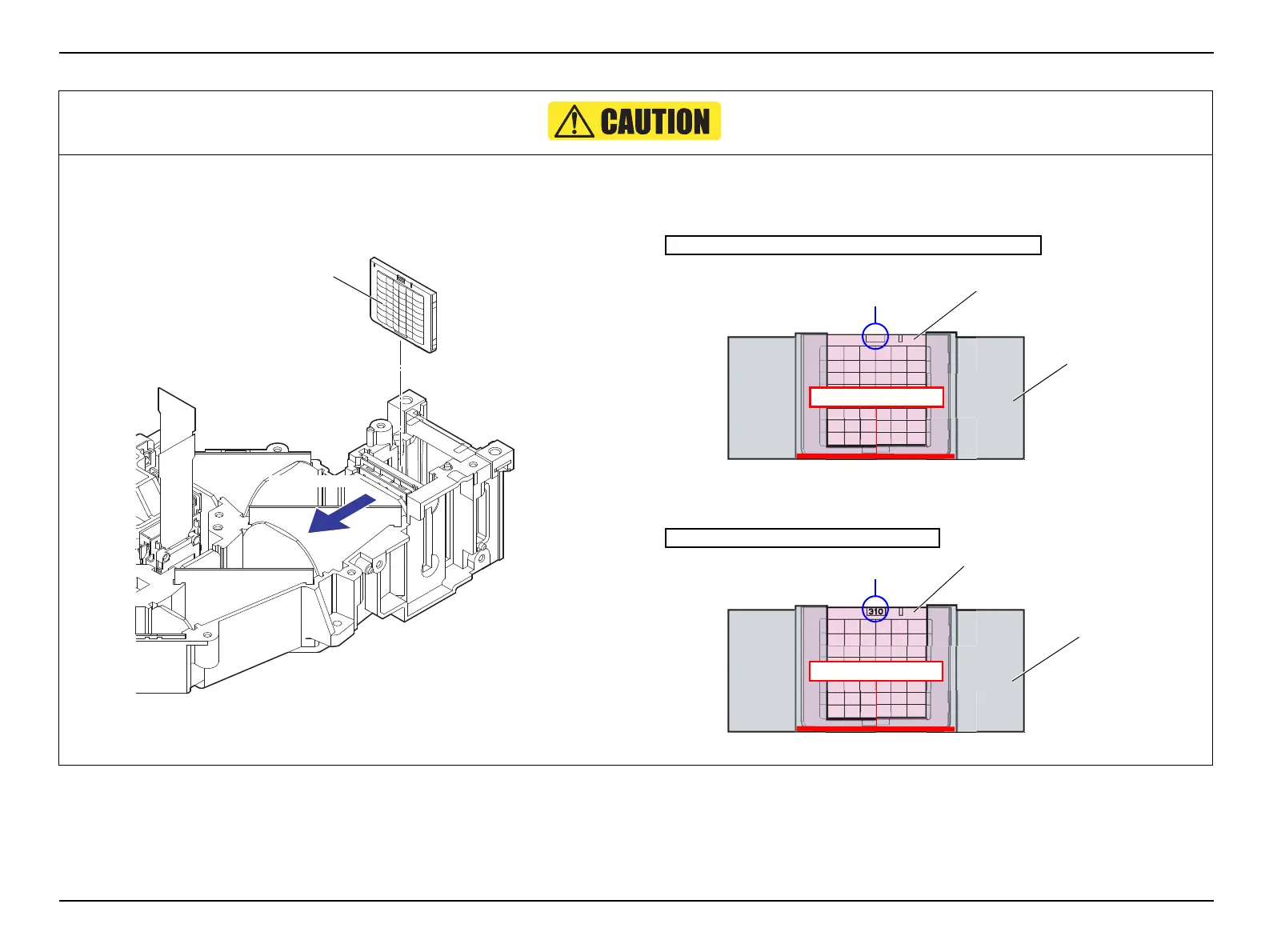
When installing the MULTI LENS;A, take care in the following.
Install the MULTI LENS;A with the convex side facing the outgoing side.
Figure 4-29.
When installing the MULTI LENS;A, set it with the inscription on the top as
seen from the outgoing side, and without any gap to the LIGHT
GUIDE,LOWER.
Figure 4-30.
Figure 4-31.
Outgoing side
Convex side of the
MULTI LENS;A
EB-S01/X14G/S11/X11/S02/X02/S12/S12H/X12/X14’s case
Inscription: H309
LIGHT GUIDE,LOWER
MULTI LENS;A
No gap in between
EB-W01/W02/W12 and EH-TW480’s case
MULTI LENS;A
Inscription: H310
LIGHT GUIDE,LOWER
No gap in between



 To Next Page
 Loading...