Introduction
9
Name Function
m
Zoom ring
Adjusts the image size. s p.29
n
Horizontal keystone
adjuster
Performs horizontal keystone correction. s p.31
o
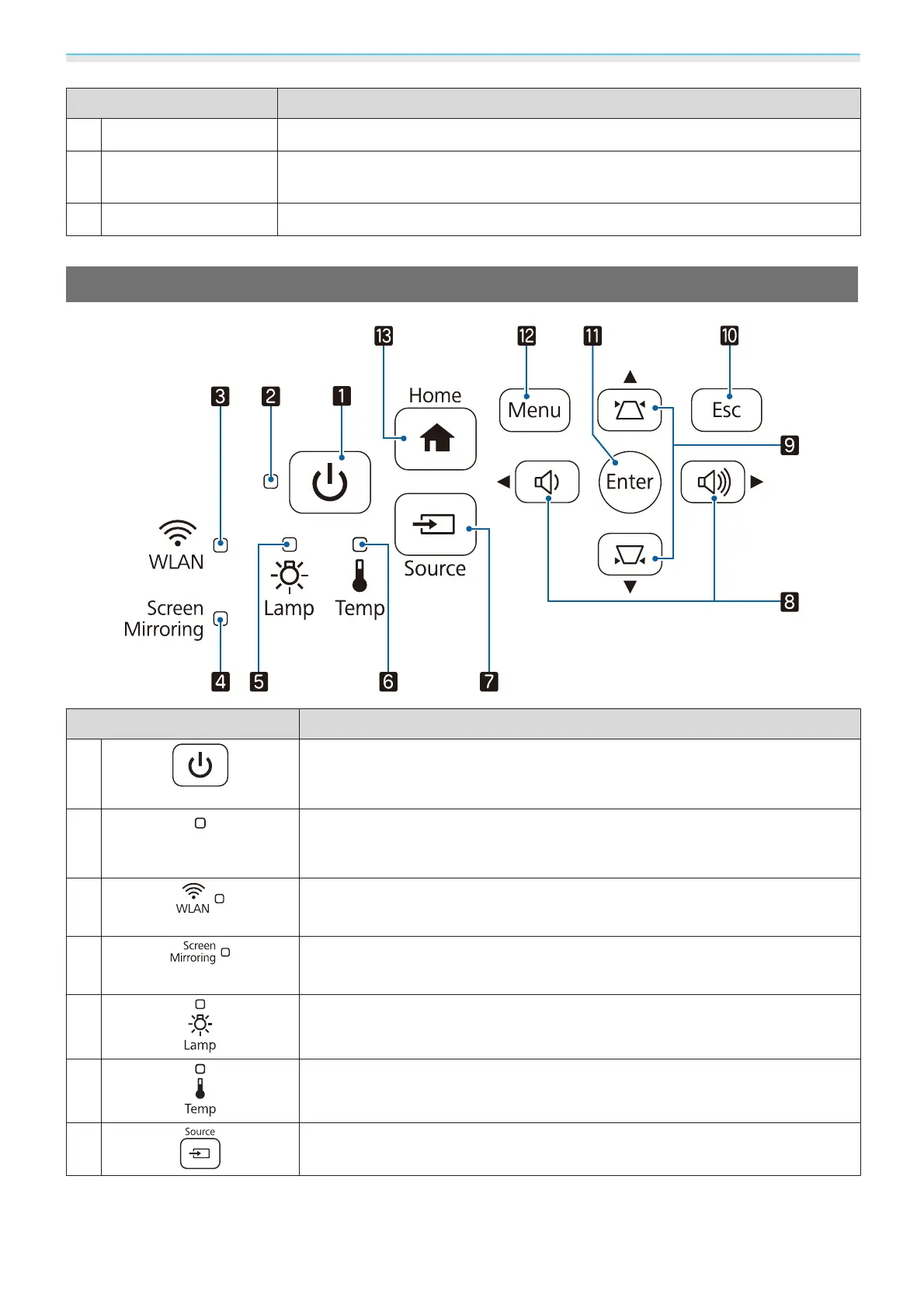
Control panel
Operates the projector. s p.9
Control Panel
Buttons/Indicators Function
a
Turns the projector on or off. s p.26
Shows the projector's status through a combination of other indicators lit and
flashing.
s p.77
b
Operation indicator
Flashes blue to indicate the projector is warming up or cooling down. Shows
the projector's status through a combination of other indicators lit and flashing.
s p.75
c
Shows the access status to the wireless LAN by lighting or flashing. s p.78
EH-TW5300/EH-TW5210 do not light or flash.
d
Shows the usage status of Screen Mirroring by lighting or flashing. s p.77
EH-TW5300/EH-TW5210 do not light or flash.
e
Flashes orange when it is time to replace the lamp. Shows the projector's errors
through a combination of other indicators lit and flashing.
s p.75
f
Flashes orange if the internal temperature is too high. Shows the projector's
errors through a combination of other indicators lit and flashing.
s p.75
g
Changes to the image from each input port. s p.26


 To Next Page