Introduction
8
Name Function
l
Control panel
Operates the projector. s p.8
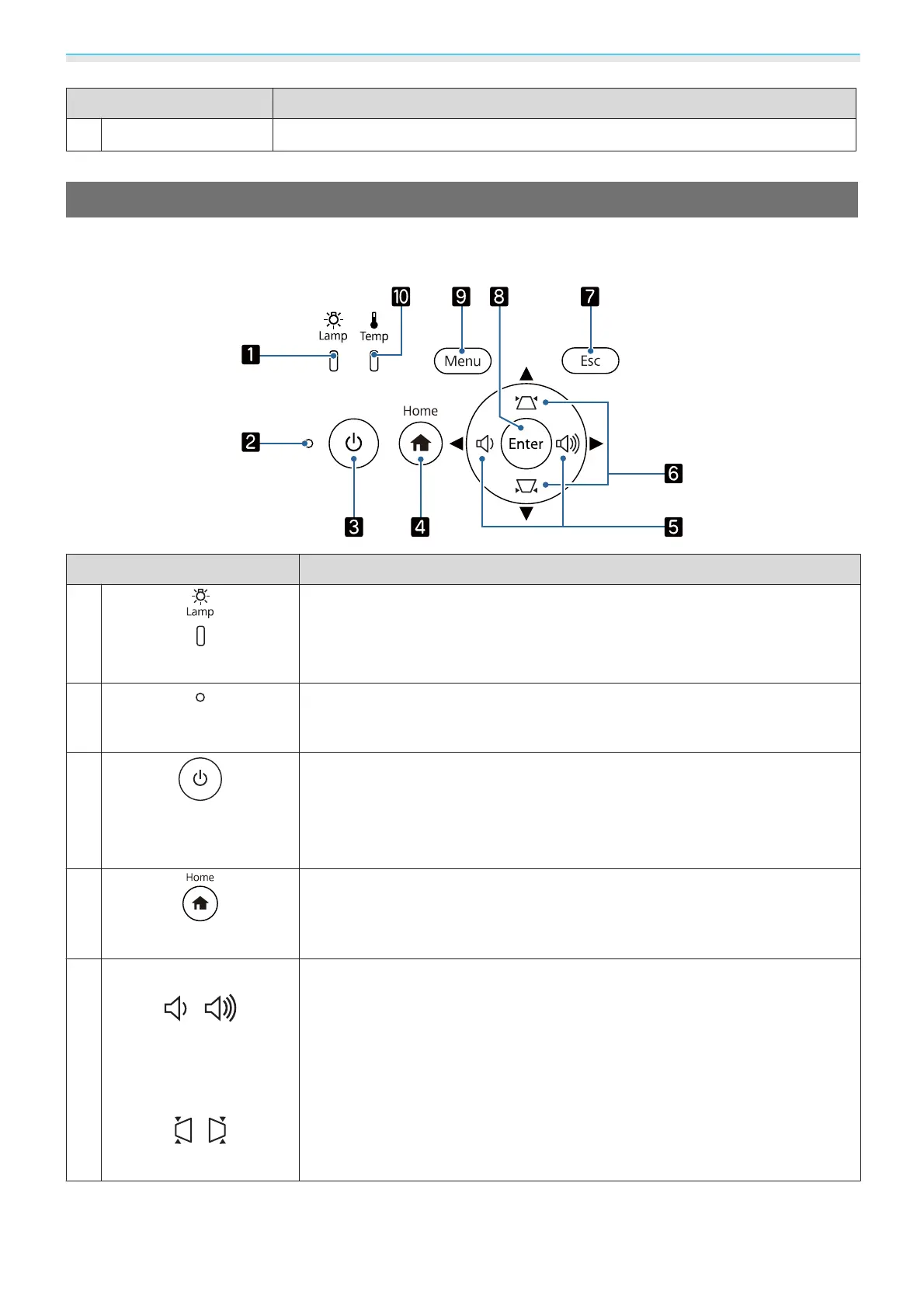
Control Panel
The control panel varies depending on the projector model you are using. The examples in this section are
for the control panel for the EH-TW7100.
Buttons (Indicators) Function
a
(Lamp indicator)
Flashes orange when it is time to replace the lamp. Shows the projector's errors
through a combination of other indicators lit and flashing.
s p.71
b
(Status indicator)
Flashes to indicate the projector is warming up or cooling down. Shows the
projector's status through a combination of other indicators lit and flashing.
s p.71
c
Standby
(Standby indicator)
Turns the projector on or off. s p.25
Lit when the projector is on. Shows the projector's status through a combina-
tion of other indicators lit and flashing.
s p.71
d
[Home]
Displays or closes the Home screen. s p.26
e
EH-TW7100:
Volume (Left/Right)
EH-TW7000:
Left/Right
•
Adjusts the volume. (EH-TW7100 only) s p.33
•
Selects menu items or adjustment values while displaying the projector's menu.
s p.58
•
When the Keystone screen is displayed, you can adjust horizontal distortion in
the projected image.
s p.30



 To Next Page