EasyManua.ls Logo

Epson EMP-X5 - User Manual

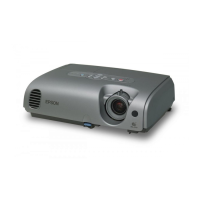
Epson EMP-X5
78 pages
Print Icon
To Next Page IconTo Next Page
Loading...
1
User's Guide

Table of Contents

Other manuals for Epson EMP-X5

Questions and Answers

  • H
    Heidi WoodSep 10, 2025
    What does Fan Error Sensor Error mean on Epson Projector?
    • K
      Kimberly YatesSep 12, 2025
      If your Epson Projector displays 'Fan Error Sensor Error', check the connections between the fans/sensors and the MA board. If the error continues after checking the connections, replace the Optical Engine and MAB set because the MA board is broken.
  • L
    Lynn Mcbride PhDSep 9, 2025
    Why does my Epson EMP-X5 Projector say the lamp cover is open?
    • N
      Nicole WalkerSep 9, 2025
      If your Epson Projector displays 'Lamp cover open (LC)', it could be due to several reasons: an abnormality of the Lamp Lid Detection Switch, an inappropriate cable connection, or an abnormality of the Lamp Lid itself. Replace the Lamp Cover if the Lamp Lid Detection Switch or the Lamp Lid is abnormal. Correct the connection if the cable connection is inappropriate.
  • T
    Tracy WagnerSep 7, 2025
    What to do if my Epson EMP-X5 has a thermistor error?
    • M
      Marilyn SotoSep 8, 2025
      If your Epson Projector displays 'Thermistor error (SE)', ensure the connectors are properly connected. If not, correct the connection. If the cable is disconnected, replace the thermistor. Replace the sensor board if it has failed. If there is an abnormality of the circuit, replace the Optical Engine and MAB set.
  • J
    Jamie StewartAug 22, 2025
    What to do if my Epson EMP-X5 Projector displays 'No Signal'?
    • D
      Doris FloresAug 23, 2025
      If your Epson Projector displays a 'No Signal' message, try the following: * Ensure all cables required for projection are securely connected. * Change the image source by pressing the [Source Search] button on the remote control or the control panel. * Turn on the power for the connected equipment. * If image signals are only outputting to the computer's LCD monitor, change the output to an external destination as well as the computer's own monitor.
  • K
    Katherine MartinSep 5, 2025
    How to fix a fan error on an Epson Projector?
    • A
      aaron56Sep 5, 2025
      If your Epson Projector displays 'Fan error (FN)', it might be due to several causes. If a fin is broken, replace the fan. If the fan's revolutions are abnormal, or the cables/conduction are damaged, replace the fan. Also, correct the connection if the connectors are inappropriately connected. Clean the fan if dust has accumulated on it. In case of micro-computer abnormality, replace the Optical Engine and MAB set. Re-download the parameters if the thermal parameters are broken.
  • V
    Veronica CohenSep 4, 2025
    What causes a lighting failure on my Epson EMP-X5?
    • A
      Angela LewisSep 4, 2025
      If your Epson Projector is experiencing a Lighting Failure (LF), start by replacing the AS Lamp Unit if the V-LA value is abnormally high or if the lamp has failed. If the Ballast’s drive waveform is unstable, replace the PS Ballast Assy. Also, if the filter is clogged due to overheating, replace the Air Filter Assy.
  • A
    Angela PowersSep 3, 2025
    What to do if my Epson Projector shows a lamp problem or failure?
    • W
      William GreenSep 3, 2025
      If your Epson Projector displays a 'Lamp problem', 'Lamp failure' or indicates that the 'Lamp cover is open', first ensure the Lamp Lid is securely fixed and the lamp itself is properly secured. Remove the lamp to inspect for any damage. If no cracks are visible, re-fit the lamp and power on the projector. If the error persists, replace the lamp. Also, if using the projector at an altitude of 1500 m or more, set "High Altitude Mode" to "On." Clean or replace the filter if it's clogged.
  • S
    Stephanie KlineSep 2, 2025
    Why is nothing appearing on the external monitor connected to my Epson EMP-X5?
    • S
      Sandra ParkerSep 2, 2025
      Only computer images from the Computer1 or Computer Input port can be displayed on an external monitor connected to your Epson Projector. Ensure you are projecting images from one of these ports.
  • T
    Timothy JohnstonSep 1, 2025
    Why do no images appear on my Epson Projector?
    • B
      Brandon RyanSep 1, 2025
      If no images appear on your Epson Projector, try these solutions: * Press the [Power] button to turn the power on. * Ensure the projector's power cable is correctly connected and the outlet is working. * Press the [A/V Mute] button on the remote to cancel A/V Mute. * Open the A/V mute slide. * Reset all settings by navigating to 'Reset' - 'Reset All'. * Change the image signal format setting according to the signal for the connected equipment.
  • L
    Lynn TaylorAug 30, 2025
    Why does my Epson Projector projection stop automatically?
    • T
      Traci RamirezAug 31, 2025
      If your Epson Projector stops projecting automatically, it might be due to the Sleep Mode being enabled. Press the [Power] button to turn the power back on. If you prefer, you can disable 'Sleep Mode' in the settings.

Summary

Notations Used in This Guide

Projector Features

Part Names and Functions

Front;Top Components

Identifies and describes the projector's front and top components.

Rear Connectors (EMP-83;822 Only)

Details the input/output ports on the rear of EMP-83/822 models.

Rear Connectors (EMP-X5;S5 Only)

Details the input/output ports on the rear of EMP-X5/S5 models.

Control Panel Overview

Explains the function of each button on the projector's control panel.

Remote Control Functions

Describes the operation and buttons of the projector's remote control.

Base Components

Identifies and describes the components located on the projector's base.

Useful Functions

Changing the Projected Image (Source Search)

How to select and switch between input sources for projection.

Functions for Enhancing Projection

Adjusting image quality like color mode and aspect ratio.

Security Functions Overview

Covers password protection, operation lock, and anti-theft features.

Configuration Menu

Using the Configuration Menu

Guide on navigating and operating the projector's settings menu.

Image Menu Settings

Adjustments for color mode, brightness, contrast, and sharpness.

Signal Menu Settings

Controls for auto setup, tracking, sync, position, and video signal.

Settings Menu Options

Configuration for keystone, zoom, operation lock, and volume.

Extended Menu Options

Settings for display, user logo, projection, and operation.

Network Menu Configuration

Settings for wired LAN, PJLink, and web control passwords.

Reset Menu Options

How to reset projector settings to default values.

Troubleshooting

Using the Help Function

How to use the projector's built-in help system for problem diagnosis.

Problem Solving Guide

Steps to diagnose and resolve projector issues based on symptoms.

Reading the Indicators

Explains the meaning of the projector's status indicators and their states.

Indicator Status Troubleshooting

Resolving issues indicated by power, warning, or no indicator status.

Image and Projection Issues

Addresses problems with image display, projection start, and connectivity.

Remote Control and Mail Issues

Troubleshooting for remote control and mail notification problems.

Appendices

Installation Methods

Describes different ways to install and position the projector for optimal use.

Cleaning and Maintenance

Procedures for cleaning the projector's surface, lens, and air filter.

Replacing Consumables

Instructions for replacing the lamp, remote control batteries, and air filter.

Saving a Users Logo

How to save a custom image as a user logo for display.

Screen Size and Distance Guide

Tables for selecting optimal projector placement based on screen size.

Connecting External Equipment

Guidance on connecting monitors, speakers, and network cables.

ESC;VP21 Commands

Details on command lists and cable layouts for projector control via ESC/VP21.

Specifications

Technical details including dimensions, power, resolution, and operating conditions.

Index

Alphabetical listing of topics and their corresponding page numbers for quick reference.

Epson EMP-X5 Specifications

General IconGeneral
Resolution1024 x 768 (XGA)
Contrast Ratio400:1
Lamp Life3000 hours (Normal Mode), 4000 hours (Eco Mode)
Display Technology3LCD
Zoom Ratio1.2x
Projection Size30 - 300 inches
Brightness2200 lumens
Weight2.7 kg
InputsComposite video, S-Video
Noise Level35 dB (standard), 28 dB (economy)

Related product manuals