2-6
Direct Printing Introduction
Note:
❏
When printing images through a computer, you can use more
various media types and sizes using the printer software for IP-100
packed with your printer. See online
User’s Guide
for more
information.
❏
The availability of special media varies by country.
c
Caution:
Use EPSON special paper under normal room environment
(temperature and humidity) to obtain best results.
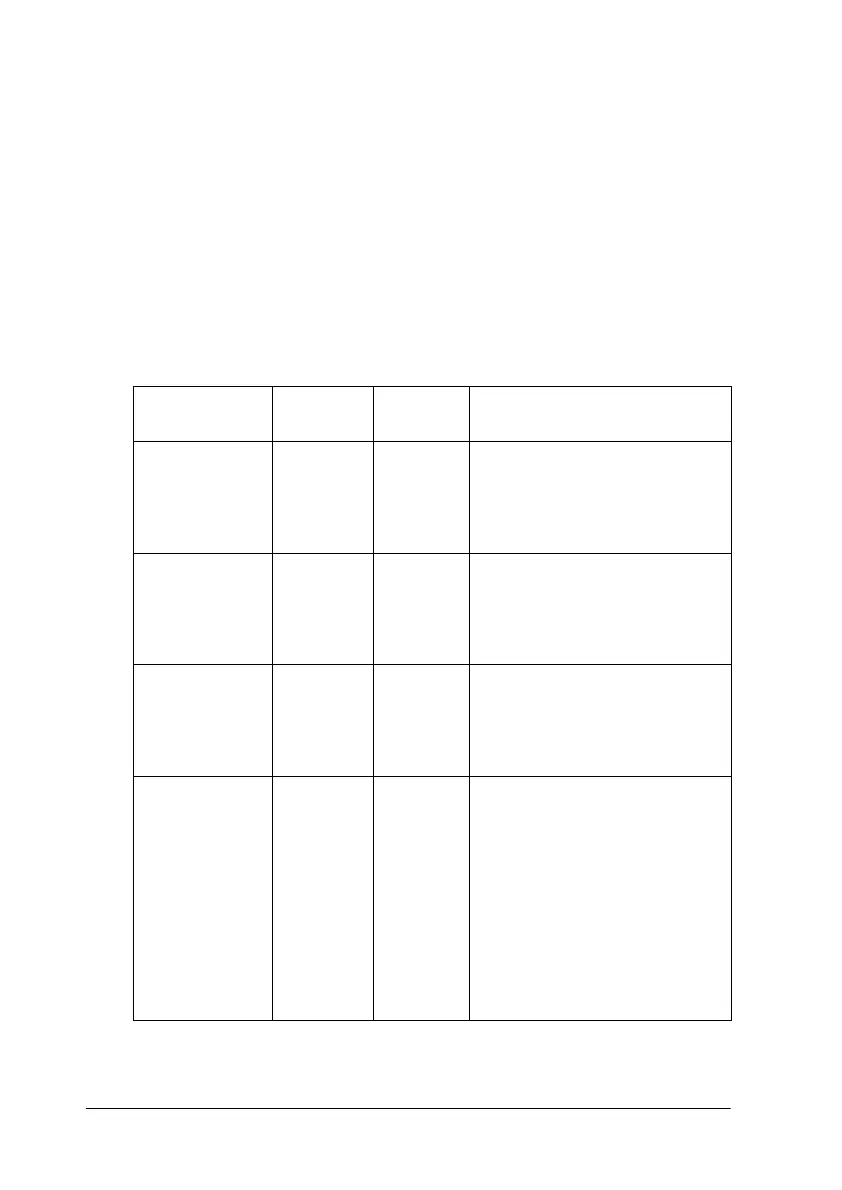
Media names Size
available
Product
code
Characteristics
EPSON 360 dpi
Ink Jet Paper
A4 S041059
S041025
This media is best suited for
printing handouts of business
presentations that contain
color images, and drafts of
your most important printouts.
Photo Quality
Ink Jet Paper
A4 S041061
S041026
This media provides you with
high quality printing at
reasonable cost. It is best
suited for printing photo
images.
Photo Quality
Glossy Paper
A4 S041126 This media gives you the
highest quality printouts at
moderate printing costs. The
glossy surface provides you
with a photo-like finish.
Photo Paper A4
4x6 inch
S041140
S041134
This media gives you the
highest quality printouts at
moderate printing costs. The
glossy surface provides you
with a photo-like finish. 4 x 6
inch EPSON Photo Paper is
perforated around the
margins so you can trim your
printed images to look like
photographs. See “Loading
EPSON Photo Paper (4 x 6
inch)” on page 3-7.



 To Next Page