45
leted from the MAX! Wall Thermostat+; factory setting
is not mandatory.
12. Operating modes
(Auto / Manu / Holiday function / Boost)
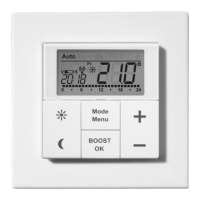
You can choose between the operating modes auto, manu
and holiday function:
Auto: Week programme – automatic temperature control
according to stored week programme.
Manu: Manual operation – the temperature is set manu-
ally with the (+) and (-) buttons.
Holiday function (
): Setting a temperature that
should be held until a xed end time.
Boost (
): Set boost function
In the MAX! House Solution you can congure the
settings for the MAX! Wall Thermostat+ via the MAX!
software.
In the MAX! Room Solution you can change bet-
ween the functions by pressing the mode button
shortly.
If the operating mode or the temperature on one de-
vice in the room is changed, all taught-in radiator
thermostats will adjust to this setting.


 To Next Page

