51
(date and time will switch on the display) with the (+)
and (-) buttons.
• Conrm setting with the OK button.
16.3 Switching nominal/actual temperature (S-A)
In the factory settings, the display will show the nominal
temperature. In the conguration menu, you can change
the display setting from nominal to actual temperature.
• O p e n t h e c o n g u r a t i o n m e n u b y p r e s s i n g t h e m e n u b u t t o n .
• Select the (S-A) menu item with the (+) and (-) buttons
and conrm with the OK button.
• Now set the format you want to show on the display („SEt“
for the nominal temperature and „ACt“ for the actual tem-
perature) with the (+) and (-) buttons.
• Conrm setting with the OK button.
If the actual temperature is selected, the display will display
„SEt“ for 5 seconds on change of the nominal temperature
(or on change of mode). Afterwards, the display automati-
cally changes back to actual temperature.
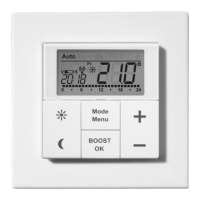
16.4 Comfort and reduced temperature (
)
The comfort (
) and reduced ( ) temperature buttons
make switching between comfort and reduced temperature
simple and user friendly. The factory setting for the comfort
temperature is 21.0°C and the reduced temperature 17.0°C.
When using MAX! without Cube, the comfort and redu-
ced temperature can be changed via corresponding but-
tons as follows:


 To Next Page