5
Operating instructions
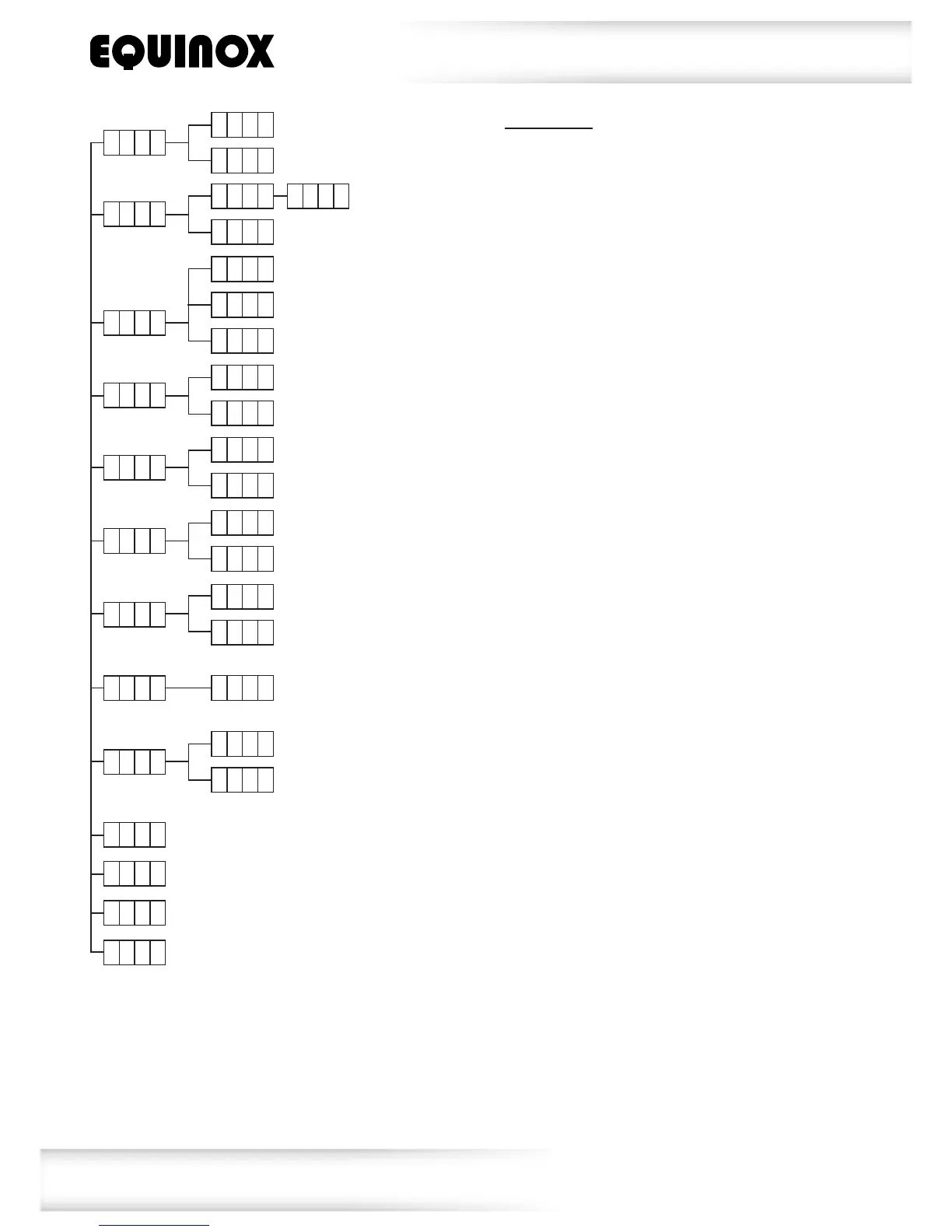
A d d r
A 0 0 1
A 5 1 2
C h N d
6 C h
1 6 C h
S h N d
S h 0
S h 8
S o U n
o n
o F F
S e n S
0
1 0 0
DMX address setting
Channel mode
Show mode 0-8
Slave 1
S L N d
S L 1
S L 2
Sound active mode
Sound sensitivity
L e d
o n
o F F
LED display on
LED display off
d s p I
I d s P
Display inversion
y e s
n o
t
I
L t
Tilt inversion
N a S t
Master mode
Slave 2
1 2 C h
r S e t
Reset
u e r
Firmware version
h o u r
Fixture hours
t e S t
Auto test
DMX mode:
OperatinginaDMXcontrolmodeenvironment
givestheuserthegreatestexibilitywhenit
comestocustomisingorcreatingashow.
Inthismodeyouwillbeabletocontrol
eachindividualtraitofthextureand
eachxtureindependently.
ToaccesstheDMXaddressmode,pressthe
“MENU”buttononthefrontoftheunittoshow
AddrontheLEDdisplay.Nowpressthe
“ENTER”buttonandusethe“UP”and“DOWN”
buttonstosettherequiredDMXaddress.
Pressthe“ENTER”buttontoconrmthesetting.
Toexitoutofanyoftheaboveoptions,
pressthe“MENU”button.
ToaccesstheDMXchannelmode,pressthe
“MENU”buttononthefrontoftheunittoshow
ChNdontheLEDdisplay.Nowpressthe
“ENTER”buttonandusethe“UP”and“DOWN”
buttonstochooseoneofthe6,12or16DMX
channelmodes.Pressthe“ENTER”buttonto
conrmthesetting.
Toexitoutofanyoftheaboveoptions,
pressthe“MENU”button.




 To Next Page