Captair Bio Smart
Mobile ductless ltering PCR workstations
12
7
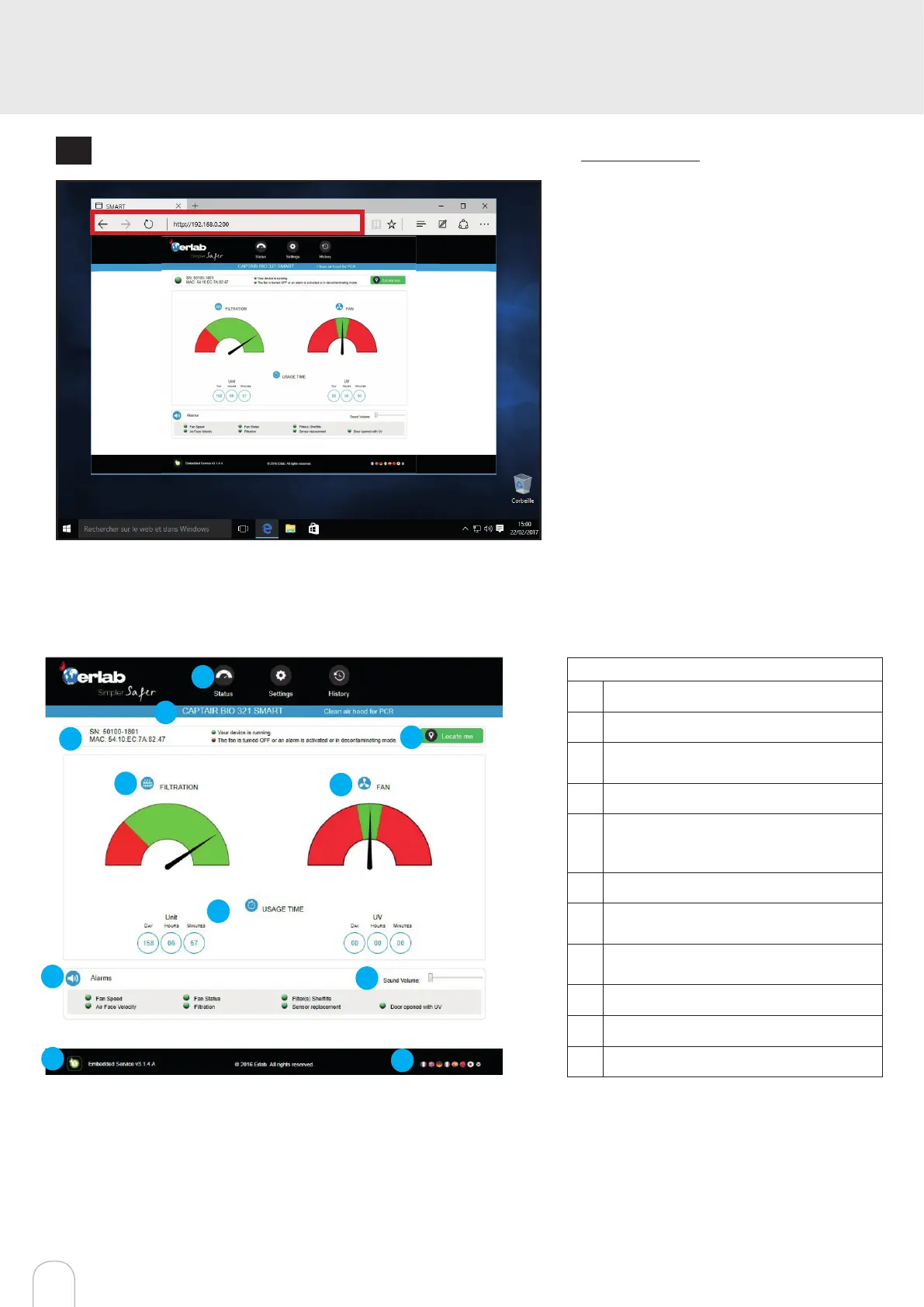
Open your web browser again, type again the following IP address 192.168.0.200 and validate
OK : You are connected to the embedded software
You enter the « Status » page and you can have ac-
cess to the « Settings » using the following creden-
tials:
Login : erlab / Password : smart
Administrator interface description
Enter the unit IP address into the address bar of your browser in order to access the embedded sotware.
1
6
7
2
3
4
5
8
9
10
11
Status page details
1 Choose active interface page
2 Device ID: Model
3 Device ID: serial number, MAC address,
device status
4 Unit location
5 Molecode Option Gauge: indicates
the saturation level of the main carbon
lter(s)
6 Fan Gauge: indicates the fan status
7 Device use time since fan was last
started and UV timer
8 Device alarm statuses (see alarm trigge-
ring conditions)
9 Volume setting
10 Embedded service version
11 Choose language



 To Next Page