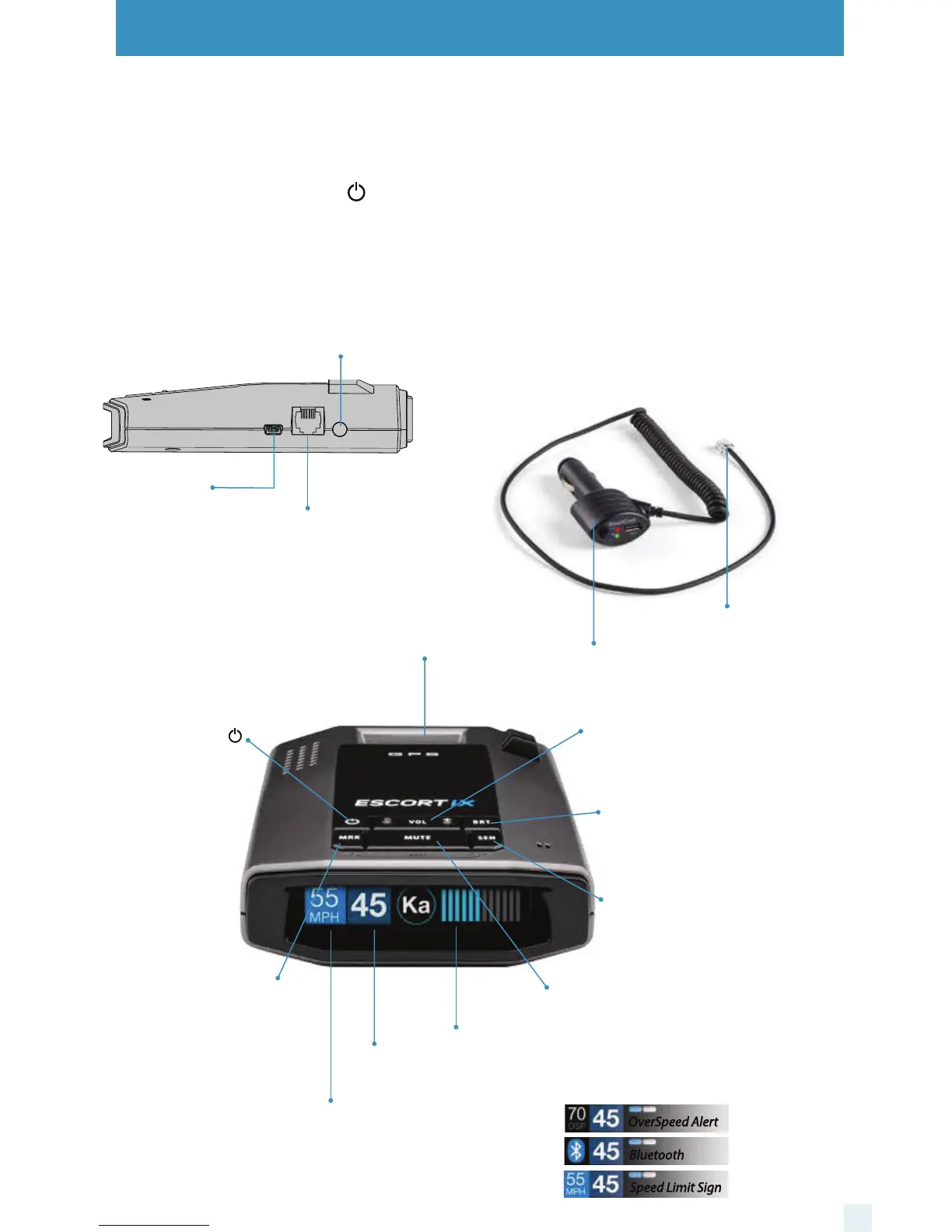
Controls & Features
6
Using ESCORT iX
1 Plug small end of SmartCord USB into modular jack
on ESCORT iX and large end of SmartCord USB into
your car’s lighter/accessory socket.
2 ESCORT iX should power on automatically. If not,
press the device’s power button.
NOTE: You can easily access and customize all of your
Settings and Preferences by pressing and holding the
MRK and SEN buttons. See Settings & Preferences for
details.
Mini USB Jack
Connects to your
computer via USB A / Mini
B cable for downloading
software updates
Modular Jack
Connects to
SmartCord USB
for powering
your device
Earphone Jack
Connects to optional 3.5 mm stereo earphone
Modular Connector
Plugs into detector jack
SmartCord USB Adapter
Connects to lighter/accessory socket
Using SmartCord USB
• Mute Button:
- Press to mute the audio for a specific alert.
- Press three times to lock out a false alert.
- Press twice while receiving a locked-out alert
to unlock.
- When connected to ESCORT Live press and
hold mute button on unit or cord to manually
report to other users a verified X or K-band
alert, or a police officer observing traffic.
• Alert Light: Blinks red when receiving a radar
or laser alert.
•
Power Light: Lights green when receiving power.
•
USB Charging Port: Charge smartphones,
tablets and other USB-charged Devices.
Display (OSP)
OverSpeed alert setting that can be
adjusted in Preferences. Bluetooth
icon will appear on display screen
blue when paired to phone and
Speed limit data will show here when
ESCORT Live App is open.
Mark Location (MRK)
To mark a location for
future alerts, press MRK
twice, then VOL + or – to
select the type of marker,
then MRK again to
confirm. Press twice
while receiving marker
alert to unmark
Display
Current speed
Power
Press to turn
ESCORT iX on or off
Mute
Press to mute an alert;
press three times to lock
out a false alert; press
twice while receiving a
locked-out alert to
unlock
Brightness (BRT)
Press to adjust display
brightness (Min, Med,
Max, Auto, Dark)
Sensitivity (SEN)
Press to adjust detector
sensitivity (Auto, Auto
NoX, AutoLoK, and
Highway)
Volume
Press and hold + or − to
adjust volume
Mount Area
The EZ Mag Mount™
attaches to device here
Display
Alert area
OverSpeed Alert
Bluetooth
Speed Limit Sign



 To Next Page