Controls & Features
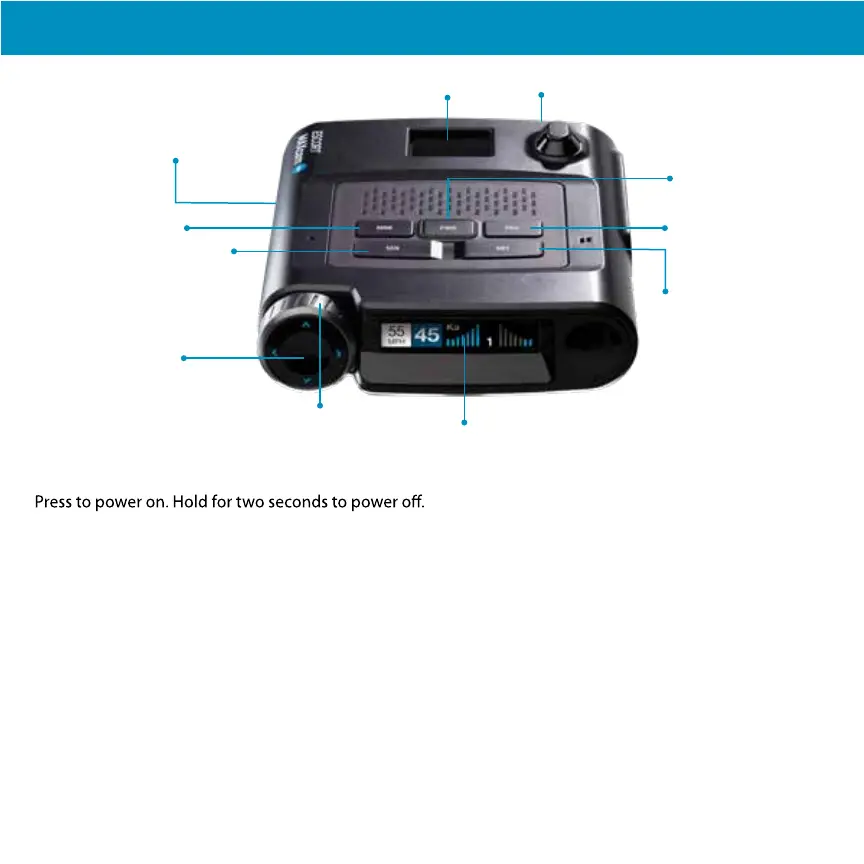
Speaker
Bottom of unit)
EZ Mag Mount™ Area Camera Lens
Power
Mute
Sensitivity
Display
Mark
Power
SEN
Press SEN to adjust the X and K band radar detection
sensitivity/range. Auto = speed adjusted. The slower
you travel, the shorter the X and K band detection
range. At 50 mph and above, X and K detection
range is at maximum. Ka band detection range is
always at maximum, regardless of the SEN setting.
MUTE
To silence an alert, press the MUTE button during
the alert. Once the radar or laser encounter has
passed, the mute will disengage, and the audio will
return to your preset level. You can also silence an
alert by pressing the Smart
Cord MUTE button.
BRT
Brightness. Press to adjust the display brightness.
MRK
To mark a location for future alerts:
• Press MRK twice
• Rotate the Volume/Rotary Dial to select the type
of marker type of marker
• Press MRK again to confirm
To unmark a location alert, press MRK twice while
receiving a marker alert.
Rotary Dial
Rotate to adjust volume. When in the Menu or using
MRK, rotate to change the setting.
7
Rotary Dial
Turn to change
volume/setting
Brightness
Program
(hold for Emergency
Recording)
Program
Briefly press PRG to access the programming
menu. To start an emergency recording, hold PRG
until MAXcam 360c states “Emergency Recording”.
The recording will automatically stop according to
the Loop Clip Time setting.


 To Next Page