Controls & Features
Using MAXcam 360c
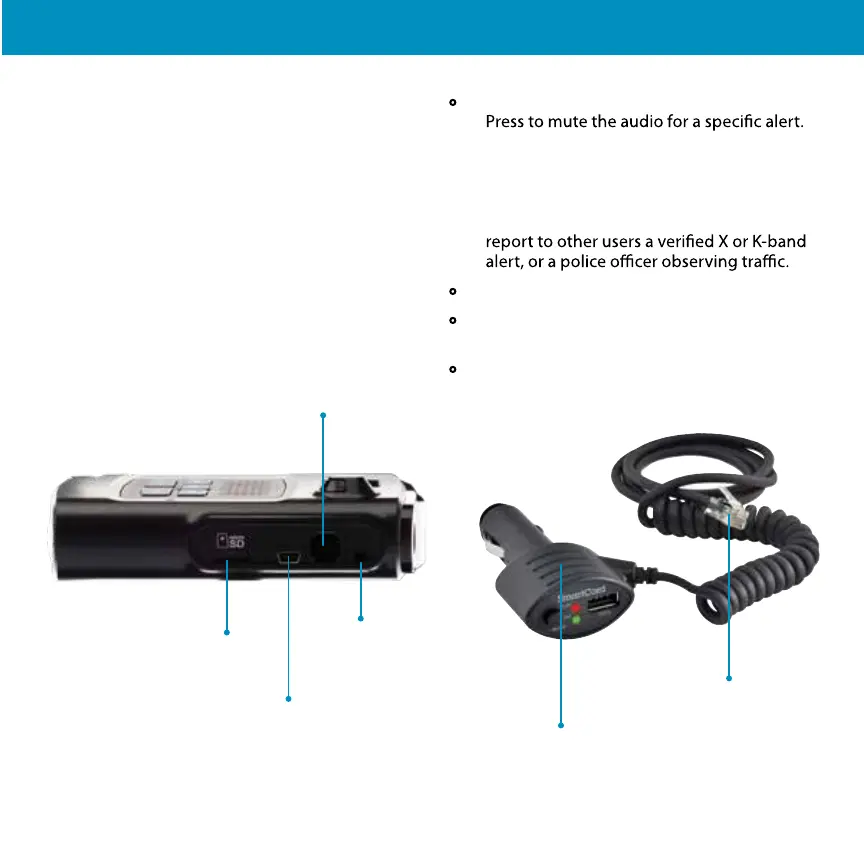
1 Plug small end of SmartCord into modular jack
on MAXcam 360c and large end of SmartCord
into your car’s lighter/accessory socket.
2 MAXcam 360c should power on automatically.
If not, press the device’s PWR button.
NOTE: You can easily access and customize all of
your Settings and Preferences by pressing the PRG button.
See Settings and Preferences for details.
Using SmartCord USB
• Mute Button:
-
- Press three times to lock out a false alert.
- Press twice while receiving a locked-out alert
to unlock.
- When connected to Drive Smarter press and hold
the mute button on unit or cord to manually
• Alert Light: Blinks red when receiving a laser alert.
• Power Light: Lights green when device is
powered on.
• USB Charging Port: Charge smartphones,
tablets and other USB-charged devices.
Modular Jack
Connects to SmartCord for powering
your device
Modular Connector
Plugs into detector jack
Smartcord USB Adapter
Connects to lighter/accessory socket
6
Mini USB Jack
Connects to your computer
via USB A/micro B cable for
downloading movie clips
SD Card Slot
16GB SD Card Included
and Pre-Installed.
Earphone Jack
Connect to optional
3.5 mm stereo earphone


 To Next Page