8
Display and Menu
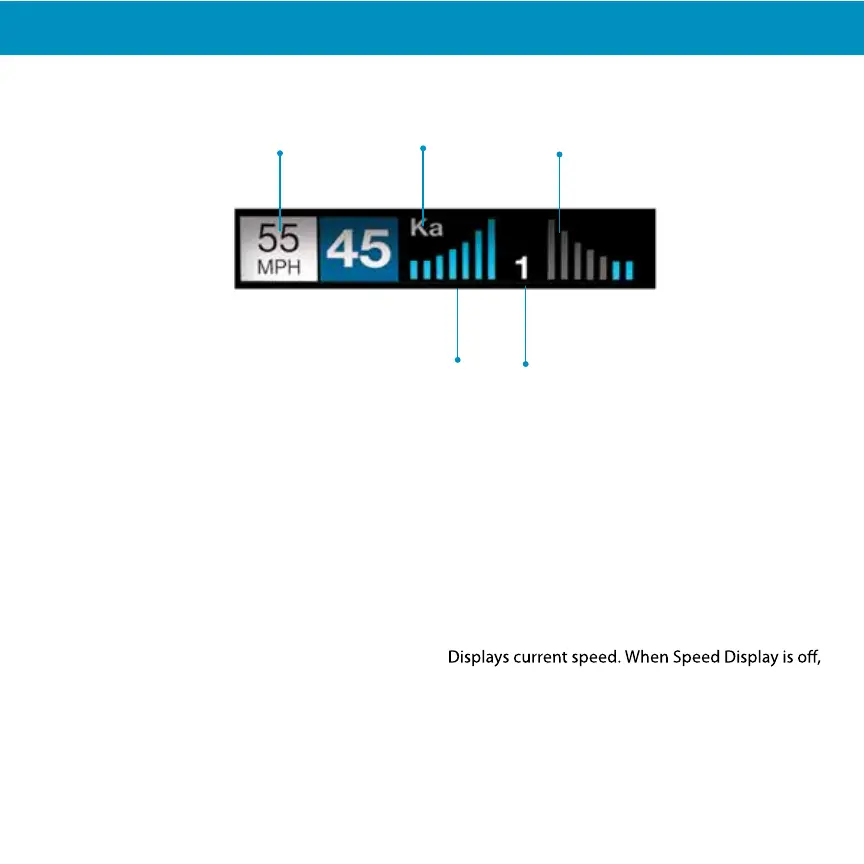
Signal Band Indicator
Displays the radar band of the alert:
- X Band (commonly false alerts)
- K band (used by police radar and false alerts)
- Ka band (almost always police radar)
- Laser (almost always police)
Signal Strength Meters
Displays the signal strength, or how close, the alert
is. The more alert bars displayed, the stronger the
signal strength. The left meter is front signal
strength. The right meter is rear signal strength.
OSP/Speed Limit Indicator
Over Speed alert setting, can be adjusted in the
Programming menu. Bluetooth icon will appear
here when paired to phone. Speed limit data will
appear here when connected to the Drive Smarter
app or your mobile Wi-Fi spot.
Signal Counter
Displays the number of alerts being detected.
Speed
displays vehicle voltage.
Rear Signal Strength Meter
Signal Band
Indicator
OSP/Speed Limit
Front Signal Strength Meter
Signal Counter


 To Next Page