Quick Reference Guide
4 5
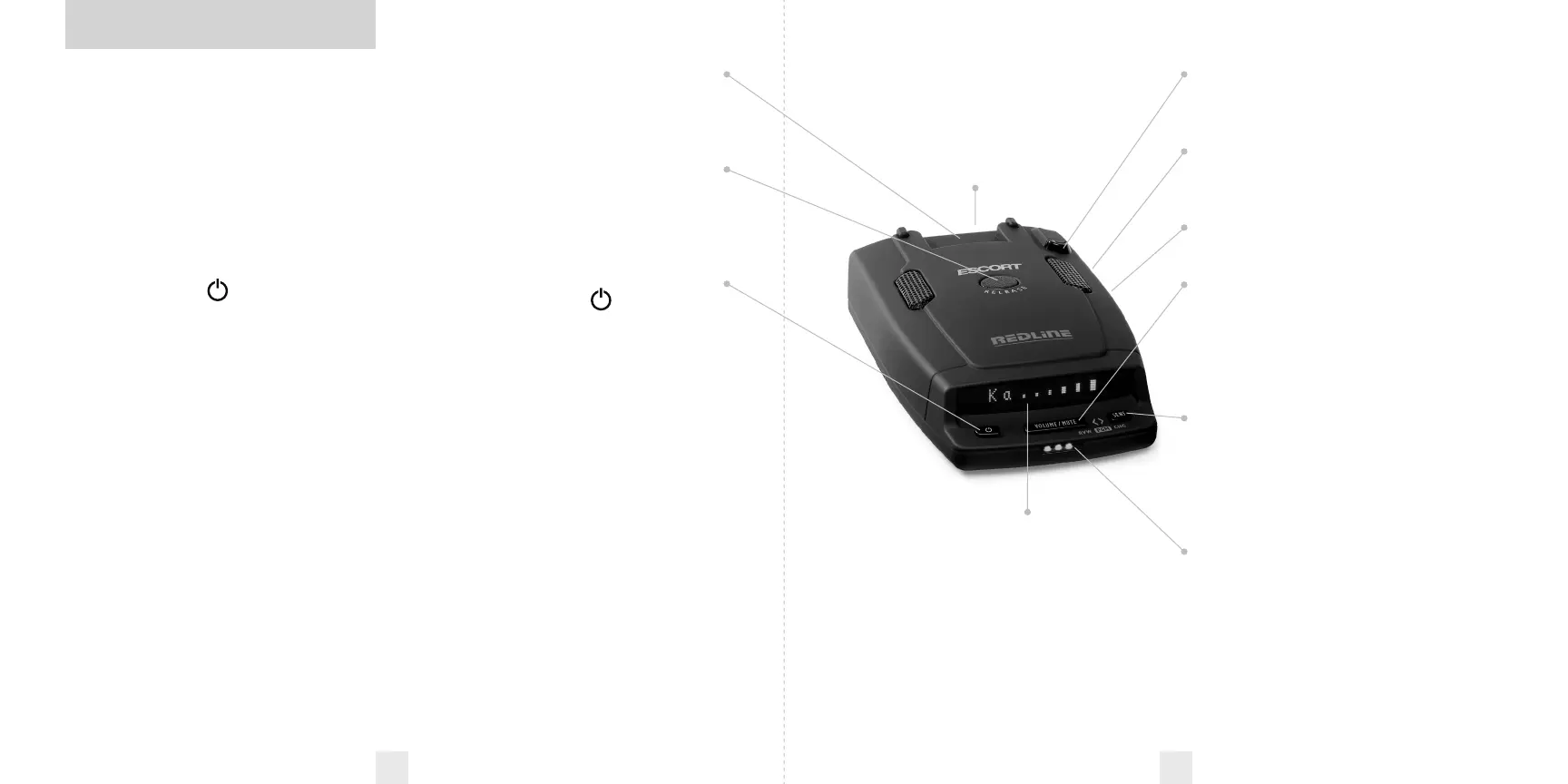
Rear Laser Port
Receives laser signals from behind the
vehicle.
Power Jack
Plug the power cord into this connector
.
Page 10
Earphone Jack
Accepts standard 3.5mm earphone.
VOLUME/MUTE Button
Briefly press this button (below the
display) to silence the audio for a specific
alert. (The audio will alert you to the next
encounter.)
Page
8
Sensitivity Button (SENS)
Switches between Highway, Auto, and
Auto NoX settings. In general, we
recommend the Highway for the best
performance.
Page 8
Alert Lamp
Indicates radar or laser alert.
Preference
s
RedLine is ready to go out of the box, just
plug it in and turn it on. But you can also
easily change 8 features for your
preferences.
Pages 12-16
Radar Antennae and Laser Lens
The rear panel of your RedLine should
have a clear view of the road. For the
best performance, do not mount the
RedLine directly behind windshield
wipers or tinted areas.
Page 6
Alphanumeric Display
RedLine’s display will show Highway,
Auto, or Auto NoX as its power-on
indication. If you prefer, you can choose
other power-on indications.
Pages 12-14
During an alert, the display will
indicate radar band, and a precise bar
graph of signal strength
.
Page 1
0
NOTE: In the Dark Mode the
display will not light during an alert.
Page
9
To begin using your RedLine,
just follow these simple steps
1 Plug the small end of the power cord
into the side jack of the detector, and
plug the large end of the power cord
into your car’s lighter socket.
2 Mount RedLine on your windshield
using the supplied windshield Mount.
3 Press the PWR
button,
located on the left side of the control
panel, to turn RedLine on.
4 Press and hold the VOLUME/MUTE
button to adjust the volume level.
Please read the manual to fully understand
RedLine’s operation and features.
QuickMount Slot
Insert RedLine’s adjustable Windshield
Mount into this slot.
Page 7
QuickMount Button
Press the release button and slide the
Windshield Mount into one of its four
locking positions.
Page 7
Power
Press the PWR
button to turn
RedLine on.
Volume
Press and hold the VOLUME/MUTE button
to adjust the alert volume level.
Page 8
AutoMute
RedLine’s patented AutoMute
automatically reduces the volume level of
the audio alert after a brief period. If you
prefer, you can turn AutoMute off.
Page 8



 To Next Page