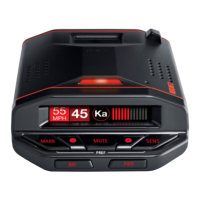
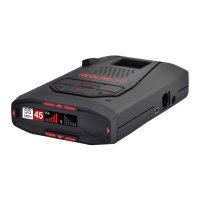
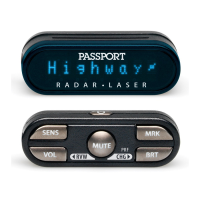
Controls and Features
98
Power
To turn RedLine on or off, press the
PWR
button located on the control
panel. When you turn RedLine on, it
provides a quick audible tone to confirm
it’s working.
If you prefer, you may program your
RedLine for a longer power-on sequence.
See the Preferences section for details.
Volume
Press and hold the VOLUME/MUTE button
located on the detector or the Mute button
on SmartCord to adjust RedLine’s alert
volume level. The audio will ramp up and
down, accompanied by a bar-graph on the
display. Once you’ve reached your
preferred audio level, simply release the
button.
Power-on Indication
After RedLine’s start-up sequence is
complete, the alphanumeric display will
show Highway, Auto, or Auto NoX to
indicate which sensitivity mode is
selected.
If you prefer, you can select alternate
power-on displays. See Preferences for
details.
Voice Alerts
RedLine provides digital voice
announcements of radar and laser bands
detected. If Safety Radar (SWS) is turned
on, a safety message will also be announced.
See the Preferences section for details.
You can also select Auto NoX mode.
This is particular helpful when driving in
urban areas where annoying X-band
intrusion alarms and door openers are
common. Auto NoX mode can be engaged
to turn off X-band completely to eliminate
these alerts. Full sensitivity is maintained
on all other bands.
See the Preferences section for details.
Brightness
RedLine’s display brightness is controlled
by a photocell located behind the front
display lens. This photocell will
automatically adjust the display based on
the ambient light in your vehicle. If you
prefer, you can select a fixed brightness
level, including Full Dark Mode.
See the Preferences section for details.
Dark
When RedLine is in Dark mode, the
display will not show visual alerts and the
alert lamp will not flash when it detects
signals. Only the audible alert tones will
tell you a signal has been detected.
Audible Alerts
For Radar signals:
RedLine uses a geiger-counter-like
sound to indicate the signal strength and
type of radar signal being encountered.
When you encounter radar, RedLine’s
audible alert will sound and occur faster
as the signal gets stronger. This allows you
to judge the distance from the signal
source without taking your eyes from the
road.
Each band has a distinct tone for easy
identification:
• X-band = beeping
• K-band = brap
• Ka-band = double-brap
• POP = full double brap
For Laser signals:
Since laser signals are a possible
threat no matter how weak, RedLine alerts
you to these bands at full signal strength.
For POP signals:
Since POP signals are a possible threat
no matter how weak, RedLine alerts you
to these bands at full signal strength.
For Safety Radar Signals:
RedLine will alert you to these signals
with a double-beep tone, and a
corresponding text message. A complete
list of the text messages is on page 23.
AutoMute
RedLine has our patented AutoMute
feature. After you encounter an alert at the
volume you selected, the AutoMute feature
will automatically reduce the volume to a
lower level. This keeps you informed
without the annoyance of a continuous full-
volume alert.
If you prefer, you can turn the
AutoMute feature off. See Preferences for
details.
Mute
The VOLUME/MUTE button, located
center on the RedLine’s control panel ,
allows you to silence the audio alert
during a radar encounter.
To mute the audio for a single specific
signal, briefly press the VOLUME/MUTE
Button on the detector or the Mute button
located on the SmartCord. After that
encounter has passed, the audio will
automatically reset to your previously
selected audio level.
Sensitivity Button
The “SENS” button selects RedLine’s
sensitivity mode. We recommend
Highway for the best overall performance.
RedLine’s “Auto” mode provides long-
range warning, but uses patented logic to
minimize false alarms from automatic
door openers etc. In this mode, RedLine’s
internal computer continuously analyzes
all incoming signals and intelligently
filters them..



 To Next Page