13
English
Remote control parts and functions
When the main unit and the remote control both have buttons
with the same functions, this manual explains how to use one
of the buttons. The other corresponding button can be used in
the same manner.
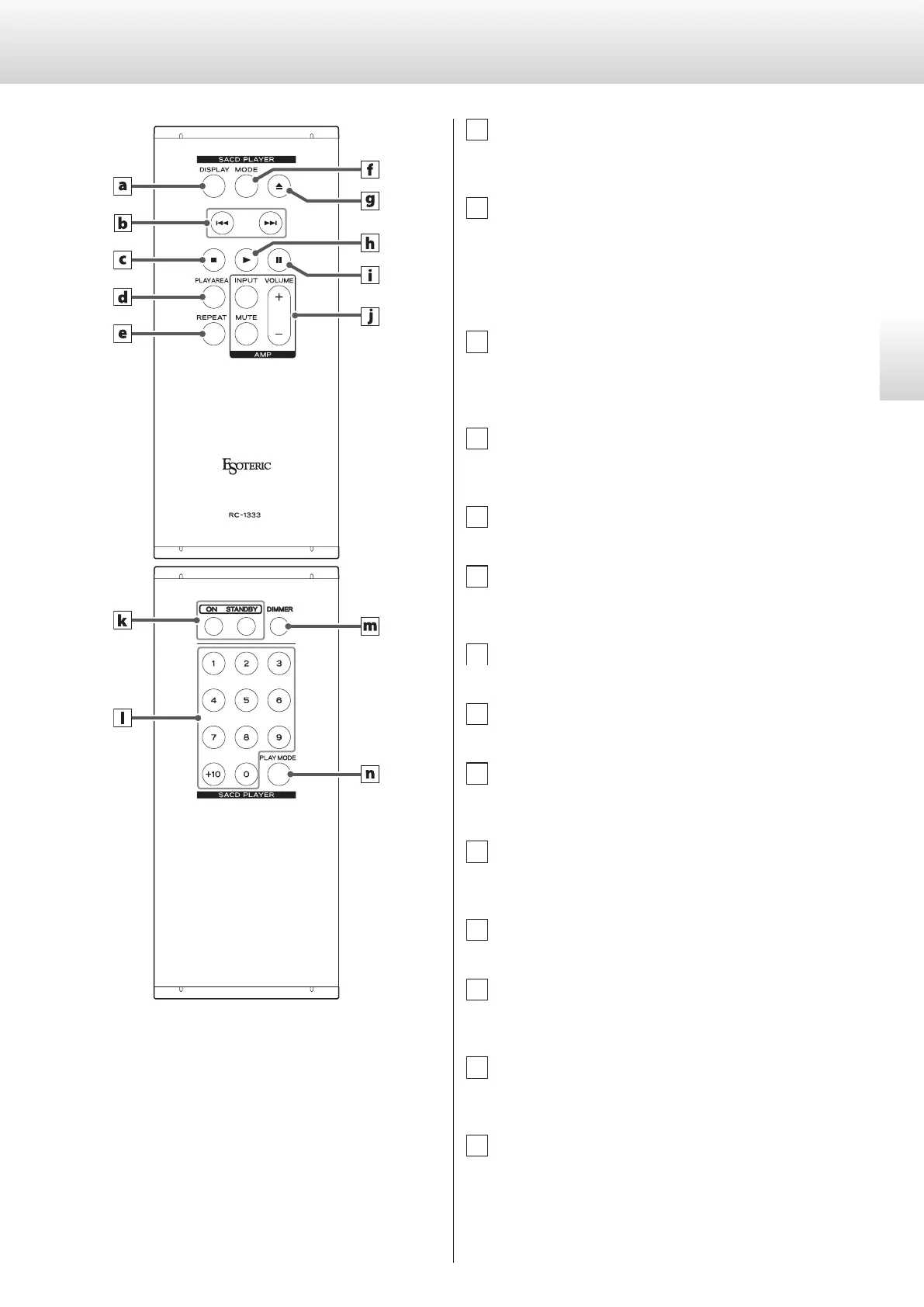
a DISPLAY button
During playback or when paused, press this button to change
what is shown on the display (page20).
b Skip (.//) buttons
Use these to skip to the previous or next track.
Press and hold these during playback to search backward/for-
ward. Repeatedly press and hold these to change the backward/
forward search speed (page18).
Use these to change parameters when in setting mode.
c Stop (8) button
Press this to stop playback.
Press this when in setting mode to complete changing settings
and return the display to normal (page17).
d PLAY AREA button
When stopped, press this to change the playback area of a Super
Audio CD (page17).
e REPEAT button
Use this for repeat playback (page20).
f MODE button
Press this to change the input source (page21).
Press and hold this to enter setting mode (page24).
g Tray open/close (-) button
Press this to open and close the disc tray.
h Play (7) button
Press this to start disc playback.
i Pause (9) button
Press this to pause playback.
Press this when paused to start playback.
j AMP buttons
These buttons are not used with this unit. They can be used with
ESOTERIC amplifiers.
k ON/STANDBY buttons
Use these to turn the unit on or put it into standby mode.
l Number buttons
Use these for track selection and program playback (pages18
and 19).
m DIMMER button
Use this to adjust the brightness of the main unit’s display
(page21).
n PLAY MODE button
Press this to switch between program and shuffle playback
modes (page19).


 To Next Page